Table of Contents >> Show >> Hide
- Why Sharing an Instagram Profile Matters
- Before You Share: A Quick Prep Checklist
- Way #1: Share Your Profile Directly From Instagram
- Way #2: Copy and Send Your Instagram Profile Link
- Way #3: Use Your QR Code or Instagram Profile Card
- Way #4: Share Your Instagram Profile From Desktop and Cross-Promote It Everywhere
- Common Mistakes to Avoid When Sharing an Instagram Profile
- How to Make People More Likely to Follow After You Share
- Real-World Experiences: What Sharing an Instagram Profile Looks Like in Everyday Life
- Final Thoughts
- SEO Tags
If you have ever typed out an Instagram username character by character like you were defusing a bomb, good news: there are much easier ways to share an Instagram profile. Whether you want to send your account to a friend, grow your creator page, help customers find your business, or simply avoid the classic “Wait, was that underscore before or after the pizza emoji?” problem, Instagram gives you several simple options.
The best part is that sharing an Instagram profile is no longer limited to tossing someone your handle and hoping they spell it correctly. Today, you can use Instagram’s built-in Share profile feature, copy a direct profile link, show a QR code or profile card, or share your account from desktop and other channels. Each method has its own sweet spot. Some are better for one-on-one chats, some shine at events, and some are perfect for creators and brands trying to turn casual interest into real followers.
In this guide, you will learn four easy ways to share an Instagram profile, when to use each method, common mistakes to avoid, and how to make your profile more clickable once people arrive. If your goal is to get more profile visits, make networking easier, or simply share your Instagram account without the digital scavenger hunt, this guide has you covered.
Why Sharing an Instagram Profile Matters
On the surface, sharing an Instagram profile sounds like a tiny task. Tap, send, done. But in practice, it plays a much bigger role in how people discover and connect with you online. For personal accounts, it helps friends, classmates, coworkers, or family find the right profile quickly. For creators, influencers, freelancers, and businesses, it removes friction from the follow process. The fewer taps, guesses, and spelling errors involved, the better your odds of turning curiosity into a follow.
Think of your Instagram profile like a digital front door. If that door is easy to find, more people walk in. If it is hidden behind a maze of misspellings and mystery usernames, people give up and move on. In other words, making your Instagram profile easy to share is not just convenient. It is smart.
Before You Share: A Quick Prep Checklist
Before you start sending your Instagram profile everywhere, take two minutes to make sure the account is ready for visitors. This step matters more than people think.
1. Double-check your username
Your username should be easy to read, easy to remember, and consistent with your other platforms when possible. If your handle looks like a Wi-Fi password, sharing it manually becomes harder.
2. Clean up your bio
If someone taps your profile after you share it, your bio should tell them who you are and why they should care. A clear profile photo, short bio, and useful link can make a big difference.
3. Know your privacy settings
If your account is private, people can still receive your profile, but they may need to send a follow request before seeing your content. That is fine, but it helps to know what experience you are sending them into.
Way #1: Share Your Profile Directly From Instagram
This is the easiest and most obvious method, which of course means many people still ignore it and manually type their username into texts like it is 2013. Instagram’s built-in Share profile option is designed to do the heavy lifting for you.
How to do it
- Open Instagram and go to your profile.
- Tap Share profile below your bio.
- From there, Instagram may show your profile card or sharing options.
- Choose the method you want, such as sending it through a messaging app, copying it, or downloading the visual version.
Why this method works so well
This option is fast, official, and flexible. Instead of building your own link or taking a screenshot, you are using Instagram’s native sharing tool. That means the information is tied directly to your account and is less likely to be copied incorrectly.
It is especially useful when you are sharing your Instagram profile with friends through text, Messenger, WhatsApp, or email. One tap gets the job done. No typing. No guessing. No “I found 11 accounts with your name and one of them appears to sell custom axolotl hats.”
Best use cases
- Sharing your profile one-on-one
- Sending your account in a group chat
- Introducing your Instagram after meeting someone new
- Quickly promoting a creator or business profile
Way #2: Copy and Send Your Instagram Profile Link
If you want a clean, direct route to your account, copying your Instagram profile link is a great choice. This method works especially well outside Instagram because a URL can be pasted almost anywhere.
What your Instagram profile URL looks like
In most cases, your Instagram profile link follows a simple structure: instagram.com/yourusername. That makes it easy to remember, but using the built-in copy feature is still better because it avoids errors.
How to share it
You can copy your link from the Instagram app through the Share profile screen, or grab it from your profile page on desktop by copying the browser address. Once copied, paste it anywhere you like.
Great places to paste your Instagram profile link
- Text messages
- Email signatures
- LinkedIn contact sections
- Your website or blog
- Digital portfolios
- Event pages
- Other social media bios
This method is also ideal for professional use. If you are a photographer, designer, local shop owner, coach, musician, or freelancer, adding your Instagram profile link to your online presence helps people discover your content without extra effort.
And let’s be honest, a clickable link looks much more polished than “Search for me on Instagram, I’m something like @official.mike.1987… maybe with two dots.”
Way #3: Use Your QR Code or Instagram Profile Card
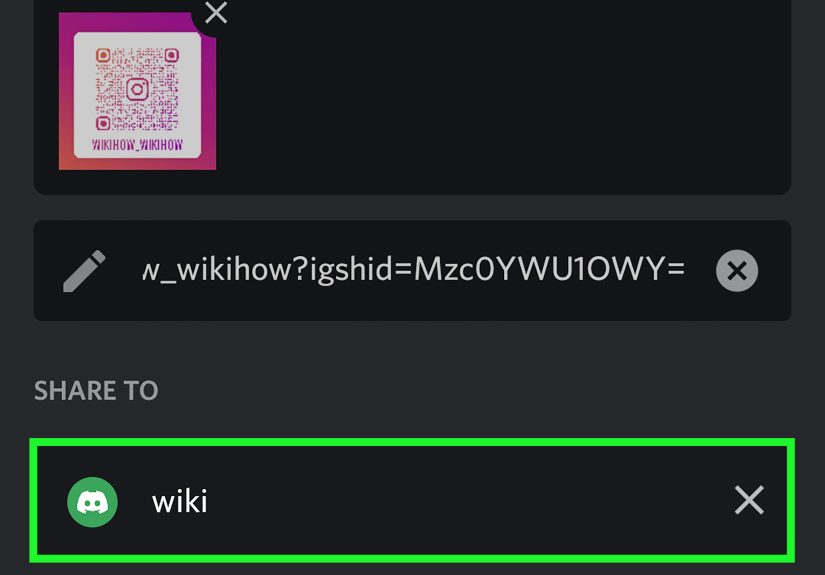
This is the method that feels the most modern, and sometimes the most fun. Instagram now makes it easy to share your profile visually using a QR code or updated profile card. Instead of sending someone a typed handle, you simply show them a scannable or shareable visual that leads straight to your account.
Why it is so useful
QR-based sharing is great for in-person situations. Imagine you are at a networking event, pop-up shop, school function, conference, or casual hangout. Rather than asking someone to spell your username correctly, you can just show them your profile card and let them scan it.
That is fast, clean, and surprisingly memorable. It also feels a little more intentional than shouting a handle across a noisy room.
How to use it smartly
- Show it on your phone screen for instant follows
- Add it to flyers, packaging, menus, or posters
- Include it on business cards
- Use it in presentation slides or event booths
- Save it as an image and share it online
A quick safety tip
Use the QR code or profile card generated by Instagram itself. That helps reduce confusion and keeps the path to your account clear. If you ever share a printed QR code in public, make sure it is easy to verify and not mixed with random shortened links that can look suspicious.
In other words, you want your QR code to say “follow me,” not “congratulations, you may have scanned a mystery square from the internet.”
Way #4: Share Your Instagram Profile From Desktop and Cross-Promote It Everywhere
Not every Instagram share starts inside the mobile app. Sometimes the easiest method is the old reliable desktop browser. If you open your Instagram profile on the web, your profile URL appears in the browser address bar. Copy that link and use it across all your digital channels.
Why desktop sharing is underrated
Desktop sharing is perfect when you are already working on your website, updating a newsletter, building a media kit, editing a resume, or managing brand assets. It is often faster to grab your Instagram profile link from a computer than to switch back and forth between apps on your phone.
Where cross-promotion works best
- Your website footer
- Author bios
- Newsletter sign-offs
- Contact pages
- Online store pages
- YouTube descriptions
- TikTok, Threads, or Pinterest bios
Cross-promotion is one of the simplest ways to grow your Instagram account because it reaches people who already know you elsewhere. They are warmer leads, so to speak. They clicked because they were already interested in your work, brand, or personality. That is a much easier crowd to convert than total strangers.
Common Mistakes to Avoid When Sharing an Instagram Profile
Sending people to an unfinished profile
If your feed is sparse, your bio is vague, or your profile picture is missing, sharing your Instagram profile may not have the effect you want. Tidy it up first.
Using the wrong account
Many people manage multiple accounts. Double-check that you are sharing the correct one before you send your profile to a client, customer, or new contact. Accidentally sharing your meme account instead of your business page can be funny, but maybe not the professional statement you were aiming for.
Forgetting that private accounts create friction
If the goal is public growth, a private account adds an extra step. That does not make it wrong, but it does change the experience.
Relying only on your username
Usernames are useful, but direct links and QR codes reduce confusion. When possible, give people a shortcut instead of homework.
How to Make People More Likely to Follow After You Share
Sharing gets people to the door. Your profile still needs to invite them inside.
Use a clear profile photo
People want instant recognition. If you are a creator or personal brand, use a clean photo of yourself. If you are a business, use a recognizable logo.
Write a bio that explains the value
A good bio answers one question fast: why should someone follow you? It does not need to be dramatic. It just needs to be clear.
Keep your content consistent
If someone taps through after you share your Instagram profile, your recent posts should make sense together. Consistency builds trust.
Add a useful link
If you are using Instagram for business, your bio link should lead somewhere meaningful, such as a shop, portfolio, booking page, newsletter, or landing page.
Real-World Experiences: What Sharing an Instagram Profile Looks Like in Everyday Life
Let’s move from theory to reality, because this is where the topic gets more interesting. In everyday life, people share Instagram profiles for very different reasons, and those reasons usually shape which method works best.
Take the example of a college student meeting new classmates during the first week of school. In that setting, the fastest method is often the best one. Instead of swapping full names and trying to search manually through dozens of lookalike profiles, one student opens Instagram, taps Share profile, and sends the account directly through a chat app. The exchange takes less than a minute. No misspellings. No wrong accounts. No awkward moment where someone follows a stranger with the same name who just happens to own three ferrets and a sailboat.
Now picture a small business owner at a weekend market. They sell handmade candles, ceramics, or baked goods and want customers to follow their Instagram for product updates. In that case, a QR code or profile card works beautifully. It can sit on the checkout table, appear on packaging, or be printed on a sign beside the product display. Customers scan, follow, and move on. The process feels smooth because it fits the moment. Nobody wants to stop shopping just to type a long username with random punctuation.
Creators often have a different experience. A freelance photographer, makeup artist, stylist, or fitness coach might use the profile link method the most. Why? Because their Instagram account often lives beyond Instagram. They want it in an email signature, on a portfolio site, inside a digital press kit, or attached to a pitch. A copied URL becomes the easiest way to connect all those touchpoints. It is simple, professional, and easy to reuse again and again.
There is also the casual social side. Plenty of people share an Instagram profile after meeting someone at a concert, a birthday party, a coffee shop, or a networking event. In those cases, the method that feels natural wins. Sometimes that is a quick direct share from the app. Sometimes it is showing the QR code. Sometimes it is just pasting the profile link into a text after the event. The point is not to use the fanciest method. It is to use the one that removes friction.
One of the most helpful lessons from real-world use is that context matters more than features. People do not care whether your sharing method is technically impressive. They care whether it is easy. That is why the best Instagram profile sharing strategy usually combines more than one method. You might use direct sharing for friends, a profile link for business use, and a QR code for in-person promotion. That mix covers almost every situation without overcomplicating things.
And that is really the heart of the whole topic: sharing your Instagram profile should feel effortless. The easier it is for people to find you, the more likely they are to connect, follow, and remember you.
Final Thoughts
If you want the simplest answer, here it is: the best way to share an Instagram profile depends on where the other person is and how fast you want the connection to happen. Use Share profile for convenience, copy your Instagram profile link for flexibility, use a QR code or profile card for in-person moments, and rely on desktop sharing and cross-promotion when you want your account visible across the web.
None of these methods are difficult, and that is exactly the point. Instagram has made profile sharing much easier than it used to be. So stop typing out your handle like a medieval scroll and start using the tools built for the job. Your future followers will thank you, and your thumbs will probably file a gratitude letter.