Table of Contents >> Show >> Hide
- Meet the ZEOS Pocket PC: A Palmtop With Real PC Energy
- Why Serial Still Matters (Yes, Even Now)
- The Problem: Proprietary Serial Adapters and the “Good Luck Finding One” Tax
- The Upgrade: Bringing Back the Standard DB-9 Serial Port
- DB-9 Pinouts: The Tiny Map That Saves Hours of Confusion
- What You Can Do With a Serial-Upgraded Palmtop
- Preservation vs. Practicality: Is Modding Vintage Hardware “Okay”?
- What This Upgrade Teaches (Beyond “Serial Is Still Cool”)
- Hands-On Experiences & Lessons Learned (Extra )
Every era thinks it invented “portable computing.” We have phones that can translate a menu, edit a video, and remind us to drink water like a tiny digital parent.
But back in the early 1990s, portable computing meant something beautifully stubborn: a palmtop PC with real keys, real DOS, and just enough power to make you feel
like a wizard… as long as you didn’t ask it to open a JPEG.
That’s why the story of an ancient pocket computer getting a serious serial upgrade is so satisfying. It’s not just nostalgia.
It’s about rescuing a genuinely useful featureRS-232 serial communicationfrom the prison of a proprietary connector and returning it to the land
of normal cables, standard pinouts, and modern adapters that don’t require an eBay treasure hunt.
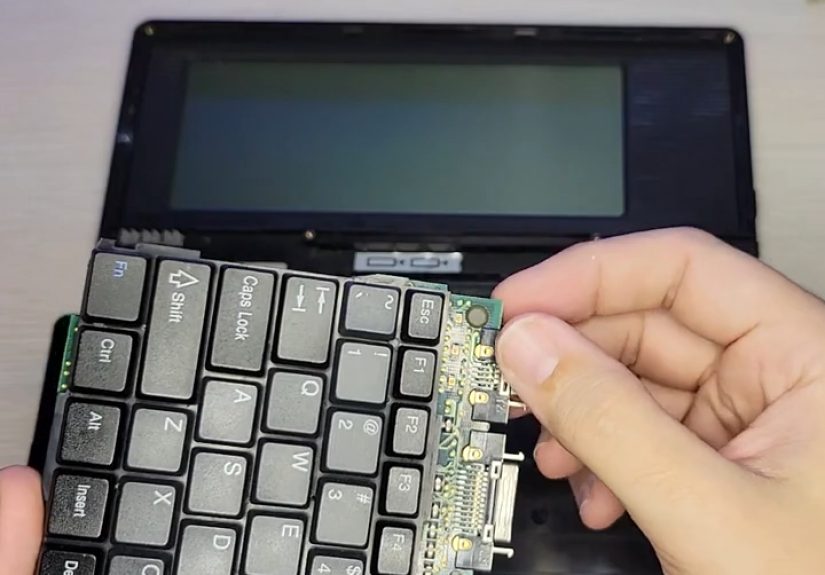
The star of this upgrade is the ZEOS Pocket PC, a DOS-based palmtop from 1992 that’s closely related to the Tidalwave PS-1000.
These machines were designed to be tiny IBM PC compatibles: capable of running a surprising amount of MS-DOS software, powered by AA batteries, and built for people
who wanted spreadsheets and word processing in their jacket pocketbecause apparently the future was supposed to involve more jackets.
Meet the ZEOS Pocket PC: A Palmtop With Real PC Energy
The ZEOS Pocket PC is basically a miniature DOS workstation from a time when “portable” meant “has a keyboard and doesn’t require a dolly.”
Under the hood, it uses an NEC V30 CPU (an 8086-compatible chip) clocked around 7.15 MHz, runs MS-DOS 5.0 from ROM,
and drives a monochrome LCD capable of 640×200 CGA-style graphics. In plain English: it can run a lot of classic DOS apps without pretending to be a toy.
Specs vary depending on how you count memory (and how the machine allocates it), but it’s commonly described as having about 1 MB total RAM,
with 640 KB conventional memory available for typical DOS programs and the rest used for things like a RAM disk. That distinction matters if you’ve
ever tried loading a DOS program and been told you’re out of memory while staring at a device that clearly has memory. DOS was nothing if not confident.
Ports That Existed… Sort Of
Here’s the twist: the ZEOS Pocket PC had the potential for “real” connectivityserial and parallelbut not in the way you’d hope.
Instead of standard connectors, it relied on proprietary adapters/cables. That was normal at the time: companies chased thinness by inventing custom
ports, then sold dongles as accessories. The business model was basically “thin device, thick cable.”
Fast-forward three decades and those proprietary cables are the stuff of legend: rare, overpriced, and sometimes missing at the exact moment you want to do something
mildly interestinglike transfer files, connect a modem, or talk to lab gear that still communicates like it’s 1997.
Why Serial Still Matters (Yes, Even Now)
If you’ve never used a serial port, it’s easy to think it’s just a weird rectangle from old PCs. But serial is more like a universal language for devices that don’t
care about trends. Routers, industrial controllers, test equipment, GPS receivers, modems, microcontrollersserial shows up everywhere because it’s simple, reliable,
and doesn’t require a full operating system to have a meaningful conversation.
On DOS palmtops, serial wasn’t just a “nice to have.” It was often the main practical path for:
- File transfers to and from a desktop PC
- Modem connectivity (dial-up, packet radio, and other delightfully noisy adventures)
- Peripheral communication (printers, instruments, and specialized devices)
- Terminal access to network gear or embedded systems
So when a classic palmtop’s serial capability is trapped behind an unobtainable cable, it’s like owning a sports car where the steering wheel was sold separately.
A serial upgrade isn’t cosmeticit restores the machine’s real-world usefulness.
The Problem: Proprietary Serial Adapters and the “Good Luck Finding One” Tax
The ZEOS Pocket PC and its relatives could be used with proprietary serial adapters that broke out to a standard connector. The catch is that these adapters
are now scarce. Even when you find one, you’re often gambling on brittle plastics, oxidized contacts, and cables that were never meant to survive the era of
USB-C everything.
And because there’s no modern factory churning out fresh replacement parts, the usual choices are:
(1) pay collector prices, (2) build a replica, or (3) modify the machine.
The “serious serial upgrade” approach chooses option threebold, practical, and surprisingly elegant when done carefully.
The Upgrade: Bringing Back the Standard DB-9 Serial Port
The heart of the upgrade is simple to describe: replace the rare proprietary serial solution with a standard DE-9 (often called DB-9) RS-232 port,
the familiar connector used on IBM PC compatibles. That means the palmtop can use common serial cables and modern USB-to-serial adapters without needing a unicorn
dongle from 1992.
The hard part is making it fitphysically and electrically.
Mechanical Reality Check: Vintage Plastic Is Not a Negotiator
A DE-9 connector is chunkier than the tiny, sleek ports designers loved in early palmtops. Installing one often requires:
- Careful case modification (measured cuts, not “hope and sandpaper”)
- Solid mounting so the connector doesn’t rip free after a few cable insertions
- Thoughtful placement so you don’t interfere with battery compartments, hinges, or internal boards
Done well, it looks almost factorylike the device is quietly relieved to have a normal port again.
Electrical Reality Check: RS-232 Is Not TTL
One of the easiest mistakes in retro-serial projects is assuming “serial is serial.” There are levels to this.
Inside many devices, the CPU speaks UART serial at TTL voltage levels (commonly 5V or 3.3V logic).
RS-232, on the other hand, traditionally uses higher positive and negative voltages and inverted logic.
That’s why you’ll often see a level-shifting chip (like a MAX232/MAX3232-style transceiver) bridging the two worlds.
In practical terms, a proper serial upgrade typically involves:
- Identifying the palmtop’s serial signals internally (TX, RX, and ground at minimum).
- Routing those signals through an RS-232 level shifter if the internal signals are TTL UART.
- Wiring the converted signals to the correct pins on the DE-9 connector.
- Optionally supporting hardware flow control lines (RTS/CTS) if the device and use case benefit from it.
This is the “serious” part of the serial upgrade: it’s not just adding a connectorit’s ensuring the electrical interface matches what classic serial devices expect.
DB-9 Pinouts: The Tiny Map That Saves Hours of Confusion
A DB-9 serial connector looks simple, but the pinout is where the magic (and the headaches) happen. The most common minimal setup for basic RS-232 communication is:
TX, RX, and GND. Add RTS/CTS when you want hardware flow control for more reliable higher-speed transfers.
Also important: DTE vs. DCE. Many computers are DTE devices. Many modems are DCE devices. If you connect two computers directly,
you’ll often need a null modem configuration that crosses transmit/receive lines appropriately.
A Quick Sanity Test: Loopback
When troubleshooting a newly installed serial port, a loopback test is your best friend. By connecting transmit to receive on the same port (with the right method and
pins), you can verify that the port can send and receive data without involving any external device.
It’s the serial equivalent of asking, “Can you hear yourself talk?” before calling customer support.
What You Can Do With a Serial-Upgraded Palmtop
Once the ZEOS Pocket PC has a standard RS-232 port, it stops being a museum piece and starts acting like a tiny field tool again.
Here are real, practical ways a serial-upgraded palmtop can be used today:
1) Transfer Files Without Exotic Accessories
Classic file transfer protocols like Kermit were designed specifically to move data over serial connections in a reliable way.
That matters when you’re dealing with older hardware, noisy links, or software that expects the world to behave like a polite 1980s terminal.
With a working serial port, you can move text files, small programs, configuration backups, and morewithout needing to track down rare proprietary cables.
2) Use It as a Tiny Terminal for Real Equipment
Plenty of devices still speak RS-232 because it’s dependable. A palmtop with a physical keyboard is genuinely handy for configuring serial-based hardware in the field:
network equipment, industrial controls, lab instruments, and embedded devices that don’t care what decade it is.
3) Connect a Modem (For Fun or For Science)
If you want to recreate the full “1992 experience,” a serial port makes external modems possible again. That opens the door to retro BBS culture,
dial-up experiments, or even just the joy of hearing a handshake tone that sounds like robots arguing.
4) Build a Bridge to Modern Computers
The modern world may have abandoned serial ports on laptops, but USB-to-serial adapters are everywhere. With a standard DB-9 interface,
the palmtop can talk to modern systems through readily available adapters, making the device far easier to integrate into a current workflow.
Preservation vs. Practicality: Is Modding Vintage Hardware “Okay”?
Purists sometimes wince at case cutting, and honestly, that reaction comes from a good place: these machines are increasingly rare.
But there’s another kind of preservation, toothe kind where a device stays alive because it’s still usable.
A thoughtful serial upgrade can be seen as conservation-through-function:
- It reduces reliance on rare accessories that may fail or disappear.
- It encourages the device to be used, not just displayed.
- It keeps the machine relevant for learning, tinkering, and real tasks.
The key is respect: clean workmanship, minimal damage, and no “hot glue as a structural philosophy.”
What This Upgrade Teaches (Beyond “Serial Is Still Cool”)
The bigger takeaway is that standards age better than proprietary solutions.
A DB-9 connector might not be fashionable, but it’s understandable. It’s documented. It’s testable. It’s compatible with decades of equipment.
When you bring a standard interface back to a vintage device, you’re not just adding a portyou’re restoring a whole ecosystem of tools and knowledge.
And in a world where modern gadgets can become e-waste because a cloud service shuts down, there’s something deeply satisfying about a 1992 palmtop gaining
new life through a connector that refuses to die.
Hands-On Experiences & Lessons Learned (Extra )
If you’ve ever worked with old pocket computers, you learn quickly that the “hard part” is rarely the headline feature. The hard part is everything around it:
the forgotten cables, the missing drivers, the unmarked connectors, the documentation scanned at an angle like it was photographed during an earthquake.
A serious serial upgrade is a perfect example. On paper it sounds like, “Add a DB-9, done.” In practice, it’s a small adventure in patience and problem-solving.
One of the first real-world lessons is that mechanical decisions ripple into electrical success. If the connector isn’t mounted securely, every time you
plug in a cable you’re applying stress to solder joints and tiny traces that were never meant to act as a gym membership. A sturdy mount feels boringuntil it saves
you from chasing an intermittent connection that only fails when you gently look at it.
The second lesson is that serial troubleshooting is 80% “is this the right cable?” and 20% everything else. Straight-through vs. null modem can turn
a working setup into a silent stare-off. Then there’s flow control: some devices behave perfectly at low speeds with no handshaking, but start dropping characters
when you push higher baud rates unless RTS/CTS is wired and enabled. When you finally see clean text scrolling across a terminal without random garbage characters,
it feels like winning a tiny, extremely nerdy lottery.
Another surprisingly human lesson: old devices reward slow, careful progress. It’s tempting to rushespecially when the goal is “just” a portbut vintage
hardware doesn’t forgive shortcuts. You measure twice because the third measurement is you realizing you measured the wrong side of the plastic. You label wires because
two identical-looking lines can swap TX and RX and ruin your afternoon. You test early because finding a mistake after everything is reassembled is how people invent
new swear words.
Once it’s working, the experience is genuinely charming. A palmtop like the ZEOS Pocket PC suddenly feels less like a relic and more like a tool again. There’s
something satisfying about typing on real keys, running simple DOS utilities, and moving data through a link that doesn’t require Wi-Fi, cloud accounts, or an app
begging for an update. The device becomes a tiny reminder that “useful” doesn’t always mean “new,” and that good interfacesespecially well-documented standardscan
outlive entire product categories.
Finally, the most fun lesson: the moment you add a standard serial port, you stop thinking of the palmtop as “a computer from 1992” and start thinking of it as
“a small, reliable interface box with a keyboard.” That mental flip is what makes retro upgrades worth doing. You’re not just fixing old hardwareyou’re expanding
what it can do in the present.