Table of Contents >> Show >> Hide
- Why Your LinkedIn Skills Matter More Than You Think
- How to Choose the Best Skills for Your LinkedIn Profile (Without Overthinking It)
- The Best Skills to List on LinkedIn (High-Impact Picks by Category)
- 1) Core human skills (aka the skills AI can’t do in a trustworthy way… yet)
- 2) Business and operations skills (how work actually gets done)
- 3) Data and tech skills (modern work runs on dataeven when it’s messy)
- 4) Customer and revenue skills (the “keeps the lights on” category)
- 5) Marketing and content skills (visibility, demand, and brand credibility)
- 6) Product, design, and build skills (turning ideas into real things)
- Example “Best Skills” Lists for Common Roles (Steal TheseEthically)
- How Many Skills Should You List on LinkedIn?
- Skills vs. Keywords: The Recruiter-Friendly Way to Phrase Them
- Endorsements: How to Get Them Without Feeling Like You’re Asking for a Kidney
- Common LinkedIn Skills Mistakes (And the Fixes)
- A Quick “Best Skills” Audit Checklist
- Experience-Based Lessons: What Actually Moves the Needle (500+ Words)
- Lesson 1: The “Right 12” beats the “Random 50”
- Lesson 2: Your top skills should match your strongest proof
- Lesson 3: “AI literacy” works best when it’s tied to responsible use
- Lesson 4: Endorsements help most when they’re believable and targeted
- Lesson 5: Small edits, repeated quarterly, beat a once-a-year profile rewrite
- Conclusion
LinkedIn is basically a giant professional buffet. Recruiters and hiring managers walk in with a plate (a job opening),
scan what’s available (your profile), and grab what looks like a perfect fit (your skills). The problem? Many profiles
list skills like they’re tossing spaghetti at the wall: “Team player!” “Hard worker!” “Microsoft Office!”
Congratulationsyou’ve described most people who have ever held a job and also a surprising number of houseplants.
The good news: choosing the best skills to list on LinkedIn isn’t about guessing what sounds impressive.
It’s about matching the skills recruiters actually search for, proving you can use them, and curating your Skills section
like it’s the trailer to the movie that is your career. Let’s make your profile the one they clicknot the one they scroll
past while thinking, “Wow, another ‘motivated self-starter.’”
Why Your LinkedIn Skills Matter More Than You Think
LinkedIn skills do three big things:
- They help you show up in searches. Recruiters search by role and keywords, and skills are a big part of that “keyword universe.”
- They act like a quick credibility snapshot. Even if someone reads nothing else (rude, but common), skills provide a fast signal of fit.
- They connect your profile to opportunities. Skills feed LinkedIn’s matching for jobs, content, learning recommendations, and “people you should meet.”
LinkedIn lets you list up to 50 skills, but only a small set is instantly visible to most viewersso the order matters.
Your Skills section is not a storage closet. It’s a storefront window. Put your best items up front.
How to Choose the Best Skills for Your LinkedIn Profile (Without Overthinking It)
If you’ve ever stared at the skills list and thought, “I can do… many things… as a human,” you’re not alone.
Here’s a practical way to choose skills that are both recruiter-friendly and truthful.
Step 1: Pick a target (or two)
Start with the role(s) you want next. “Something in business” is not a target. “Customer Success Manager in SaaS” is.
Skills are only “best” in context. Public speaking is gold for a Sales Leader and less urgent for a Backend Engineer
(unless your code presents quarterly business reviews, which would be impressive and slightly concerning).
Step 2: Pull skills from real job descriptions
Open 10 job posts you’d genuinely apply for and highlight repeated requirements. You’re building a “skills frequency list.”
You’ll usually see patterns like:
- Role skills (e.g., project management, forecasting, stakeholder management)
- Tool skills (e.g., Excel, Salesforce, SQL, Jira, GA4)
- Human skills (e.g., communication, adaptability, conflict resolution)
- Industry skills (e.g., HIPAA compliance, retail merchandising, B2B SaaS go-to-market)
Step 3: Build a balanced “skills stack”
The strongest LinkedIn profiles don’t list 50 random skillsthey list the right mix that maps to the job.
Aim for:
- 5–8 core skills that define your professional identity
- 5–8 supporting skills that show range (tools, methods, adjacent expertise)
- 3–6 differentiators that make you stand out (a niche platform, a rare domain, a growth specialty)
Step 4: Prove the skills where it counts
Skills alone are claims. Recruiters love proof. Back your skills up in these places:
- Experience bullets (with results: %, $, time saved, growth)
- Projects (what you did, how you did it, what changed)
- Certifications and credentials (tie them directly to skills)
- Featured section (portfolios, case studies, talks, writing, dashboards)
Bonus: LinkedIn has been moving toward showing how you applied skills (projects, credentials, experience) instead of relying on
“badges” alone. In other words: evidence is trending. Good time to be specific.
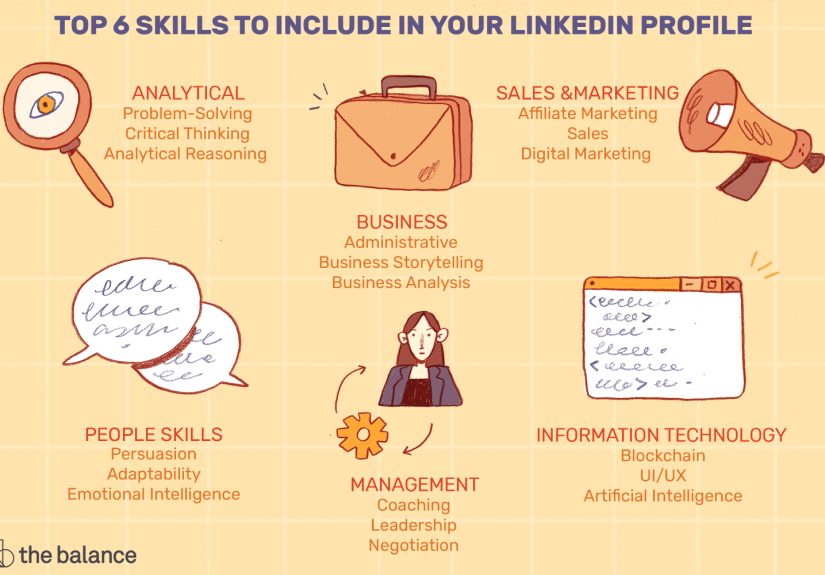
The Best Skills to List on LinkedIn (High-Impact Picks by Category)
Below are skill categories that consistently show up across U.S. job postings and major skills reports.
You don’t need all of theseyou need the ones that match your target role and your actual strengths.
Think “curated playlist,” not “every song you’ve ever heard.”
1) Core human skills (aka the skills AI can’t do in a trustworthy way… yet)
These are “career multipliers.” They matter in almost every industry and seniority level:
- Communication (written, verbal, cross-functional, executive-ready)
- Critical thinking (problem framing, tradeoffs, decision-making)
- Collaboration & teamwork (working across teams, not around them)
- Adaptability (handling change without setting Slack on fire)
- Conflict mitigation / resolution (de-escalation, alignment, negotiation)
- Stakeholder management (influencing without authority)
- Leadership (owning outcomes, coaching, setting direction)
If your profile feels “thin,” strengthening this category is a fast winbecause recruiters often search for these terms,
and your Experience section can easily support them with specific examples.
2) Business and operations skills (how work actually gets done)
These skills signal you can run processes, manage outcomes, and deliver results:
- Project management (planning, execution, risk, delivery)
- Process optimization (improving workflows, reducing cycle time)
- Budgeting & resource management (forecasting, allocation, ROI)
- Change management (adoption, training, stakeholder alignment)
- Go-to-market (GTM) strategy (positioning, launch planning, enablement)
- Growth strategy (experiments, funnel thinking, scaling)
- Risk management (compliance, controls, mitigation planning)
Even if you’re not an “operations person,” including one or two of theseif truecan move you into a more senior, trusted bucket.
3) Data and tech skills (modern work runs on dataeven when it’s messy)
You don’t need to become a full-time data wizard, but basic data fluency is powerful in almost every role:
- Microsoft Excel (analysis, reporting, modeling, pivot tables)
- Data analysis (KPIs, trends, segmentation, insights)
- Data visualization (dashboards, storytelling with charts)
- SQL (querying data for business insights)
- Python (automation, analysisespecially for analytics roles)
- AI literacy (using AI tools responsibly, understanding limitations)
- LLM proficiency (prompting, evaluation, workflow integrationrole-dependent)
- Cybersecurity fundamentals (risk awareness, best practices)
If you’re wondering whether “AI skills” belong on your profile: if you use AI tools at work, list it thoughtfully.
“AI literacy” is a safer, broader skill than niche buzzwordsunless your job truly requires those buzzwords.
4) Customer and revenue skills (the “keeps the lights on” category)
If your work touches customers, growth, or retention, these skills are high value:
- Customer service (issue resolution, satisfaction, loyalty)
- Customer success (adoption, renewals, churn reduction)
- Solutions-based selling (discovery, value framing, objections)
- Account management (relationship building, upsell/cross-sell)
- Customer engagement (messaging, touchpoints, lifecycle)
- Negotiation (pricing, scope, timelines, partnerships)
Revenue skills pair well with human skills: “communication + stakeholder management + solutions selling” is basically a recruiter magnet for many roles.
5) Marketing and content skills (visibility, demand, and brand credibility)
Marketing roles benefit from a clear mix of creative, strategic, and analytical skills:
- Content strategy (planning, positioning, editorial calendars)
- SEO (keyword strategy, on-page optimization, search intent)
- Copywriting (conversion-focused writing, brand voice)
- Marketing analytics (attribution, performance tracking)
- Email marketing (segmentation, automation, lifecycle)
- Paid media (Google Ads, social ads, targeting)
- Social media marketing (platform strategy, community, growth)
If you list “SEO,” back it up with outcomes. Example: “Increased organic sessions 42% in six months by rebuilding topic clusters and internal linking.”
Proof turns a common skill into a compelling one.
6) Product, design, and build skills (turning ideas into real things)
For product, UX, and engineering-adjacent roles:
- Product management (roadmaps, prioritization, discovery)
- User research (interviews, surveys, usability testing)
- UX design (wireframes, prototypes, interaction design)
- A/B testing (experimentation, interpretation)
- Agile / Scrum (sprints, ceremonies, iteration)
- Requirements gathering (user stories, stakeholder alignment)
- Tools (Figma, Jira, Confluence, GitHubrole-dependent)
Example “Best Skills” Lists for Common Roles (Steal TheseEthically)
The simplest way to choose skills is to model a high-fit skill stack for your role, then adjust to match your real experience.
Here are examples you can customize.
Project Manager
- Project Management
- Stakeholder Management
- Risk Management
- Process Optimization
- Agile Methodologies
- Budget Management
- Communication
- Change Management
- Jira (or your tool)
- Cross-functional Leadership
Data Analyst
- SQL
- Data Analysis
- Microsoft Excel
- Data Visualization
- Dashboarding (Tableau/Power BI)
- Statistics
- Python (if applicable)
- Business Intelligence
- Storytelling with Data
- Critical Thinking
Customer Success Manager
- Customer Success
- Customer Engagement
- Account Management
- Stakeholder Management
- Conflict Resolution
- Renewals Management
- Onboarding
- Communication
- CRM (Salesforce/HubSpot)
- Process Improvement
Content Marketer
- Content Strategy
- SEO
- Copywriting
- Content Marketing
- Marketing Analytics
- Email Marketing
- Social Media Marketing
- Project Management
- Brand Messaging
- Communication
How Many Skills Should You List on LinkedIn?
You can list up to 50 skills. That doesn’t mean you should immediately sprint to 50 like it’s a supermarket sweep.
A smart approach:
- Minimum: 10 skills (so you’re not a mystery novel with missing pages)
- Strong baseline: 15–25 skills (enough depth without noise)
- Upper range: 30–50 (only if they’re all relevant and defensible)
Focus first on making your top skills match your target roles. If someone only reads your top visible skills,
would they immediately “get” what you do?
Skills vs. Keywords: The Recruiter-Friendly Way to Phrase Them
LinkedIn skills work best when they use standard industry wording. “Spreadsheet Sorcery” is funny, but recruiters search for “Excel.”
Here’s how to keep it human and searchable:
Do this
- Use common labels: “Project Management,” “Stakeholder Management,” “Data Analysis.”
- Include tools if they matter: “Salesforce,” “Google Analytics 4,” “SQL.”
- Add a method skill if it fits: “Agile,” “A/B Testing,” “Process Optimization.”
Not this
- Overly vague skills: “Hardworking,” “Go-getter,” “Perfectionist.” (Also: please don’t.)
- Overly trendy fluff: “Synergy,” “Thought leadership,” “Disruptive mindset.”
- Skills you can’t defend in an interview: the “fake it till you make it” era ends at the technical screen.
Endorsements: How to Get Them Without Feeling Like You’re Asking for a Kidney
Endorsements aren’t the whole game, but they can support credibilityespecially when they come from people who actually worked with you.
The easiest way to earn endorsements is to make it simple and specific.
- Pick 3–5 priority skills you want endorsed (the ones tied to your target role).
- Give first. Endorse colleagues genuinelyespecially for skills you’ve seen them use well.
- Ask with context. “If you feel comfortable, could you endorse me for X? I used it on Y project where we achieved Z.”
- Refresh proof. Add a project, portfolio item, or bullet that demonstrates that skill.
The key is alignment: if your profile screams “Data Analyst” but the endorsements all say “Public Speaking,” it creates friction.
Not bad, just confusing. And confusion is the #1 enemy of recruiter clicks.
Common LinkedIn Skills Mistakes (And the Fixes)
Mistake 1: Listing everything you’ve ever touched
If you list 50 skills but only 8 relate to your target role, you’ve created noise. Fix it by trimming and prioritizing.
Keep the skills that match your next jobnot your entire career history.
Mistake 2: Skipping tools that employers screen for
If job posts repeatedly mention a tool (Excel, Salesforce, SQL, Jira) and you use it, list it. Recruiters often filter for tools
because it reduces training time.
Mistake 3: Using skills with no proof
Add at least one bullet, project, or “Featured” item that demonstrates your top skills. If your top skill is “Project Management,”
show a project delivered early, under budget, or at higher quality.
Mistake 4: Ignoring the “new basics” of AI
You don’t need to be an AI Engineer, but many roles now reward baseline AI comfort. If you responsibly use AI tools for drafting,
analysis, research, automation, or customer support workflows, consider listing AI literacy and pairing it with an example
of how you used it to improve outcomes (speed, quality, accuracy, consistency).
A Quick “Best Skills” Audit Checklist
- My top skills match the roles I want next.
- I have a healthy mix of role skills, tool skills, and human skills.
- I can defend every listed skill in a conversation or interview.
- My Experience and Projects sections prove my top 5–8 skills.
- I’ve reordered my skills so the best ones show first.
- I review and refresh my skills every few months (or after a big project).
Experience-Based Lessons: What Actually Moves the Needle (500+ Words)
The internet loves lists of “top LinkedIn skills,” but the real magic is how you choose and support your skills.
Below are experience-based lessons drawn from common profile-audit patterns and composite examples (not one specific person),
because careers are personal and privacy is cool.
Lesson 1: The “Right 12” beats the “Random 50”
A common scenario: someone lists 40–50 skills because LinkedIn allows it, and they’re trying to look versatile. The result is a Skills section
that reads like a junk drawer: a few useful items, a lot of mystery keys, and something sticky that nobody wants to touch.
When that person narrows down to a focused setsay 12–18 skills that directly match the target roletwo things happen:
recruiters understand the profile faster, and the profile keywords become more consistent across sections. Even without changing job history,
the profile becomes easier to “index” and easier for humans to trust.
Lesson 2: Your top skills should match your strongest proof
Another frequent pattern: someone pins “Leadership” or “Strategy” as their top skill, but their Experience section only lists responsibilities:
“Managed team,” “Worked on projects,” “Supported stakeholders.” That’s not proofthat’s a weather report (“cloudy with a chance of management”).
The fix is adding one or two bullets that show measurable outcomes. For example:
“Led cross-functional launch that reduced onboarding time by 30% and improved activation by 12%.”
Suddenly “Leadership” and “Project Management” aren’t just claimsthey’re supported by impact.
When your top skills and your proof align, your profile feels coherent, and coherence is persuasive.
Lesson 3: “AI literacy” works best when it’s tied to responsible use
A lot of professionals want to add AI skills (and they should, if relevant), but the best profiles avoid vague statements like
“AI expert” unless that’s literally the job. A stronger approach is:
AI literacy + a concrete workflow. Example:
“Used AI-assisted drafting to speed up first-pass documentation, then performed human review for accuracy and compliancecutting turnaround time by 25%.”
This shows you understand AI as a tool, not a personality trait. It also signals judgmentsomething employers value when AI gets involved.
Lesson 4: Endorsements help most when they’re believable and targeted
Endorsements can feel awkward, but targeted endorsements are easier than you think. The profiles that benefit most usually do two things:
(1) they pick a small set of skills that matter for the target role, and (2) they ask people who actually saw those skills in action.
The endorsement becomes a “second signal,” not the main story. It’s especially effective when the person endorsing you has direct relevance:
a manager, a client, a project partner, or a teammate from a high-impact initiative.
Lesson 5: Small edits, repeated quarterly, beat a once-a-year profile rewrite
The best LinkedIn profiles aren’t perfectthey’re maintained. A practical habit is doing a 20-minute refresh every quarter:
reorder skills, add one new skill earned through a project, remove one that no longer matches your target, and update a bullet with a metric.
This keeps your profile aligned with how work changes (and yes, work changes constantly). Over time, these tiny updates stack into a profile
that looks active, current, and crediblethree qualities that quietly increase the chance someone reaches out.
If you take nothing else from this: don’t chase “best skills” in the abstract. Choose skills that match your next job, then support them with proof.
That’s how your LinkedIn skills section becomes a real career asset instead of a decorative sticker collection.
Conclusion
The best skills to list on LinkedIn are the ones that (1) match your target roles, (2) show up in real job descriptions,
(3) reflect what you can confidently do, and (4) are backed by proof in your experience, projects, and credentials.
If you curate your skills like a highlight reelnot a data dumpyou’ll be easier to find, easier to trust, and harder to ignore.