Table of Contents >> Show >> Hide
- What “Domesticated” Actually Means (In Human Terms)
- Firmware 101: What’s Inside the Plastic Brick
- Why a Firmware Mod Works (And Why It Can Go Sideways)
- Three Levels of Domestication (Choose Your Adventure)
- Specific Domestication Mods People Actually Do
- Security and Ethics: Keep the “Mod” Domestic
- A Practical Toolbox (No, You Don’t Need a Lab Coat)
- Is It Worth It? A Quick Decision Checklist
- Conclusion: A Polite Speaker Is a Joy Forever
- Field Notes: of Real-World “Domestication” Vibes
You know the type of Bluetooth speaker I’m talking about: the one that thinks it’s the main character. You tap the power button and it responds like it’s announcing the next act at Carnegie Hall: “POWER ON! BLUETOOTH MODE!” at a volume that suggests it wants your neighbors to pair, too. The music can be subtle, but the startup voice prompt? That’s always mixed like it’s competing for a Grammy.
“Domesticated through firmware mod” is the gentle art of taking that chaotic little audio gremlin and turning it into a polite household citizen. Not a different speaker. Not a new personality. Just the same hardware… with better manners.
What “Domesticated” Actually Means (In Human Terms)
Domestication isn’t about making your speaker “more powerful.” It’s about making it less dramatic. Firmware (the software living inside the speaker) controls everything you complain about at 7 a.m.: how it boots, how it pairs, how it behaves when it loses signal, and how it yells at you when you didn’t ask.
The usual “wild” behaviors people want to tame
- Obnoxious startup/shutdown chimes (sometimes louder than your music).
- Voice prompts that narrate your life like an audiobook you didn’t buy.
- Auto power-off timers that treat “pause” as “goodbye forever.”
- Pairing quirks (auto-connecting to the wrong device like a clingy ex).
- LED behavior that turns your bedroom into a tiny lighthouse.
- Volume steps that go from whisper to jet engine in two clicks.
- EQ tuning that’s… enthusiastic about bass and not much else.
The twist: a lot of speakers already have some domestication options through official firmware updates and manufacturer apps. The deeper “firmware mod” route is what you do when official settings are missing, locked down, or simply don’t fix the behavior you hate.
Firmware 101: What’s Inside the Plastic Brick
Most Bluetooth speakers are a small society of parts: a Bluetooth audio system-on-chip (SoC), an amplifier stage, battery management, buttons/LEDs, and sometimes extra features like AUX input, speakerphone mics, or multi-speaker pairing.
Under the hood, the speaker runs a Bluetooth “stack” (layers of software protocols) and a set of audio behaviors built around common profiles like A2DP (streaming audio) and AVRCP (play/pause/skip control). That’s why your speaker can act like a tiny wireless sound system and a remote control at the same time.
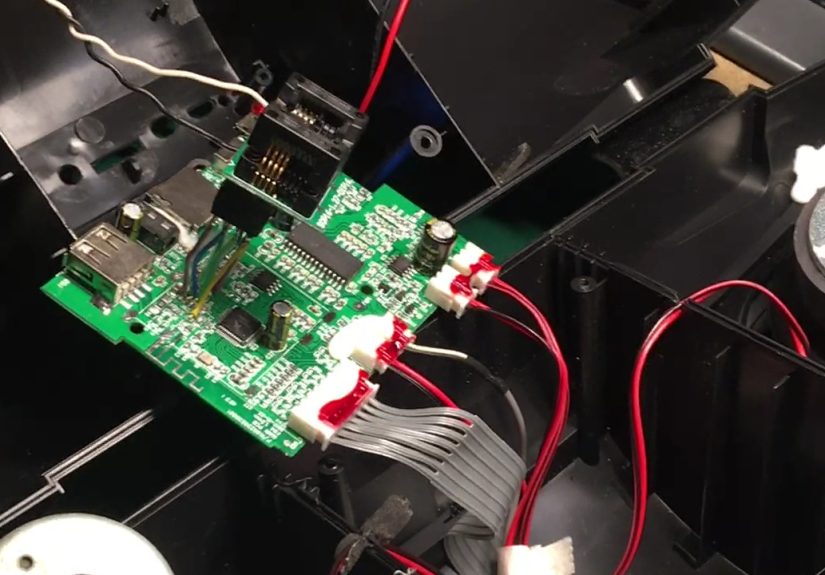
Where does the firmware live? Often in flash memorysometimes inside the main chip, and very often in a small external flash chip on the circuit board. That external flash is the “book” you can sometimes read, copy, andif you’re carefuledit.
Why a Firmware Mod Works (And Why It Can Go Sideways)
Think of a speaker’s firmware as a combination of:
- Core code (Bluetooth connection logic, audio routing, button handling).
- Configuration data (timers, EQ curves, volume tables, LED patterns).
- Assets (chime sounds, voice prompts, sometimes even little DSP “presets”).
“Domestication” usually targets configuration and assets first, because changing those can be dramatic (silencing prompts, adjusting timeouts) without rewriting the whole Bluetooth brain. Replacing or patching core code is possible in some ecosystems, but it’s also where “oops” becomes “brick.”
Real risks you should respect
- Bricking: a bad flash write can leave the speaker unable to boot.
- Warranty loss: opening the device often voids support.
- Battery safety: puncturing or shorting a lithium pack is not a hobby; it’s a headline.
- Legal/ethical boundaries: modifying devices you don’t own or bypassing access controls can be unlawful.
The good news: most domestication goals can be approached in a layered waystarting with the official path, then stepping into “tinker mode” only if you truly need it.
Three Levels of Domestication (Choose Your Adventure)
Level 1: The Manufacturer’s Knobs (Polite, Safe, Often Underrated)
Before you grab a screwdriver, check whether your speaker already supports the behavior you want through its app. Some brands let you disable alert sounds, change standby behavior, or improve connectivity via firmware updates. In other words: sometimes the “firmware mod” is simply “use the official firmware settings you never opened.”
- Disable alerts and tones: some speaker families expose toggles for chimes/alerts once you update firmware and use the companion app.
- Stability fixes: updates can improve pairing reliability, reduce dropouts, and fix weird edge cases (especially after phone OS updates).
- Security patches: Bluetooth features occasionally need fixesdon’t skip updates just because you hate apps.
If your speaker can be domesticated this way, take the win. The best firmware mod is the one that doesn’t require you to label 14 screws on a napkin like you’re prepping for a tiny courtroom trial.
Level 2: Semi-Official Tweaks (Service Modes, Hidden Combos, “Tech Support Lore”)
Some products have reset/update sequences, diagnostic modes, or button combos that change behavior. These aren’t always clearly advertised, but they can be legitimate and reversible. This level is where “domestication” feels like teaching a cat to sit: technically possible, mostly dependent on patience and the moon’s alignment.
If you go here, document everything you do. Not because you’ll forget, but because future-you will insist it “wasn’t that complicated” and then immediately get it wrong.
Level 3: True Firmware Mod (Solder Smell Optional, Backups Mandatory)
This is the hands-on route: accessing the firmware storage (often flash), extracting it, identifying what controls the annoying behavior, editing it, and writing it back. In many reverse-engineering projects, the most reliable access method is a direct read of the flash contents (sometimes requiring a clip, a programmer, or careful board work).
The domestication workflow generally looks like this:
- Identify the platform (chip family and firmware format).
- Locate the firmware storage (internal flash or external SPI flash).
- Make a full backup (before you even think about edits).
- Analyze (search for known tables, audio assets, configuration blocks).
- Patch (minimal changes; one variable at a time).
- Re-flash and validate (confirm boot, pairing, audio output, charging behavior).
Notice what’s missing: “rush.” Domestication rewards the slow and meticulous. Speakers are patientyour time is the thing that gets set on fire.
Specific Domestication Mods People Actually Do
1) Muting voice prompts and startup sounds
This is the gateway domestication mod because it’s emotional. It’s also often feasible. Some devices store chimes as audio assets in firmware, or toggle them via configuration keys. The “best case” is an official toggle. The “next best” is a config change. The “hard mode” is patching assets.
2) Disabling (or extending) auto power-off
Auto-off is great for battery life and awful for desk speakers. Firmware mods can sometimes adjust the idle timer, modify what counts as “activity,” or disable the feature entirely. The hidden cost: you’re trading convenience for battery wear if the device stays awake all day. Domestication is compromise, not magic.
3) Fixing pairing behavior and reconnection logic
The most common “why are you like this” moment is a speaker that reconnects to the wrong device, forgets a device, or insists on pairing mode at random. Firmware updates sometimes solve this, but a deeper mod may target how the speaker stores bonded devices (and how it prioritizes them).
4) Calming LEDs and UI behavior
Some speakers are designed to be seen from space. If the LED patterns are controlled in firmware tables, a “domestication” patch can reduce blink frequency, change brightness steps, or disable certain animations. Your nightstand will thank you. Your lighthouse will retire.
5) Tuning EQ and volume steps for real listening
Many speakers ship with an EQ curve that flatters in a showroom: boosted bass, extra sparkle, and a midrange that quietly packs up and moves out. If the platform exposes DSP parameters, you can often bring vocals back, smooth harshness, or make volume changes feel linear instead of cliff-like.
Security and Ethics: Keep the “Mod” Domestic
A firmware-mod conversation isn’t complete without the boring-but-important part: security updates and ethics. Bluetooth ecosystems can have vulnerabilities that require firmware patches, and audio devices are no exception. The practical takeaway is simple: keep official updates in mind even if you plan to mod, and don’t distribute modified firmware images that include proprietary code or assets.
Legal reality is also… not as fun as solder. In the U.S., there are DMCA-related rules around bypassing access controls, and there are also exemptions that may apply for diagnosis, maintenance, or repair in certain contexts. But “repair” and “tinkering for new features” don’t always land in the same bucket. If your domestication goal is “make my own device less obnoxious,” stay mindful about how you get there and what you share.
A Practical Toolbox (No, You Don’t Need a Lab Coat)
If you’re headed toward Level 3, here’s what the typical domestication bench looks like in real life:
- Basics: precision screwdrivers, spudger, tweezers, a decent light.
- Safety: eye protection, a non-conductive workspace, respect for lithium batteries.
- Electronics sanity: multimeter, soldering iron, flux, and patience.
- Firmware access: a way to read flash (clips/programmers vary by hardware).
- Analysis tools: hex viewer, binary inspection tools, and obsessive note-taking.
The most important tool is still the least glamorous: a verified backup. Domestication without a restore path is just improvisational brick-laying.
Is It Worth It? A Quick Decision Checklist
- Yes if the speaker is otherwise great (sound, battery, build) and the annoyance is specific and fixable.
- Yes if you enjoy hardware tinkering and you’re comfortable with “learning by carefully not breaking things.”
- Maybe if the speaker is cheap and sealed like a clamsometimes your time costs more than a replacement.
- No if the battery is swollen, the board is potted in epoxy, or the speaker is your only daily driver.
Conclusion: A Polite Speaker Is a Joy Forever
A Bluetooth speaker doesn’t have to be loud in spirit to be loud in sound. Domestication through firmware whether it’s an official app toggle, a hidden setting, or a careful firmware patchlets you keep the hardware you like while removing the behaviors you hate. The north star is simple: fewer surprises, fewer interruptions, and a speaker that acts like it lives with other people.
Start with the official path. Update firmware. Check settings. Then, if the device still insists on shouting “BLUETOOTH MODE!” like it’s auditioning for theater camp, you’ve got optionsjust take them one careful step at a time.
Field Notes: of Real-World “Domestication” Vibes
The first time you try to domesticate a Bluetooth speaker, you learn a humbling truth: the annoying part is never the part you expected. You think you’re going to defeat a voice prompt. You imagine a clean victory, like flipping a switch labeled “Stop Talking.” Instead, you open the case and discover a tiny universe of design choices, each one made by someone who clearly never tried to use this speaker in a quiet room at night.
The opening ritual is surprisingly emotional. There’s the hopeful phase (“This will be simple”), followed by the bargaining phase (“If I don’t break the clips, I’ll stop buying cheap gadgets”), and then the acceptance phase (“Okay, I will break a clip, but I’ll pretend it was already like that”). Once you’re in, the board looks innocentuntil you realize every component is smaller than your confidence.
Then comes the detective work. You’re looking for the firmware storage like it’s a hidden room in a mystery novel. Sometimes it’s obvious: a little 8-pin flash chip sitting there like, “Yes, I contain your speaker’s entire personality.” Other times, it’s not obvious at all, and you spend fifteen minutes reading part numbers and whispering, “Please be external flash. Please be external flash,” because internal flash often means a tougher road.
The moment you get a clean backup feels like winning a tiny lottery. You haven’t changed anything yet. You haven’t fixed the voice prompt. But you’ve captured the current state of the universe, and you can go back if you mess up. That backup is domestication’s seatbelt: you hope you never need it, but you’re very glad it exists.
Patching is where you discover your own personality flaws. You want to change five things at once: silence the startup chime, calm the LED, tweak the EQ, and disable auto-off forever. But the speaker rewards restraint. Change one value. Test. Listen. Reconnect. Did pairing still work? Did the battery still charge? Did it boot twice, like it’s nervous? A “domesticated” speaker is born from small, boring choices repeated patiently, not one heroic all-at-once flash.
And when it workswhen you power on the speaker and it simply… powers onthere’s a strange quiet satisfaction. No announcement. No drama. Just music. It’s not flashy, but that’s the whole point. You didn’t build a monster truck. You taught a gadget basic manners. Congratulations: your speaker is now house-trained.