Table of Contents >> Show >> Hide
- Why “Submit” Is Weak Landing Page Button Copy
- What High-Converting CTA Button Text Does Instead
- Better Alternatives to “Submit” by Landing Page Type
- Button Text Alone Won’t Save a Bad Landing Page
- Common CTA Mistakes to Avoid
- How to Test Landing Page Button Text the Smart Way
- Conclusion
- Practical Experiences: What Happens When Teams Stop Using “Submit”
- SEO Tags
There is something almost magical about a good landing page. A visitor shows up curious, skims a headline, nods at the offer, and then clicks the button like it owes them money. That last moment matters more than many marketers admit. You can have a sharp headline, a persuasive value proposition, a handsome hero image, and social proof polished to a high shine, but if your button says Submit, you may be draining energy right at the point of conversion.
“Submit” is the beige paint of landing page button text. It is technically acceptable. It is widely available. It inspires absolutely nobody. On a page designed to create momentum, clarity, and confidence, that word feels cold, generic, and oddly bureaucratic. It sounds less like a reward and more like paperwork. Nobody wakes up hoping to submit anything. They want to get the guide, start the trial, book the demo, claim the offer, or save their seat.
That is why smart landing page optimization often starts with one deceptively small element: the call-to-action button. The best button text does not simply label an action. It removes hesitation. It tells people what happens next. It makes the click feel safe, simple, and worthwhile. In plain English, it answers the silent question every visitor is asking: What do I get if I click this?
So let’s talk about why “Submit” underperforms, what high-converting button copy does better, and how to write landing page button text that sounds less like a tax form and more like an invitation.
Why “Submit” Is Weak Landing Page Button Copy
It focuses on the company, not the visitor
“Submit” describes what your form wants, not what your visitor wants. That is the core problem. Great landing pages are built around user motivation. People do not arrive because they are eager to help your CRM collect neat little rows of data. They arrive because they want an outcome. Maybe they want a quote, a free template, a consultation, a discount, or a faster solution to a painful problem. Your CTA button should mirror that motivation.
When the button says Get My Free Quote, the emphasis is on value. When it says Book My Demo, the next step feels concrete. When it says Download the Guide, the click feels connected to a reward. “Submit,” by comparison, feels emotionally flat. It does not reinforce the offer. It does not intensify desire. It does not reduce uncertainty. It just sits there like a sleepy office clerk.
It sounds high-friction
Words carry emotional weight. Some words feel light and easy. Others feel formal, demanding, or final. “Submit” belongs in the second group. It suggests giving something up. It can imply effort, review, compliance, or delay. That is not the mood you want at the conversion moment. You want the button click to feel like progress, not surrender.
Especially on lead-generation pages, visitors are already making a tiny trust leap by entering personal information. A generic, cold button label can make that leap feel bigger. A more specific CTA softens the perceived risk. It tells the user where they are going and why the action is worth taking.
It creates ambiguity
Ambiguity kills conversions. If a visitor is unsure whether clicking the button will start a free trial, trigger a sales call, send a request, create an account, or launch a swarm of follow-up emails, hesitation shows up fast. The best landing page button text reduces that hesitation by spelling out the next step clearly.
Clarity beats cleverness here. “Unlock My Audit” may work if the offer is truly an audit. “Let’s Go” might sound fun in a brainstorming session, but it tells visitors very little. A CTA should not be a riddle. This is not an escape room. It is a landing page.
What High-Converting CTA Button Text Does Instead
It leads with a specific action
Strong CTA copy usually starts with a verb because verbs create momentum. Good landing pages are directional by nature. They are not museum exhibits. They are decision environments. Button text such as Start My Free Trial, Get the Checklist, Reserve My Spot, or See Pricing gives users a clear action and a clear expectation.
It reinforces the benefit
Button copy works best when it reminds people what they are getting. This is where many pages leave money on the table. A weak button label ends the sales conversation too early. A strong one reinforces the value proposition at the last possible second. That is why Download My Free Template usually feels stronger than Download, and Get Instant Access often feels more compelling than Continue.
The principle is simple: the closer your button language matches the offer, the easier the click feels. Relevance is persuasive.
It sounds natural in the customer’s voice
Many high-performing CTAs read as if the visitor is speaking. First-person phrasing can make a button feel more personal and more immediate. Compare these pairs:
- Start Your Free Trial vs. Start My Free Trial
- Get Your Quote vs. Get My Quote
- Reserve Your Seat vs. Save My Seat
There is no universal winner in every context, but first-person phrasing often feels more tangible. It helps the visitor picture ownership. That mental shift matters.
It matches buyer intent
The best button text depends on what the visitor is ready to do. Someone browsing a top-of-funnel guide is not in the same mindset as someone comparing software plans or requesting a service estimate. Your CTA should match that intent.
If the offer is informational, use button text that promises access: Get the Report, Read the Guide, Download the Toolkit. If the offer is commercial, use button text that signals progress toward purchase: See Plans, Add to Cart, Book a Demo, Talk to Sales. If the offer is time-sensitive, appropriate urgency can help: Claim My Discount, Save My Seat Today, Start Now.
Better Alternatives to “Submit” by Landing Page Type
Here is where the fun begins. You do not need mystical copywriting powers. You just need button text that matches the page goal.
Lead magnet landing pages
- Get the Guide
- Download My Checklist
- Send Me the Template
- Get Instant Access
Demo and consultation pages
- Book My Demo
- Schedule a Free Call
- Talk to an Expert
- Get My Consultation
Free trial and SaaS signup pages
- Start My Free Trial
- Create My Account
- Get Started Free
- Try It Now
Event and webinar pages
- Save My Seat
- Reserve My Spot
- Join the Webinar
- Register Now
Ecommerce landing pages
- Add to Cart
- Buy Now
- Shop the Sale
- Get the Bundle
Service quote or estimate forms
- Get My Free Quote
- Request an Estimate
- See My Pricing
- Check Availability
The rule is not “always use longer copy.” The rule is “make the value obvious.” Sometimes two words are enough. Sometimes five are better. The sweet spot is usually concise, specific, and benefit-led.
Button Text Alone Won’t Save a Bad Landing Page
Let’s be fair to the humble button. Better CTA copy helps, but it cannot rescue a page that is overloaded, confusing, or visually chaotic. Good landing page performance comes from alignment between the message, the form, the design, and the action.
Make the primary CTA visually obvious
If users have to hunt for the button, you have a larger problem than word choice. The primary CTA should stand out with contrast, whitespace, and visual hierarchy. It should look clickable. It should not fight for attention with five other colorful elements, three side offers, and a navigation bar having an identity crisis.
Reduce competing actions
Pages convert better when they have one dominant next step. Secondary links may still exist, but they should not compete with the main CTA. If your landing page says Book My Demo and also shouts Read Blog, Watch Video, Browse Careers, and Follow Us Everywhere, you are not guiding visitors. You are politely escorting them out of the funnel.
Support the button with reassuring microcopy
Sometimes the strongest conversion lift comes from the words around the button. A short privacy note, delivery expectation, or no-risk reassurance can reduce hesitation. Examples include:
- No credit card required
- Takes less than 30 seconds
- We’ll never share your email
- Cancel anytime
Good microcopy helps your CTA do its job. Think of it as the friend who whispers, “Relax, this is the good line.”
Keep forms short and relevant
If your button says Get My Free Guide but the form asks for first name, last name, email, company, job title, revenue band, blood type, and childhood nickname, visitors will notice the mismatch. A friction-heavy form makes a benefit-led button feel dishonest. Ask only for what you truly need at that stage.
Make it accessible and readable
Good CTA design also respects usability. The label should be descriptive, easy to scan, and readable on all devices. The button should have strong contrast, a comfortable tap target on mobile, and visible states when hovered, focused, or clicked. A clear CTA is not just better for conversions. It is better for human beings, which remains a surprisingly solid marketing strategy.
Common CTA Mistakes to Avoid
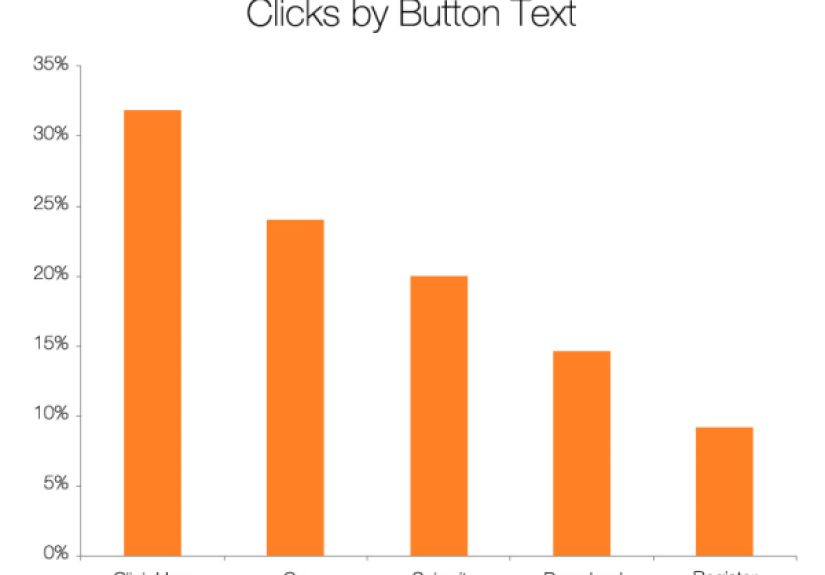
- Using generic labels: Submit, Click Here, Continue, and Go can work in narrow contexts, but they often fail to communicate value.
- Being too clever: If users need a second to interpret the button, that second can become a bounce.
- Overpromising: Do not make the click sound easier or more rewarding than the next step actually is.
- Using guilt-based copy: Buttons like “No Thanks, I Hate Saving Money” may get attention, but they can also erode trust.
- Ignoring message match: Your ad, headline, offer, form, and CTA should all feel like parts of the same conversation.
- Skipping tests: Best practices are a starting point, not a universal law. Your audience gets the final vote.
How to Test Landing Page Button Text the Smart Way
Testing CTA copy does not need to be dramatic. You do not need a war room, three dashboards, and a gong. You need a reasonable hypothesis and clean comparisons.
Start by testing one variable at a time. Compare Submit against a specific value-led alternative. Then test first-person versus second-person phrasing. Then test benefit emphasis versus action emphasis. Keep the offer, design, and traffic source stable enough that you can learn something meaningful.
A simple testing roadmap might look like this:
- Replace Submit with a specific offer-based CTA.
- Test first-person wording such as Get My Quote against second-person wording such as Get Your Quote.
- Test a stronger value cue such as Get Instant Access or Start Free Today.
- Test supporting microcopy near the button.
- Measure not just clicks, but completed conversions and downstream lead quality.
The goal is not to find the “perfect” button forever. The goal is to keep reducing friction. Optimization is less like finding buried treasure and more like clearing rocks from a hiking trail. Each improvement makes the next step easier.
Conclusion
If there is one lesson to keep, it is this: landing page button text is not a decorative detail. It is part of the offer. The words on your CTA should reassure, direct, and motivate. “Submit” rarely does any of those jobs well. It is vague, impersonal, and often heavier than it needs to be.
Better button copy makes the click feel obvious. It tells visitors what they are about to get, why it matters, and what happens next. Pair that clarity with strong visual hierarchy, a focused page goal, short forms, and smart testing, and your landing page will stop asking people to “submit” and start giving them a reason to act.
In other words, do not make people feel like they are turning in homework. Make them feel like they are getting something useful. Your conversion rate may thank you with the quiet dignity of a graph that finally goes up and to the right.
Practical Experiences: What Happens When Teams Stop Using “Submit”
In real landing page work, changing button text often feels too small to matter until the results start showing up. That is the funny thing about conversion optimization: the changes that look tiny in a meeting can have outsized effects when they happen at the moment of decision. Teams will spend weeks debating hero images, font weights, and whether a smiling person should point left or right, then leave a default “Submit” button sitting at the bottom of the form like it wandered in from 2009.
One common experience is that a page starts feeling more coherent as soon as the CTA is rewritten to match the offer. A webinar page that changes from Submit to Save My Seat suddenly feels like it has a destination. A quote form that switches to Get My Free Estimate feels more transparent. A software page that replaces Register with Start My Free Trial becomes easier to understand in a glance. The visitor no longer has to interpret the button. The button finishes the sales sentence.
Another pattern shows up with sales teams. When marketing uses generic button text, sales often ends up dealing with weaker intent signals because the click itself did not filter expectations very well. More specific CTA wording can improve message match. People who click Book a Demo usually know they are booking a demo. People who click Talk to Sales are less likely to act surprised when sales contacts them. That makes follow-up smoother and reduces the “Wait, what did I sign up for?” problem nobody enjoys.
Design teams also tend to notice that once the CTA copy gets stronger, the rest of the interface becomes easier to organize. A clear primary action helps establish hierarchy. It becomes more obvious which button should have the bold color, which links should be quieter, where testimonials belong, and what supporting microcopy should say. In that sense, better button text is not only a copy improvement. It is a structural improvement. It tells the whole page what job it is supposed to do.
Perhaps the most useful experience of all is this: replacing “Submit” often changes how a team thinks about the page. They stop asking, “How do we get users to complete the form?” and start asking, “What result is the visitor hoping to get here?” That is a much better question. Once teams think that way, the CTA becomes clearer, the form gets shorter, the headline gets sharper, and the page becomes more persuasive without sounding pushy. Small word, big lesson.