Table of Contents >> Show >> Hide
- Quick specs at a glance
- Design and build: simple, modern, and not trying to be furniture
- Setup: the important part is removing the plastic (seriously)
- Controls and display: friendly enough for non-nerds, useful enough for nerds
- Performance in the real world: cooking, dust, and pet life
- Smart features: what’s actually useful (and what’s mostly “nice to have”)
- Filtration and maintenance: the cost of clean air (and how to keep it reasonable)
- How to choose the right size (and why “too big” is often just “right”)
- Pros and cons
- Who should buy the WELOV P200 Pro?
- Bottom line
- Extended Hands-On Experience: Living with the P200 Pro
Air purifiers are the adult version of eating your vegetables: not thrilling, undeniably helpful, and somehow you only get serious about them after one
bad allergy season (or one ambitious attempt at pan-searing fish indoors). The WELOV Wi-Fi Smart Air Purifier P200 Pro aims to make the whole “cleaner
air” thing easierespecially if you like controlling your home from your phone, your voice, or a smart home hub.
This hands-on review breaks down what the P200 Pro does well, where it’s a little overconfident, and how it fits into real-life routineslike cooking,
pets, dust, and the ongoing quest to sleep through the night without sounding like you’re sharing a room with a leaf blower.
Quick specs at a glance
- Filtration: Pre-filter + H13 “True HEPA” + activated carbon (3-stage system)
- Smart features: Wi-Fi app control + Matter pairing for compatible smart home ecosystems
- Sensor + display: PM2.5 reading with color-coded air quality indicator
- Coverage claims: Marketed for large-room coverage (up to ~1570 ft² in 1 hour, depending on source/testing conditions)
- Noise focus: Sleep mode is designed to run quietly, with lights dimming/off behavior
- Maintenance: Replace main filter every ~3–6 months; clean pre-filter regularly
Translation: it’s trying to be the “set it and forget it” purifier that also plays nice with a modern smart home. The big question is whether the
smart features meaningfully improve daily useor just give you more buttons to tap while you pretend you’re not procrastinating.
Design and build: simple, modern, and not trying to be furniture
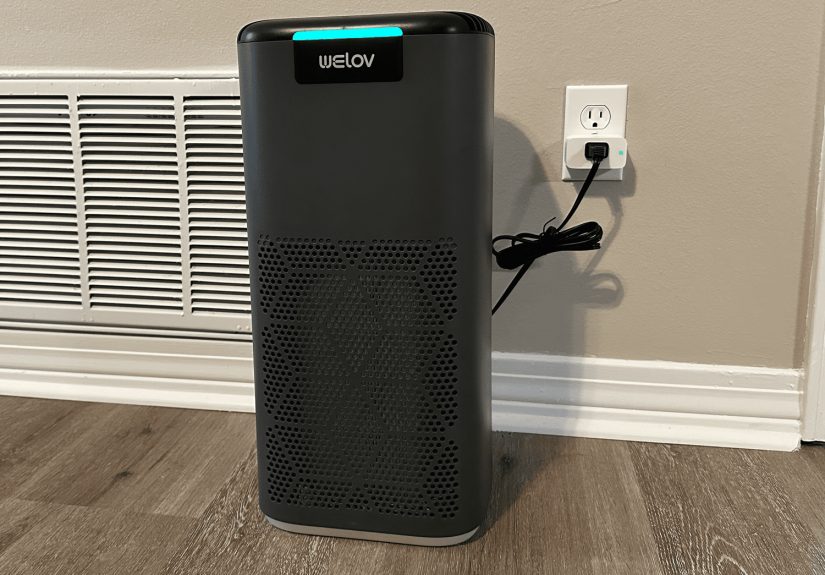
The P200 Pro reads as a practical appliance first: a tall, compact tower with a top control panel and a perforated intake pattern. It’s designed to
disappear into a corner of a bedroom or living room without turning your space into a tech showroom. That’s a complimentmost of us want “clean air,”
not “look at my air-cleaning monolith.”
One nice touch is the lighting and display approach: it’s functional (air quality, modes, timers) without screaming at you. If you’re putting it in a
bedroom or nursery, the ability to reduce or manage lighting matters more than brands like to admit.
Setup: the important part is removing the plastic (seriously)
Unboxing and filter prep
Setup is straightforward, but there’s one critical step that applies to basically every purifier on Earth: the filter ships in protective plastic.
If you forget to remove the bag, the purifier will still run… and you’ll still breathe air… but the airflow will be awful and you’ll have invented a
very expensive fan.
- Flip the unit over and open the filter cover.
- Remove the filter and take off the protective plastic.
- Reinstall the filter and close the cover.
- Plug it in, power on, and you’re ready to run it manually.
If you stop here, you can still use the P200 Pro as a normal air purifier. The “smart” part is optionallike adding hot sauce. Not required, but
sometimes life is better with it.
Wi-Fi + app setup
For app control, the unit relies on a typical smart-appliance flow: put the purifier into pairing mode, then add it through the companion app. The
P200 Pro uses a Wi-Fi indicator behavior and on-device instructions to guide you through.
Once connected, the app experience is where the value shows up: schedules, timers, filter-life tracking, and “is it actually running?” peace of mind
when you’re out of the house.
Matter pairing (the “future-proof” pitch)
Matter is meant to make smart home devices easier to connect across ecosystems. In practice, your experience depends on what your smart home platform
currently supports for the “air purifier” device type. The P200 Pro can be paired via a Matter code/QR, and then controlled through compatible
platformsbut the depth of controls can vary.
The takeaway: Matter is a real benefit if you want to reduce app clutter and centralize control. Just set your expectations that “connected” doesn’t
always mean “every advanced feature is exposed everywhere.”
Controls and display: friendly enough for non-nerds, useful enough for nerds
Top panel basics
You get the core controls you’d want without opening an app: power, fan speed changes, sleep mode, timer functions, and lighting control. This is
underrated. In a lot of homes, “smart device” still needs to pass the test of “works when my phone is dead and I’m annoyed.”
Auto mode behavior
Auto mode uses the onboard PM2.5 sensor to adjust fan speed based on the detected particulate level. When the air quality is worse, it ramps up; when
things calm down, it backs off. In real life, auto mode is the setting you’ll use mostbecause it’s the closest you’ll get to a purifier that behaves
like a well-trained pet (quiet, helpful, and not asking questions).
PM2.5 display and color indicator
The PM2.5 reading is the number you’ll see most often. PM2.5 refers to fine particles (2.5 microns or smaller) that can hang in the air longer than
larger dust and can spike during activities like cooking, cleaning, or heavy outdoor pollution days.
| Indicator color | Air quality label | Typical fan response | PM2.5 range (µg/m³) |
|---|---|---|---|
| Green | Good | Low | 0–50 |
| Orange | Moderate | Medium | 50–100 |
| Red | Bad | High | > 100 |
This is usefuland it’s also a reminder of a key limitation: PM2.5 is not “everything.” It’s a meaningful indicator for particles, but it won’t tell
you the full story about gases and VOCs. If your goal is “stop the smell of fresh paint,” that’s not a PM2.5-only problem.
Performance in the real world: cooking, dust, and pet life
Most people don’t buy a purifier because they enjoy reading numbers on a display. They buy one because something in the house is causing discomfort:
allergies, dust, wildfire season haze, pets, or cooking odors that linger longer than your motivation to clean the stovetop.
Cooking spikes are the easiest “proof” test
The most immediate, visible test is cookingespecially high-heat searing. Fine particles rise quickly, the PM2.5 number jumps, and auto mode responds
by increasing fan speed. This is the kind of cause-and-effect feedback that helps you trust the device. You don’t have to wonder if it’s doing
anything; it tells you, and you can hear/feel the difference in airflow.
Bedroom use: the quiet factor is the whole game
In bedrooms, the purifier’s job is “run continuously without becoming the main character.” Sleep mode lowers fan speed and reduces display activity.
If a purifier nails sleep mode, it tends to become part of the room. If it doesn’t, it gets banished to the hallway like a loud clock.
The P200 Pro leans hard into low-noise operation. And in day-to-day use, that matters more than a fancy spec sheetbecause the best air purifier is
the one you’ll actually keep running.
Pet homes: filtration helps, but expectations should be realistic
If you have pets, you’re dealing with a mix of particles (dander, hair) and odors. A pre-filter helps catch larger bits, while HEPA handles fine
particulates, and carbon helps with smells. That combo is the right approach. Just remember: an air purifier complements cleaningit doesn’t replace
it. You’ll still need vacuuming, washing bedding, and keeping litter boxes (or dog beds) from becoming tiny scent factories.
Smart features: what’s actually useful (and what’s mostly “nice to have”)
The app features people actually use
Smart control can be gimmicky, but air purifiers are one category where it can genuinely improve the experiencebecause the device is meant to run for
long periods and respond to routines.
- Schedules: Run higher speeds during cooking hours, lower speeds overnight.
- Timers: Great for bedroomsset it to run hard for an hour, then settle down.
- Filter tracking: Helps avoid the “wait… when did I last replace that?” problem.
- Remote control: Turn it on before you get home (especially useful during allergy or smoke seasons).
Matter control: the promise and the reality
Matter is the P200 Pro’s headline feature, and it’s a compelling direction for smart home products. The reality today is that platform support can
limit how much you can do through a hub versus the native app. Many users will still rely on the AiDot app for the deeper featuresespecially anything
involving detailed air quality history or advanced settings.
If you’re already invested in a smart home ecosystem, Matter compatibility is still a win: it’s one fewer device trapped in a single-brand silo. If
you’re not into smart home stuff, you can ignore Matter entirely and still get a solid purifier.
Filtration and maintenance: the cost of clean air (and how to keep it reasonable)
The filter system
The P200 Pro uses a multi-stage approach: a pre-filter for larger particles, an H13 HEPA filter for fine particulates, and activated carbon to help
reduce odors. That’s a standard, proven layout for portable air cleanersand it’s the right foundation if you’re targeting dust, pollen, smoke
particles, and pet-related particulates.
Replacement timing
Filter replacement schedules always depend on your environment. A purifier in a quiet bedroom with windows closed will go longer than one living next to
a busy road or working overtime in a kitchen-adjacent open floor plan.
- Pre-filter cleaning: Clean every 2–4 weeks (vacuum or wipe down gently).
- Main filter replacement: Replace about every 3–6 months for best performance.
Resetting the filter indicator
After replacing the filter, you’ll typically reset the filter indicator with a button press-and-hold sequence. This is common, and it keeps the device
from nagging you forever after you’ve already done the responsible adult thing.
Important limitation: gases vs. particles
A PM2.5-focused sensor and display are helpful for particle pollution, but they’re not a full “air chemistry lab.” Some guidance even notes that
particle sensors do not detect gas pollution. That matters if your concern is VOCs, solvent smells, or other gaseswhere ventilation and source control
are often the most effective first steps.
How to choose the right size (and why “too big” is often just “right”)
Air purifier marketing is famous for big room-size numbersand those numbers usually assume a higher fan speed than you’ll want to use all day,
especially in a bedroom. The smarter way to size a purifier is to focus on performance metrics and your likely usage.
CADR: the metric that actually helps comparisons
CADR (Clean Air Delivery Rate) is a standardized way to describe how much filtered air a purifier delivers. Higher CADR generally means faster cleaning
for a given room size. If you’re comparing purifiers, CADR is more informative than vague “covers up to” claimsespecially if the product carries a
verification mark.
Placement: give it room to breathe
Even a great purifier underperforms if it’s shoved into a tight corner like it’s being punished. You want clear airflow into the intake and out from
the exhaust. As a rule of thumb, leave clearance around the unit and avoid blocking vents with curtains, furniture, or laundry piles you’re “totally
folding later.”
Also remember: purifiers help, but don’t do everything
Government and public health guidance is consistent on this point: portable air cleaners can reduce indoor air pollution, but they can’t remove all
pollutants. You’ll get the best results by combining filtration with source control (reduce smoke, reduce strong chemical sources) and smart
ventilation when outdoor conditions allow.
Pros and cons
What works really well
- Quiet operation: Sleep-friendly behavior is a genuine strength for bedrooms.
- Auto mode: Set-and-forget convenience for everyday particle changes (cooking, dust, routine activity).
- Smart control options: App control is useful; Matter is a forward-looking bonus for ecosystem users.
- Maintenance clarity: Filter reminders + accessible cleaning guidance help keep performance consistent.
What to think twice about
- Sensor scope: PM2.5 is important, but it’s not a full indoor air quality readout (especially for gases/VOCs).
- Smart home depth may vary: Matter compatibility doesn’t guarantee every feature appears in every platform.
- Big coverage claims: Real coverage depends on fan speed, room layout, and how tolerant you are of noise.
Who should buy the WELOV P200 Pro?
The P200 Pro makes the most sense for people who want a purifier that’s easy to live withquiet, automatic, and smart enough to fit into a routine.
- Bedroom sleepers: If noise and lights keep you up, the sleep-mode approach matters.
- Pet owners: Multi-stage filtration helps with everyday dander and odor management (alongside cleaning).
- Busy households: Auto mode + schedules reduce the need to think about it constantly.
- Smart home users: Matter can reduce ecosystem friction and keep your setup cleaner long-term.
If you want deep IAQ analytics (VOC trends, CO2, humidity insights), you may prefer pairing a purifier with a dedicated indoor air quality monitoror
choosing a purifier that emphasizes multi-sensor reporting rather than PM2.5 alone.
Bottom line
The WELOV Wi-Fi Smart Air Purifier P200 Pro is built around a practical promise: clean particle-laden air efficiently, stay quiet enough for real homes,
and make control easier through app + Matter compatibility. In daily use, the strongest parts are the quiet operation and the “hands-off” convenience of
auto mode and scheduling.
The biggest caveat is also straightforward: its air quality feedback is centered on PM2.5, and that’s only one slice of indoor air quality. If you go
in expecting “excellent particle cleanup + convenient smart control,” it delivers. If you expect it to be a full-spectrum air quality detective, you’ll
want more sensors (or a separate monitor) in the mix.
In other words: it’s a smart purifier that’s best when it’s quietly doing its job in the backgroundlike the world’s least dramatic roommate.
Extended Hands-On Experience: Living with the P200 Pro
After the initial setup excitement wears off (which, for an air purifier, is about 90 seconds), the P200 Pro settles into the role every purifier
should aim for: background support. That’s where you start noticing the small usability choicessome delightful, some mildly annoying, and some that
make you wonder who tested this in a real home with real chaos.
The first week with the P200 Pro tends to be a cycle of “I’m going to watch the number!” followed by “Okay, I’m done watching the number.” In the
beginning, the PM2.5 display is oddly addictive. You’ll trigger it on purpose: cook something, spray a little cleaning product (carefully), fluff a
blanket, and watch the reading respond. It’s not just entertainmentit builds trust. When auto mode reacts quickly to a cooking spike by raising fan
speed, the device feels competent. It’s the difference between “Is this thing working?” and “Oh. Yep. It’s working.”
The real win is that you can stop micromanaging. Auto mode becomes the default, and it’s the setting that makes the P200 Pro feel like a smart
appliance rather than a dumb fan with a filter taped to it. On quieter days, it stays subtle. On messier dayslike when someone burns toast or you
sear steakit ramps up without you having to remember where you left your phone. The sound profile matters here, too: low speeds are easy to ignore,
and even higher speeds are more “steady airflow” than “jet engine,” which is what you want in a shared living space.
Night use is where the P200 Pro earns its keep. A purifier can have the best filtration in the world, but if it keeps you awake, it becomes an
expensive décor piece. Sleep mode helps on two fronts: noise and light. In practice, that means you’re more likely to leave it running consistently.
And consistency is what makes filtration effective over timeespecially for allergy-prone households. If you wake up and realize you forgot the purifier
existed, that’s success. If you wake up because you’re annoyed at it, that’s a return label.
App control is most useful when it supports real routines. For example, you can schedule higher fan speeds during predictable “pollution windows”:
weekday dinner cooking, weekend cleaning, or mornings when you’re making coffee and toast like you’re hosting a tiny breakfast restaurant. Then you can
automatically drop to a quieter mode at bedtime. This is the kind of automation that doesn’t feel like a tech demoit feels like a practical household
habit, like setting a thermostat schedule.
Filter maintenance is also more manageable than many people expect. The pre-filter cleaning rhythmvacuuming it every few weeksfits into normal
cleaning. It’s the same vibe as vacuuming baseboards: not thrilling, but satisfying once it’s done. And the replacement cycle (every few months,
depending on conditions) is predictable enough that you can plan it rather than getting surprised by reduced performance. If you’re the kind of person
who forgets this stuff, filter-life tracking and reminders are genuinely helpful, not just “smart feature fluff.”
The most important mindset shift is understanding what the sensor doesand what it doesn’t. In daily life, PM2.5 feedback is great for particles:
cooking smoke, dust disturbances, outdoor pollution infiltration. But it won’t fully capture odor issues that are more gas/VOC-driven, and it won’t
replace good ventilation decisions. Over time, the best experience is treating the P200 Pro as one strong tool in a larger “cleaner air” toolkit:
filter particles efficiently, reduce sources when possible, ventilate strategically, and keep the purifier running consistently enough that you’re not
relying on it as an emergency response device.
After a couple of weeks, the P200 Pro’s biggest compliment is also the least exciting: it becomes normal. The air feels fresher, dust feels less
dramatic, and the purifier becomes part of the room’s baselinequietly doing its job while you focus on more important things, like deciding what’s for
dinner and why the socks never make it to the laundry basket on their own.