Table of Contents >> Show >> Hide
- What “multiple Stories” means on Instagram
- How to add multiple Stories on Instagram in 15 steps
- Open the Instagram app
- Tap your profile picture or the plus icon
- Enter the Story camera
- Tap the gallery thumbnail in the lower-left corner
- Look for Select or Select Multiple
- Choose the photos and videos you want to post
- Be intentional about the sequence
- Tap Next
- Edit each Story slide individually
- Keep text short and readable
- Use stickers strategically
- Use Layout if you want multiple photos on one Story frame
- Use the photo sticker tool for a layered look
- Choose your audience
- Post, review, and save your best work
- When to use separate Story slides vs. one collage Story
- Best practices for better Instagram Stories
- Common mistakes to avoid
- Troubleshooting Instagram Story upload issues
- Why this matters for creators, brands, and regular humans with camera rolls
- Experience-based tips: what people learn after using multiple Instagram Stories regularly
- Conclusion
- SEO Tags
Posting one Instagram Story is easy. Posting several Stories in a clean, strategic, “Wow, this person definitely has their life together” way is where things get interesting. Whether you are sharing vacation highlights, a product launch, a restaurant review, or just ten photos of your dog making suspiciously human facial expressions, learning how to add multiple Stories on Instagram can make your content feel smoother, faster, and a lot more engaging.
If you have ever uploaded one Story, gone back, uploaded another, gone back again, and repeated the process until your patience left the chat, there is good news: Instagram gives you faster ways to add multiple Story slides at once. It also gives you creative tools for putting multiple photos on a single Story frame if you want a collage-style look instead of a slideshow.
In this guide, you will learn exactly how to add multiple Stories on Instagram in 15 steps, plus how to make them look better, avoid common mistakes, and use the right method for the kind of Story you want to tell.
What “multiple Stories” means on Instagram
Before jumping into the steps, it helps to clear up one common confusion. When people search for how to add multiple Stories on Instagram, they usually mean one of two things:
- Multiple Story slides: You upload several photos or videos at once, and Instagram posts them as separate Story frames in sequence.
- Multiple photos on one Story: You create a collage-style Story using Instagram’s Layout feature or the photo sticker tool.
This article covers both. The main 15-step process focuses on uploading several Story slides at once, because that is the fastest and most practical method for most users. Then we will cover the collage-style option too, because sometimes one Story frame with layered images looks better than a rapid-fire photo parade.
How to add multiple Stories on Instagram in 15 steps
-
Open the Instagram app
Start on the Instagram home screen. Make sure you are using the mobile app, because Story creation tools are easiest and most complete there.
-
Tap your profile picture or the plus icon
You can usually begin from your profile picture at the top of the feed, or by tapping the + icon and choosing Story. On some devices, the exact layout looks slightly different, but the destination is the same: the Story composer.
-
Enter the Story camera
Once the Story screen opens, you can either take a new photo or video right there, or upload media you already have. If your content is already saved to your phone, uploading from the gallery is the fastest route.
-
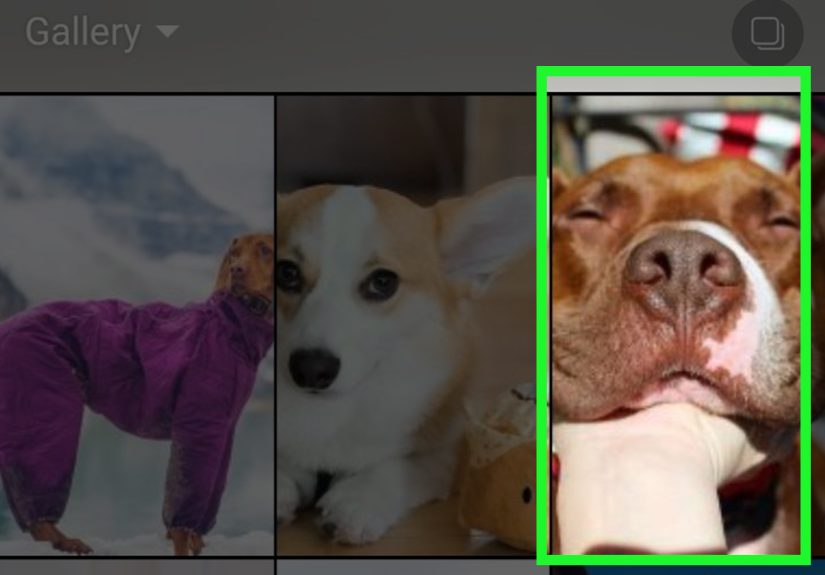
Tap the gallery thumbnail in the lower-left corner
This opens your camera roll or media library. If your phone has albums or folders, you may also be able to switch between them to find the exact content you want faster.
-
Look for Select or Select Multiple
Depending on your app version and device, Instagram may show a button labeled Select, Select Multiple, or an icon that looks like stacked squares. This is the magic button that saves you from uploading one Story at a time like it is 2018.
-
Choose the photos and videos you want to post
Tap each item you want to include. Instagram numbers them in the order you select them, which becomes the order they appear in your Story. That means your coffee photo can go first, your menu shot second, and your dramatic dessert reveal third, exactly as nature intended.
-
Be intentional about the sequence
The order matters. A multi-Story upload works best when it feels like a mini narrative rather than random camera-roll confetti. For example, if you are posting a travel Story, a strong order might be airport, arrival, hotel view, local food, sunset, then one final reaction shot.
-
Tap Next
After selecting your media, tap Next or the arrow button. Instagram will prepare each photo or video as its own Story slide.
-
Edit each Story slide individually
This is where good Stories become memorable Stories. Tap through each selected slide and customize it. You can add text, music, GIFs, polls, a location sticker, a mention, or a link sticker if you need one. Editing each frame separately helps every slide feel intentional instead of thrown together.
-
Keep text short and readable
If you add captions or commentary, avoid stuffing each frame with a wall of text. Instagram Stories are fast-moving. A short sentence, a clever label, or one useful instruction usually performs better than a mini novel trapped in a tiny font.
-
Use stickers strategically
Polls, questions, quizzes, countdowns, emoji sliders, music, and link stickers can make Stories more interactive. The key word is strategically. One engaging sticker is helpful. Seven stickers on one frame looks like your Story got into a fight with a stationery store.
-
Use Layout if you want multiple photos on one Story frame
If your goal is not several Story slides but one collage-style Story, tap Layout in the Story camera. This lets you place multiple images in a grid on one screen. It is perfect for before-and-after content, outfit choices, product comparisons, or quick recaps.
-
Use the photo sticker tool for a layered look
If you want a more creative collage, choose a background image first, then open the sticker tray and use the Photo sticker to layer additional photos on top. This method looks less formal than Layout and gives you more control over size, overlap, and placement.
-
Choose your audience
When everything looks right, decide whether to share with Your Story, Close Friends, or send it directly to specific people. If the Story is more casual or personal, Close Friends can be a smart choice. Not every behind-the-scenes moment needs to be broadcast to the entire internet.
-
Post, review, and save your best work
Tap Share, then watch your Story once it goes live. Make sure the order feels smooth and the text is readable. If it is a Story you may want later, save it to your device or add it to a Highlight so it does not disappear into the 24-hour void forever.
When to use separate Story slides vs. one collage Story
Use separate Story slides when:
- You want to tell a sequence or timeline.
- You have multiple videos mixed with photos.
- Each image needs its own caption, sticker, or music moment.
- You want viewers to tap through a mini story rather than absorb everything at once.
Use one collage Story when:
- You are comparing products, outfits, rooms, or design options.
- You want a mood board or roundup look.
- You need one strong visual frame instead of several separate slides.
- You want your Story to feel more curated and less like a camera-roll sprint.
Best practices for better Instagram Stories
Knowing how to post multiple Stories on Instagram is only half the battle. The other half is making them worth watching. Here are the habits that help:
- Start strong: Your first slide should grab attention immediately. Lead with the most interesting image, not the warm-up act.
- Use vertical visuals: Story content looks best in a full-screen vertical format. A 9:16 layout usually works best for clean viewing.
- Mix formats: A few photos, one short video, a poll, and a sticker can keep the sequence from feeling repetitive.
- Think in chapters: If you are posting many Story slides, group them mentally into little chapters such as arrival, activity, reaction, and takeaway.
- Keep branding subtle: If you are using Stories for business, maintain your visual style without turning every frame into a billboard.
Common mistakes to avoid
Even great content can flop if the Story experience is messy. Here are the most common mistakes:
- Posting too many similar images: Five near-identical sunset shots may matter deeply to you, but your viewers may not survive all five.
- Overcrowding one frame: If you use Layout or photo stickers, make sure the final frame is still easy to understand.
- Ignoring order: A scrambled sequence makes the Story feel confusing and lower quality.
- Tiny text: If viewers have to squint, they probably will not.
- No interaction: If your Story is for engagement, add a poll, question, or simple call to action.
Troubleshooting Instagram Story upload issues
If Instagram will not upload your multiple Stories properly, try these quick fixes:
- Check your internet connection, especially if you are uploading videos.
- Close and reopen Instagram.
- Update the app to the latest version.
- Reduce clutter in the Story if a slide contains too many moving elements or stickers.
- Clear app cache on Android if the app is acting stubborn.
- Try uploading fewer items at once, then post the rest in a second batch.
Also remember that app labels can vary a little by phone model, operating system, and version of Instagram. If you see Select instead of Select Multiple, or if an icon looks slightly different, that is normal.
Why this matters for creators, brands, and regular humans with camera rolls
Instagram Stories are not just casual throwaway content anymore. They are one of the fastest ways to stay visible, talk to followers, and share updates without cluttering your main grid. For creators, Stories are a daily touchpoint. For brands, they are a place for launches, behind-the-scenes content, FAQs, and quick links. For everyone else, they are a perfectly acceptable place to post concert clips, vacation recaps, and evidence that your lunch was, in fact, photogenic.
When you know how to upload multiple Story slides at once, you save time. When you know when to use Layout or layered photos, your Stories look better. And when you learn to organize your content like a mini narrative, people are more likely to actually watch the whole thing instead of tapping through like they are speed-running social media.
Experience-based tips: what people learn after using multiple Instagram Stories regularly
One of the most interesting things about learning how to add multiple Stories on Instagram is that the technical part becomes easy very quickly. The real learning curve comes from experience. The first time most people try a multi-Story upload, they usually focus on getting the content posted. After a few tries, they start noticing what actually makes viewers stick around.
A common experience is realizing that order matters more than expected. A random stack of five good photos often performs worse than three photos arranged in a clear sequence. For example, a small business posting a product launch might get better reactions by showing the problem first, the product second, and the result third. A travel creator might begin with the destination reveal, then show the best food shot, and finish with a short video clip that captures the mood. People respond better when the Story feels guided rather than dumped out of a camera roll bucket.
Another experience users talk about is the difference between “more content” and “better content.” Just because Instagram lets you upload multiple Story slides does not mean every single photo deserves a starring role. Many users discover that trimming a 10-slide Story down to six stronger frames makes the entire sequence more watchable. It is the social media version of packing for a trip: you think you need everything, then realize half of it was emotional baggage.
Creators and casual users also tend to learn that a little editing goes a long way. Not every frame needs dramatic stickers, songs, GIFs, captions, and six arrows pointing at the obvious. In fact, cleaner Stories often feel more polished and trustworthy. A simple location tag, one line of text, and one interactive sticker can outperform a frame that looks like it lost a fight with a craft store.
Business accounts often report another useful lesson: Stories feel more personal than feed posts. A polished grid post may build brand image, but Stories build familiarity. Posting multiple Story slides from an event, a product restock, or a behind-the-scenes moment gives followers a sense of immediacy. It feels less like advertising and more like participation. That is especially true when the Story includes a poll, a question sticker, or a quick explanation in plain language.
Many users also figure out that Highlights are underrated. A strong sequence of Stories does not have to vanish forever after 24 hours. Saving useful Stories into Highlights can turn quick updates into long-term profile assets. Tutorials, FAQs, reviews, menu items, product drops, travel guides, and event recaps all work well there. In other words, your Story can stop being temporary and start pulling long-term value.
And finally, people learn that the best multiple Instagram Stories usually feel human. They are clear, paced well, visually simple, and just interesting enough to make someone tap forward because they want to, not because they are trying to escape. That is the sweet spot. Not perfection. Not chaos. Just smart, useful storytelling in a format built for fast attention spans.
Conclusion
If you want to add multiple Stories on Instagram, the easiest method is to open the Story creator, go to your gallery, tap Select or Select Multiple, choose your photos or videos in order, edit each frame, and share them all at once. If you want several images inside one Story instead, use Layout for a grid or the Photo sticker for a more layered design.
The smartest approach is not just posting more. It is posting with structure. Think about sequence, readability, visual balance, and audience interaction. Do that consistently, and your Instagram Stories will look better, feel more intentional, and hold attention longer.