Table of Contents >> Show >> Hide
- What Is Off-Facebook Activity, Really?
- Why Your Off-Facebook Activity Matters
- How to View Your Off-Facebook Activity
- How to Clear Your Off-Facebook Activity History
- How to Turn Off Future Off-Facebook Activity
- Other Ways to Control How Facebook Uses Your Data
- What About Businesses and Compliance?
- Pick Your Privacy Level: Three Simple Strategies
- Real-World Experiences & Lessons Learned
- Conclusion: You Can’t Opt Out of the Internet, But You Can Opt In to Control
Ever searched for new sneakers on a random website and then had Facebook
(sorry, Meta) bombard you with sneaker ads for the next three weeks? That’s
not magic. That’s your Off-Facebook Activity hard at work.
The good news: you’re not stuck with it. Facebook now gives you tools to
see, clear, and even turn off a big chunk of this tracking. The less-good news:
the settings are buried deeper than your 2011 vacation photos.
This guide walks you through exactly how to:
- Understand what Off-Facebook Activity actually is
- Find and review the data Facebook collects about you from other sites
- Clear your Off-Facebook Activity history
- Turn off future Off-Facebook Activity tracking
- Lock down related settings like ads, apps, and location
Grab a coffee (or an incognito window); it’s time to take back a bit of
control over your data.
What Is Off-Facebook Activity, Really?
Off-Facebook Activity (now often labeled
Your activity off Meta technologies) is a summary of information
that businesses and apps share with Meta about your interactions with them.
Think of it as a behind-the-scenes report card of everything you do on
websites and apps that use tools like the Meta Pixel, Facebook Login,
or other Meta business integrations.
Examples of Off-Facebook Activity include:
- Visiting an online store or viewing specific product pages
- Adding an item to your cart or completing a purchase
- Searching for flights, hotels, or insurance quotes
- Using an app that lets you sign in with Facebook
Businesses send that data back to Meta so it can:
- Show you “more relevant” ads
- Measure ad performance for advertisers
- Build behavioral profiles and audience segments
In plain English: your activity elsewhere helps Facebook decide what to
advertise to you and how to categorize you (“shoe enthusiast,” “new parent,”
“planning a vacation,” and so on).
Why Your Off-Facebook Activity Matters
Some people don’t mind hyper-targeted ads; others get uncomfortable when
Facebook knows they looked at a very specific product at 2:13 a.m. on
a random site they barely remember visiting.
Here’s why Off-Facebook Activity deserves your attention:
-
It’s surprisingly detailed. The Off-Facebook Activity
page can show hundreds of apps and sites that have shared data
with Meta over the last several months. -
It feeds ad targeting. The more data Facebook collects,
the better it can predict what you’ll clickand the more “sticky” your
profile becomes. -
It shapes the digital version of you. Those signals are
used to infer your interests, financial situation, health-related concerns,
and life events. That’s powerfuland potentially invasiveprofiling. -
It’s easy to forget it exists. Many users never touch
these settings, which means data quietly piles up in the background.
You can’t completely disappear from Meta’s radar, but you can drastically
reduce how much data is tied directly to your account.
How to View Your Off-Facebook Activity
On Desktop
- Log in to Facebook in your browser.
-
Click your profile picture (or the menu icon) in the top-right corner and
choose Settings & privacy, then
Settings. -
Look for Accounts Center (usually in the left sidebar)
and open it. -
Go to Your information and permissions (wording may
vary slightly). -
Click Your activity off Meta technologies or
Off-Facebook activity.
You should now see a summary of the organizations that have shared your
activity with Meta. Clicking into the list typically shows:
- The names of apps and websites
- When they last sent activity
- How many interactions were recorded
On Mobile (Facebook App)
- Open the Facebook app and tap the menu (☰) in the bottom or top bar.
- Tap Settings & privacy, then Settings.
- Tap Accounts Center.
-
Go to Your information and permissions >
Your activity off Meta technologies.
The interface changes from time to time, but the key phrases to look for are
“Off-Facebook Activity” or “Your activity off Meta technologies.” If you see
a long list of brands and apps you don’t recognize, don’t panicthat’s
normal. (Annoying, but normal.)
How to Clear Your Off-Facebook Activity History
Viewing your activity is only step one. To take action, you’ll need to
clear that history. Think of this as deleting the “memory” of which sites
were linked to your profilethough Meta may still keep some anonymized data
behind the scenes.
Clearing Off-Facebook Activity on Desktop
-
From the Your activity off Meta technologies page, look
for a button like Clear history or
Disconnect activity history. - Click it. A confirmation pop-up will appear.
-
Read the explanation carefully. You’ll usually see language saying that
your past activity will be disconnected from your account, but Meta may
still use data in aggregated form. - Confirm by clicking Clear history or Confirm.
What Clearing Your History Actually Does
When you clear your Off-Facebook Activity:
-
Meta disconnects the link between your profile and that
specific batch of activity. -
Advertisers lose some of the fine-grained targeting they had based on
those events. -
Meta may still keep anonymized or aggregated data for analytics,
security, and reportingjust not tied directly to your account.
Think of it like shredding a file with your name on it but keeping the
overall statistics in a spreadsheet. It’s not perfect privacy, but it’s a
meaningful improvement compared with doing nothing.
How to Turn Off Future Off-Facebook Activity
Clearing your history is a one-time cleanup. If you want to prevent new
off-Facebook activity from being linked to your account, you need to adjust
the future activity setting.
Turn Off Future Activity via Accounts Center
-
Go back to Your activity off Meta technologies in
Accounts Center. -
Find and select Manage future activity or
Disconnect future activity. -
Toggle the setting off so that new activity from apps and
websites will no longer be associated with your account. -
Confirm in the pop-up. Facebook will warn you that:
- You may see less “relevant” ads
- Some logins or personalization features could be affected
One important caveat: if you use Facebook Login to sign in
to certain apps or websites (like Spotify, Pinterest, or game apps),
disconnecting future activity can affect how those logins work. In some
cases, you might need to switch to email-based or other sign-in methods.
Other Ways to Control How Facebook Uses Your Data
Off-Facebook Activity is only one piece of the privacy puzzle. To really
dial down tracking and profiling, it’s worth spending another 10–15 minutes
reviewing related settings.
Tame Targeted Ads in Ad Preferences
Facebook’s ad system uses your off-site activity, on-site behavior, and
profile details to decide which ads to show you. You can’t turn ads off
completely (if only), but you can limit how personal they feel.
- Open Settings & privacy > Settings.
- Select Ads or go into Ad preferences.
-
Review:
- Categories used to reach you (interests, demographics)
- Activity information from ad partners
- Ads shown using your activity on Meta products
-
Turn off or limit options that allow Facebook to use data from partners
and off-site activity to personalize ads.
You’ll still see ads, but they’ll feel less like Facebook is reading your
mind and more like it’s taking a guess.
Review Third-Party Apps and Websites
Over the years, you’ve probably connected apps and sites to your Facebook
accountquiz apps, games, “login with Facebook” tools, and more. Each one
can request access to your data and, in some cases, send activity back.
- Go to Settings & privacy > Settings.
-
Look for Apps and websites or a similar option under
permissions. - Review the list of active, expired, and removed apps.
-
Remove any apps you no longer use or don’t recognize, or limit their
permissions where possible.
This is like spring-cleaning your account. If an app doesn’t spark joyor
you don’t remember ever installing itit probably shouldn’t have access to
your data.
Control Location, Link History, and On-Platform Activity
A few more settings worth checking while you’re in there:
-
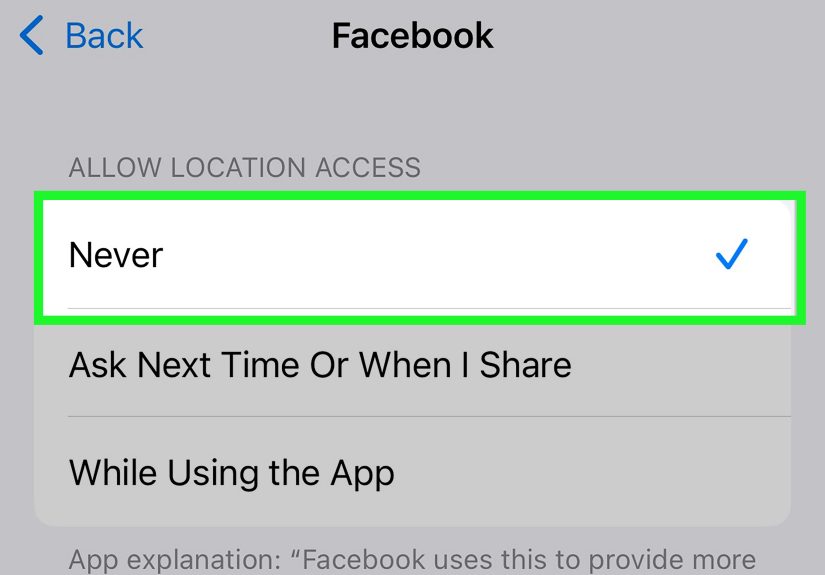
Location settings: Turn off precise location or limit it
to when you’re using the app if you don’t want Facebook to know exactly
where you are. -
Activity log and search history: In your profile’s
Activity log, you can clear your search history and review other actions
you’ve taken on Facebook. -
Link history: Facebook now tracks the links you click
inside its apps. In settings, look for link history controls and turn
tracking off if you’d rather not have a running list of everything
you’ve tapped.
None of these settings will turn Facebook into a zero-tracking zone, but
together they significantly shrink the amount of data tied directly to you.
What About Businesses and Compliance?
If you run ads or use tools like the Meta Pixel on your own website,
Off-Facebook Activity affects you from the other side.
From a compliance and trust perspective, you should:
-
Clearly disclose in your privacy policy that you use Meta tools for
analytics or advertising. -
Obtain consent for tracking where laws like the GDPR or state privacy
laws apply (for example, via cookie banners). -
Avoid collecting more personal data than you reasonably need
(“data minimization”). -
Honor user requests to opt out of tracking or targeted advertising
where required.
Users are increasingly aware of Off-Facebook Activity and similar tracking
tools. Being transparent about how you use themand offering meaningful
opt-outscan build trust instead of suspicion.
Pick Your Privacy Level: Three Simple Strategies
You don’t have to go from “I’ve never opened my settings” to “tin-foil hat”
in one day. Here’s a quick way to choose your comfort level.
Level 1: Basic Cleanup (5–10 Minutes)
- View your Off-Facebook Activity.
- Clear your history.
- Remove any obviously sketchy third-party apps.
Result: Your profile is less cluttered with old data, and at least the
worst offenders are gone.
Level 2: Serious Boundaries (15–20 Minutes)
- Do everything in Level 1.
- Turn off future Off-Facebook Activity.
-
Go through Ad preferences and limit data from ad partners and sensitive
ad topics. - Turn off location tracking or restrict it to “Only while using the app.”
Result: Facebook still works, but it has a lot less information to build
highly personalized profiles about you.
Level 3: Privacy Power User (Ongoing)
- Regularly review your Off-Facebook Activity and apps & websites list.
-
Avoid “Login with Facebook” when signing up for new services (use email
or password managers instead). -
Pair Facebook settings with browser-level protections like tracker
blockers and privacy-focused browsers. - Periodically delete your activity log, searches, and link history.
Result: You’re still on Facebook, but on your terms. The platform gets
less raw material to work with, and your digital footprint becomes much
harder to stitch together.
Real-World Experiences & Lessons Learned
The first time most people open the Off-Facebook Activity page, they have
the same reaction: “Wait… all these companies are sending my data
to Meta?” The list can be long and weirdly specificairlines you checked
once, stores you forgot existed, apps you installed for five minutes and
never used again.
After clearing that history and turning off future activity, users often
notice a few things:
-
Ads feel less creepy. You still see promotions, but they
tend to be more genericbased on broad interests and on-platform activity
rather than that obscure product you Googled at midnight. -
Facebook feels slightly “quieter.” When fewer signals are
coming in from the outside world, your feed and ad mix can feel a bit
less aggressively tuned to whatever you did yesterday on another site. -
You become more intentional about logins. Once you’ve
seen how often Facebook Login shows up in your Off-Facebook Activity,
you’re more likely to think twice before tapping “Continue with Facebook”
on a random app.
There can be trade-offs. Some people report that after turning off future
activity, a few apps connected via Facebook Login became less convenient or
needed re-authentication. Others noticed that certain “smart” recommendations
disappearedthings like automatically resurfacing a shopping cart from a
partner site. If you rely heavily on these convenience features, it’s worth
testing your favorite apps after changing settings.
On the positive side, going through this process forces you to audit your
whole digital ecosystem. You may discover accounts you no longer use, old
game apps with access to your profile, or marketing platforms that have
quietly tracked you for years. Removing or limiting those connections makes
you less dependent on a single login and reduces the harm if one account is
ever compromised.
Over time, users who regularly manage Off-Facebook Activity and related
settings tend to think differently about data in general. You start to ask,
“Does this app really need my Facebook login? Do I want my purchase history
feeding into ad profiles? Do I trust this site with my behavior data?”
That mindset is more powerful than any single setting.
The reality is that opting out of Off-Facebook Activity doesn’t suddenly
make you invisible. Data flows through many channelsother ad networks,
analytics tools, data brokers, and more. But this is one of the rare cases
where a huge platform gives you a relatively clear switch to disconnect a
big chunk of tracking from your personal account.
Think of it as digital hygiene: clearing your Off-Facebook Activity,
tightening your ad settings, and reviewing your app connections are like
brushing and flossing for your online life. It doesn’t guarantee perfection,
but it keeps things from getting out of controland it reminds you that you
still have a say in how your data is used.
Conclusion: You Can’t Opt Out of the Internet, But You Can Opt In to Control
Facebook’s Off-Facebook Activity tools won’t end online tracking, but they
give you something you didn’t have for years: a dashboard and a set of
controls. You can see who’s sending data, clear what’s already there, and
shut off a major pipeline of future tracking.
If you do nothing else today, at least:
- Open your Off-Facebook Activity page
- Clear your history
- Decide whether to disconnect future activity
It’s a small investment of time that can pay off in a big wayless creepy
ads, fewer hidden connections, and a bit more control over how your data
flows through the Meta universe. You may not be able to opt out of the
internet entirely, but you can absolutely opt in to better privacy.