Table of Contents >> Show >> Hide
- What This Guide Covers (and What It Doesn’t)
- Before You Start: Parts You Should Have
- Tools & Supplies That Make Life Easier
- Step-by-Step: Install an Aftermarket Car Stereo
- Step 1: Save your settings and disconnect the battery
- Step 2: Remove dash trim and access the factory radio
- Step 3: Check what you’re working with (basic vs factory amp)
- Step 4: Prep your wiring harness (the clean way)
- Step 5: Match and connect the wires (don’t freestyle this)
- Step 6: Install the dash kit and mount the new stereo
- Step 7: Plug everything in (and don’t forget the antenna)
- Step 8: Do a “before you reassemble everything” test
- Step 9: Troubleshooting quick hits
- Step 10: Final assembly (aka: put the car back together)
- Smart Installation Habits (That Pros Use Too)
- Conclusion: You’ve Got This (and Your Dash Still Looks Good)
- Real-World Experiences From the Garage (What No One Mentions Until It Happens)
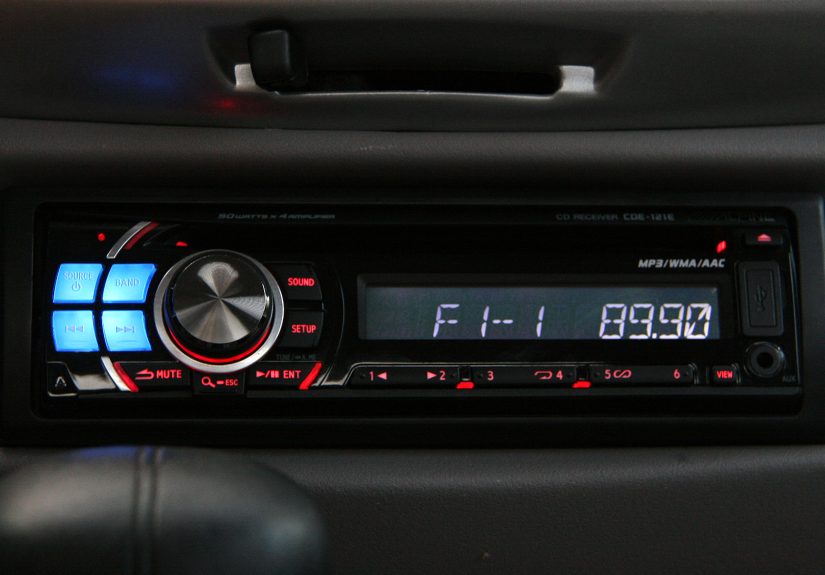
Installing an aftermarket car stereo sounds like one of those jobs that requires three engineering degrees, a monk’s patience, and hands that can bend like rubber. In reality, a basic head unit swap is totally doable in a driveway with common tools as long as you treat the wiring like it’s important (because it is) and you don’t “test” circuits by touching bare wires together like you’re starting a campfire.
This guide walks you through a straightforward, “keep the factory wiring intact” install using the right adapters: a dash kit, a vehicle-specific wiring harness adapter, and (often) an antenna adapter. We’ll also cover the classic gotchasfactory amplifiers, weird dash shapes, and why your stereo turns on but your speakers go on strike.
What This Guide Covers (and What It Doesn’t)
This is for installing a basic aftermarket car stereo (single-DIN or double-DIN) into a vehicle that currently has a factory radio. We’re focusing on a clean, reversible install with adaptersnot cutting up your car’s original harness like it owes you money.
We’re not diving deep into custom fiberglass dash work, DSP tuning, multi-amp competition builds, or “I relocated my HVAC controls to the trunk.” (Respectfully: you’re on a different spiritual journey.)
Before You Start: Parts You Should Have
1) The head unit
Single-DIN is the classic “one slot tall” radio size. Double-DIN is taller and typically includes larger touchscreens. Make sure your new stereo fits your dash opening with the right kit.
2) Dash kit (vehicle-specific)
A dash kit fills gaps, provides mounting brackets, and helps your new stereo look like it belongs thererather than “installed during a windstorm.”
3) Wiring harness adapter (vehicle-specific)
This is the hero of an easy install. It plugs into your car’s factory connector on one side, and gives you labeled wires to connect to your stereo harness on the other.
4) Antenna adapter (often required)
Many vehicles use an antenna plug that doesn’t match aftermarket stereos. An adapter prevents the sad “radio mode is just static” moment.
5) Optional but common extras
- Steering wheel control interface (if you want volume/track buttons to keep working)
- Factory amp integration interface (if your vehicle has a premium audio amp)
- USB/Aux retention adapters (if the car has factory ports you want to keep)
- Backup camera adapter (if applicable)
Tools & Supplies That Make Life Easier
- Plastic trim removal tools (prevents “I swear that scratch was already there”)
- Phillips and flathead screwdrivers
- Socket set (very common for radio brackets)
- Wire stripper/cutter
- Crimp tool and butt connectors or solder + heat shrink
- Electrical tape (for bundling and backup insulation)
- Zip ties (because cables love chaos)
- Multimeter or test light (for troubleshooting and verifying power/ground)
- Flashlight (your dash contains at least one black screw hiding in a black corner)
Step-by-Step: Install an Aftermarket Car Stereo
Step 1: Save your settings and disconnect the battery
If your car has radio presets you care about, take a photo of them. Then disconnect the negative (-) battery terminal. This reduces the risk of shorts, blown fuses, and turning your wrench into modern art.
Step 2: Remove dash trim and access the factory radio
Use trim tools to gently pry off the panels around the radio. Work slowlyclips are designed to hold tight, not to survive rage. Once trim is off, remove the screws/bolts holding the factory radio in place.
Pull the radio out carefully and unplug:
- The main wiring harness connector(s)
- The antenna plug
- Any other connectors (USB modules, factory microphones, etc.)
Pro tip: Take a quick photo of what plugs into what. Your future self will be grateful.
Step 3: Check what you’re working with (basic vs factory amp)
Two cars can look identical on the outside and be totally different behind the dash. If your vehicle has a factory amplifier, a “simple” install may need an interface so the new stereo can properly feed the amp and turn it on.
Clues you might have a factory amp:
- Premium audio badge (Bose, JBL, Infinity, Harman Kardon, etc.)
- Factory subwoofer
- Multiple harness plugs on the radio
- No sound when you “wire it like normal” (the amp never gets the turn-on signal)
Step 4: Prep your wiring harness (the clean way)
Your aftermarket stereo comes with its own harness (a bundle of wires that plugs into the back of the new unit). Your vehicle-specific harness adapter also has a bundle of wires. The goal is to connect stereo harness ↔ vehicle adapter harness wire-for-wire so your install is plug-and-play at the car.
Step 5: Match and connect the wires (don’t freestyle this)
Most aftermarket stereos follow standard wire colors. Your harness adapter will usually match these colors too. The “big three” you must get right:
- Yellow: 12V constant (memory/preset power)
- Red: 12V accessory/switched (turns on with ignition or ACC)
- Black: ground
Common additional wires:
- Blue/White: amp remote turn-on (also used to trigger some factory amps or aftermarket amps)
- Orange/White: illumination/dimmer (ties into dash lighting so buttons dim with headlights)
- Speaker wires: usually four pairs (front/rear, left/right). Solid color is typically (+), same color with stripe is (–).
Connection methods (choose one and do it well):
- Crimp butt connectors: fast and reliable if crimped properly
- Solder + heat shrink: excellent connection, takes more time
- Twist + tape: please don’t (unless you enjoy intermittent sound and mysterious rattles)
After connecting, gently tug each wire to confirm it’s secure. Then bundle the harness neatly with zip ties. A tidy harness fits better behind the dash and reduces stress on connections.
Step 6: Install the dash kit and mount the new stereo
Dash kits vary wildly by vehicle. Some snap in. Some bolt in. Some require transferring factory brackets. Follow the dash kit instructions carefully and dry-fit everything before final assembly.
If your new stereo uses a metal DIN sleeve, you may need to bend the sleeve tabs to lock it into the kit. If it uses side brackets, you’ll bolt it in like the factory radio.
Step 7: Plug everything in (and don’t forget the antenna)
Plug the harness adapter into the car’s factory plug(s). Plug the other side into your new stereo’s harness. Connect the antenna using the correct adapter if needed. Connect USB extensions, mic cables, and any interfaces (steering wheel controls, factory amp adapters) per their instructions.
Step 8: Do a “before you reassemble everything” test
Reconnect the negative battery terminal. Turn the key to ACC.
Check:
- Does the stereo power on?
- Do all speakers play (front left/right, rear left/right)?
- Does FM/AM work (antenna connected properly)?
- Does it keep presets after turning the car off (yellow constant power is correct)?
- If you have a factory amp, does it produce clean sound (amp turn-on and interface are right)?
If something is wrong, fix it nowbefore you reinstall 14 clips and 6 screws and discover the radio is silent. That’s how dashboards learn new curse words.
Step 9: Troubleshooting quick hits
- Won’t turn on: Check the fuse on the stereo harness, check vehicle radio fuse, confirm red/yellow have proper voltage, confirm ground is solid.
- Turns on but loses memory: Yellow constant and red accessory may be swapped, or constant power isn’t actually constant.
- No sound but stereo powers up: Factory amp not turning on, amp integration needed, or speaker wires not connected to correct outputs.
- Weak bass / weird hollow sound: One or more speakers wired out of polarity (+/– reversed on a channel).
- Engine whine: Ground issue, RCA routing near power cables (if using amps), or poor connection quality.
Step 10: Final assembly (aka: put the car back together)
Once everything tests good, slide the stereo fully into position, secure it with screws/bolts, and confirm nothing pinches behind it. Then reinstall trim panels in reverse order.
Take a final test drive with music on. Listen for rattles. If you hear a new buzz, congratulationsyou’ve discovered the ancient dash tradition of “one clip isn’t seated.”
Smart Installation Habits (That Pros Use Too)
Label, photograph, and keep your factory parts
Save the factory radio, screws, and brackets. If you sell the car or need warranty work, returning to stock becomes much easier. Photos also help if you need to troubleshoot later.
Don’t skip proper wire connections
Audio systems live in heat, vibration, and occasional moisture. Good connections stay good. Bad connections become “Why does it cut out only on left turns?” mysteries.
Use interfaces to retain factory features
Steering wheel controls, factory amps, chimes, and OEM displays may require dedicated interfaces. If you want everything to work like it did from the factory (or better), plan for that up front instead of treating it as an afterthought.
Conclusion: You’ve Got This (and Your Dash Still Looks Good)
A basic aftermarket car stereo install is mostly about preparation: the right dash kit, the right wiring harness adapter, and the discipline to connect wires cleanly instead of improvising. Do that, and you’ll end up with better sound, modern features, and the deeply satisfying feeling of saving money while learning how your car actually works.
If you hit a wallespecially with factory amps or advanced integrationthere’s no shame in calling in a professional. The goal is a reliable system, not a dashboard that looks like it lost a wrestling match.
Real-World Experiences From the Garage (What No One Mentions Until It Happens)
The first time you install a car stereo, you assume the hardest part will be wiring. Honestly? Half the battle is the dash. The dash has clips. The clips have opinions. And at least one clip is positioned in a way that suggests the engineers were paid by the hour and hated joy. You’ll pop trim loose, feel confident, and then realize the panel is still attachedbecause one hidden screw is tucked behind a rubber mat, a cupholder insert, or a mysterious “storage pocket” that has collected exactly twelve pennies and a fossilized french fry.
The next surprise is how little space exists behind the radio. In your imagination, there’s a wide-open cavity where wires can relax and breathe. In reality, it’s a tight nook with sharp angles where harnesses go to get smushed. This is why bundling your wiring matters. When your connections are neat and compact, the stereo slides in smoothly. When your harness looks like spaghetti fleeing a pot, the radio won’t seat fullyand then you’ll push harder, and then you’ll hear the heartbreaking sound of plastic tabs protesting. The best move is to fold the harness like a careful accordion, tuck it to one side, and keep bulky interfaces from sitting directly behind the head unit.
Another classic: the stereo powers on, you celebrate, and then… no sound. Silence. You double-check speaker wires, and everything looks right. This is the moment you learn about factory amplifiers and integration modules. Some vehicles won’t pass audio to the speakers without an amp turn-on signal, or they require an interface to translate signals correctly. It’s not that your new stereo is brokenit’s that your car is politely refusing to cooperate until you speak its dialect. Once you add the right interface and feed the amp a proper remote signal, the sound returns like magic.
Then there’s the “memory wipe” problem: every time you turn the car off, your presets vanish, and the clock resets to 12:00 like it’s haunted. Usually, that’s a constant power issueyellow isn’t truly constant, or yellow and red got swapped. Fixing it is simple, but the lesson is real: test your wiring before reassembling the dash. Because taking panels off the first time feels like surgery; taking them off the second time feels like a personal failure you’ll replay at 2 a.m.
My favorite real-world detail is how your ears become a diagnostic tool. If bass sounds weak and the music feels “hollow,” you might have a speaker wired out of polarity. If you hear a high-pitched whine that changes with engine RPM, ground quality becomes suspect. If a rattle appears the moment you turn the volume up, it might be a loose trim piece that didn’t seat fully. The car tells you what’s wrongyou just have to listen like a slightly annoyed audio detective.
And finally: keep your factory radio and parts. Even if you’re never going back to stock, it’s good insurance. Vehicles get sold, traded, or returned at the end of a lease. And nothing boosts resale confidence like being able to say, “Yep, it’s reversiblefactory unit is right here.” Plus, it’s oddly satisfying to finish the job, look at your clean install, and realize you didn’t cut a single factory wire. That’s not just a stereo install. That’s a victory.