Table of Contents >> Show >> Hide
If you have ever shopped for a graphing calculator, you already know the market has two moods: confusing and expensive. One minute you are comparing screens, batteries, and exam rules like a tiny electronics editor. The next minute you are whispering, “Why does a calculator cost more than my headphones?”
That is exactly why the TI-84 graphing calculator keeps winning the popularity contest. It is not the newest kid in math class, and it is definitely not the flashiest device on the shelf, but it remains the model students, parents, tutors, and teachers recognize instantly. In many cases, when people say they need a graphing calculator, what they really mean is, “Should I just buy a TI-84 and be done with it?”
For most students, the answer is yes. The TI-84 Plus CE in particular still sits near the top of the list because it balances familiar controls, classroom acceptance, exam-day confidence, and enough power for algebra, precalculus, statistics, and a good chunk of calculus. That does not mean it is perfect. It simply means it solves the problem most buyers actually have: finding a reliable, school-friendly calculator that will not become a very expensive paperweight two weeks into the semester.
Below, we break down the best graphing calculators available right now, explain why the TI-84 Plus CE still leads the pack, and help you decide when it is smart to buy one and when an alternative may fit better.
Why the TI-84 Still Dominates the Conversation
The TI-84 family has achieved something rare in school tech: it became the default. That matters more than many buyers realize. A graphing calculator is not just a gadget. It is a classroom tool, a homework companion, and sometimes an exam-day security blanket. Familiarity counts. A lot.
The reason the TI-84 graphing calculator keeps showing up in backpacks is simple. Teachers know where the menus are. Students can find tutorials everywhere. Tutors often teach with it. Friends can compare button paths without speaking in calculator hieroglyphics. Even when rival models are cheaper or more modern in certain ways, the TI-84 often wins because it is the machine the academic ecosystem already speaks fluently.
That makes the TI-84 Plus CE the safe bet. It is the calculator equivalent of ordering the menu item everybody recommends. Maybe there is a trendier dish, but this one is proven, filling, and unlikely to betray you during finals week.
What Makes the TI-84 Plus CE Stand Out
The current star of the family is the TI-84 Plus CE. Compared with older brick-like graphing calculators, it feels more student-friendly thanks to its slimmer body, lighter design, rechargeable battery, and bright color screen. Those are not cosmetic upgrades. They make the calculator easier to carry, easier to read, and less annoying to live with day after day.
The color display is one of the most practical features. On paper, a color screen sounds like a luxury. In actual use, it helps separate graphs, highlight tables, and make visual math less of a headache. If you have ever stared at overlapping lines on a monochrome display and felt personally attacked by algebra, the appeal becomes obvious fast.
The calculator also includes preloaded apps and the MathPrint feature, which helps expressions appear more like textbook math and less like a robot having a bad day. In plain English, it is easier to follow your own work. That matters when you are dealing with fractions, exponents, matrices, and multi-step problems that already have enough drama.
There is also a TI-84 Plus CE Python version for buyers who want built-in Python support. That option adds another layer of usefulness for students in computer science or STEM-heavy programs, while still staying within the familiar TI-84 family experience.
The Best Graphing Calculators to Consider
1. Best Overall: TI-84 Plus CE
If you want the most practical all-around choice, the TI-84 Plus CE is still the best graphing calculator for most students. It is widely recognized, commonly allowed on major exams, easy to find in stores, and supported by an enormous universe of tutorials and classroom habits. It is not the cheapest option, but it is often the least risky one.
Best for: middle school advanced math, high school, AP courses, college entry-level math, tutoring, and students who value familiarity over experimentation.
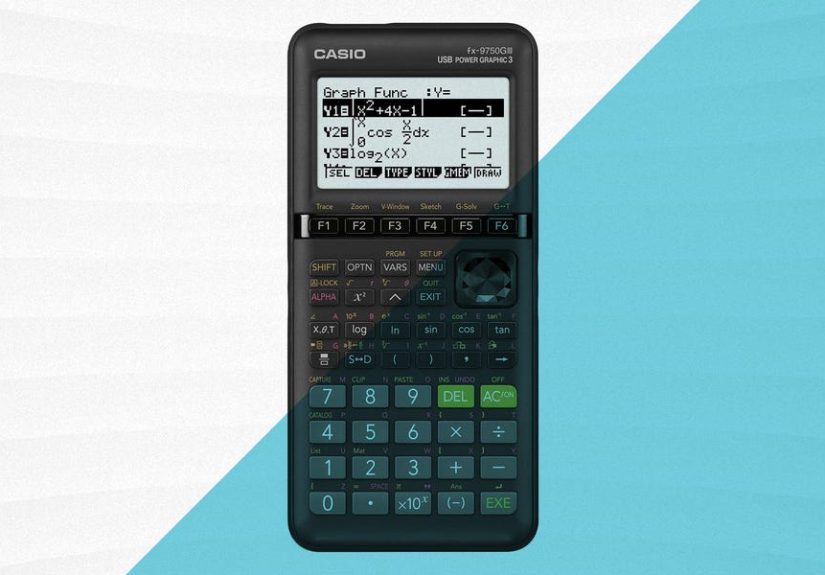
2. Best Budget Alternative: Casio fx-9750GIII
The Casio fx-9750GIII is the calculator for buyers who want strong graphing features without paying full TI prices. It handles graph plotting, probability distributions, vector arithmetic, spreadsheets, and even MicroPython support. That is a lot of value for students who need real functionality but do not need the TI name on the front.
Its main disadvantage is not raw usefulness. It is momentum. Some classrooms are built around TI workflows, which means a cheaper calculator can still feel inconvenient if every demonstration in class uses different button paths.
3. Best for Visual Learners: Casio fx-CG50
If you want more visual punch, the Casio fx-CG50 deserves attention. Its strong color display and 3D graphing tools make it appealing for students who understand math better when they can really see what is happening. It is a solid option for advanced users who want a visual-first experience.
That said, the fx-CG50 is often more of a specialist pick than a universal recommendation. It is impressive, but it does not enjoy the same near-automatic classroom familiarity as the TI-84.
4. Best for Advanced Math and Deeper Features: TI-Nspire CX II
The TI-Nspire CX II is what happens when Texas Instruments decides the TI-84 needs an overachieving cousin. It offers faster performance, built-in Python support, and a more advanced environment for deeper exploration. If the TI-84 is the dependable standard, the Nspire is the student who color-codes their notes and somehow enjoys doing it.
For many students, though, the added power comes with a steeper learning curve. That is why the TI-Nspire is often better for advanced users than first-time buyers.
5. Best Modern Interface: NumWorks Graphing Calculator
The NumWorks graphing calculator stands out for its modern, app-style interface and user-friendly design. It also offers an online simulator, which is a nice perk for students who want to practice from a browser. If you value clean menus and a more current-feeling user experience, NumWorks is a legitimate contender.
Still, it remains the “interesting alternative” in many schools rather than the undisputed default. In other words, it is cool, but the TI-84 still gets invited to more math parties.
Why the TI-84 Is Still the Smartest Buy for Most People
The biggest reason to buy a TI-84 graphing calculator is not that it beats every rival on every spec. It does not. The reason is that it gets the most important things right at the same time.
- It is familiar. Help is easy to find from teachers, tutors, classmates, and online videos.
- It is practical. The interface is established, the button layout is widely known, and the learning curve is reasonable.
- It is exam-friendly. The TI-84 family is commonly used across standardized testing settings, though students should always verify the current rules for their specific exam.
- It is durable enough for student life. It is built for backpacks, desks, late-night study sessions, and the occasional panic squeeze before a test.
- It keeps its relevance. A good TI-84 can remain useful across several years of coursework instead of one single class.
That blend is why so many buyers keep circling back to it. You are not just buying hardware. You are buying a lower chance of compatibility headaches, a lower chance of classroom mismatch, and a higher chance that somebody nearby already knows how to help you use the thing.
Where the TI-84 Falls Short
No calculator deserves a halo. The TI-84 has real downsides, and ignoring them would be like pretending textbooks are inexpensive.
First, the price can bounce around wildly depending on where you shop. At major U.S. retailers, the TI-84 Plus CE can land in the low $110 range at some mass merchants but climb into the $140 to $160-plus range elsewhere. That means comparison shopping matters. A lot. The same calculator can wear very different price tags depending on whether you are shopping at a big-box store, office supply chain, or electronics retailer.
Second, the TI-84 is powerful enough for most students, but it is not the best choice for every advanced use case. If you want more sophisticated symbolic math tools, a different class of calculator may serve you better. Likewise, if you value a more modern interface above all else, newer rivals can feel fresher.
Third, the TI-84’s greatest strength is also its curse: tradition. It is beloved because it is familiar, but that also means parts of the experience can feel old-school. For some users, that is comforting. For others, it is the technological equivalent of hearing a dial-up tone in their soul.
How to Choose the Right Graphing Calculator
Buy a TI-84 if:
- You want the safest all-around choice for school.
- Your teacher, tutor, or class materials already use TI-based instructions.
- You are preparing for standardized tests and want a well-known, commonly accepted model family.
- You value ease of support more than cutting-edge features.
Choose a cheaper alternative if:
- You are on a tighter budget.
- Your class does not require TI-specific workflows.
- You are comfortable learning a different interface.
Choose a more advanced model if:
- You need deeper math tools or a richer feature set.
- You are comfortable with a steeper learning curve.
- You want a calculator that feels more like a mini computing environment.
One more smart tip: always check your school’s calculator expectations and your specific exam’s current rules before buying. A graphing calculator is too expensive to purchase on vibes alone.
Real-World Experiences With the TI-84 Graphing Calculator
One reason the TI-84 graphing calculator remains so popular is that the ownership experience tends to be reassuring. Students often start out intimidated, especially if they are moving up from a basic scientific calculator. The first few days can feel like learning a tiny spaceship. There are menus, graph windows, table settings, and mysterious buttons that seem to promise either brilliance or disaster. Usually both. But once students get through that first awkward stage, the TI-84 often becomes less scary than expected.
A common experience is the “I finally get why people buy this” moment. It usually happens during a graphing lesson, a statistics unit, or the night before a test when a student realizes the calculator can show the relationship between equations and tables much faster than hand-drawn work. That does not mean it replaces understanding. It means it makes patterns easier to see. For many learners, that is the point where the calculator stops feeling like an overpriced requirement and starts feeling like a real academic tool.
Parents often describe a different experience: sticker shock followed by reluctant acceptance. At first, the TI-84 can seem absurdly expensive for something with the word “calculator” attached to it. Then the school year starts, the math gets harder, and the value becomes easier to justify. A device that works across multiple classes, survives several years, and is widely supported can feel less like a splurge and more like educational infrastructure. Not glamorous, but useful in the way a good backpack or reliable laptop is useful.
Tutors and teachers often appreciate the TI-84 for a simpler reason: consistency. When a student brings in a TI-84, the teacher usually already knows the path to the menu, the graph settings, and the troubleshooting steps. That saves time. A lot of time. In real classrooms, convenience matters. A calculator can be technically excellent and still become a headache if every demonstration requires translation. The TI-84 avoids much of that friction, which is part of why it keeps showing up year after year.
There is also the exam-day experience, which is where the TI-84 earns a lot of loyalty. Students tend to want something familiar when the pressure is high. Nobody wants to sit down for a major test and think, “This would be a fun moment to experiment with a new interface.” The TI-84 family offers a kind of muscle memory. Students know where functions live. They know how to graph quickly. They know how to check tables, run basic statistical work, and move between screens without thinking too hard. That comfort is not flashy, but it is incredibly valuable.
Of course, not every experience is glowing. Some buyers later realize they could have saved money with a Casio model, especially if their class did not care about brand familiarity. Others find the TI-84 a little old-fashioned compared with newer interfaces. But even those critiques usually come with a reluctant compliment: the calculator works, it is dependable, and it is easy to get help with. In the end, that may be the most honest summary of the TI-84 experience. It is not trying to be trendy. It is trying to be useful, and most of the time, it succeeds.
Final Verdict
If you are shopping for the best graphing calculators, the TI-84 Plus CE still deserves the top spot for most students. It combines the right mix of usability, familiarity, exam-readiness, and broad classroom support. It is not always the cheapest option, and it is not the most advanced model on the market, but it remains the strongest all-around buy because it solves the real problem students face: needing one graphing calculator that works almost everywhere they need it.
If your priorities are budget, the Casio fx-9750GIII is worth a look. If you want more advanced tools, the TI-Nspire CX II becomes appealing. If you love modern design, NumWorks is interesting. But if you want the recommendation with the fewest question marks attached, the TI-84 graphing calculator is still the one to beat.
In other words, the TI-84 is not just a classic. It is the rare school purchase that keeps surviving new competition because it remains genuinely useful. In the world of graphing calculators, that is about as close to legendary as it gets.