Table of Contents >> Show >> Hide
- A Quick Look at the iPhone 14 Lineup
- Safety First: How the iPhone 14 Tries to Watch Your Back
- Camera Upgrades: Subtle Specs, Big Everyday Gains
- Is the iPhone 14 Enough of an Upgrade?
- Who the iPhone 14 Is Really For
- Real-World Experiences with iPhone 14 Safety and Cameras
- Conclusion: A Practical Upgrade with Real-Life Benefits
For years, Apple has used the iPhone to show off faster chips and sharper screens. With the iPhone 14, the headline is different. This time, Apple leans hard into two things most people actually care about every single day: staying safe and taking better photos. It’s not the flashiest upgrade on paper, but if you’ve ever fumbled for your phone after a fender bender or tried to take a decent picture in a dim restaurant, the iPhone 14’s priorities make a lot of sense.
The iPhone 14 may look familiar on the outside, but under the glass you’ll find smarter safety tools, upgraded cameras, and Apple’s latest tricks in computational photography. Think of it as the “peace of mind” iPhone: a device that not only captures your life but is also designed to help protect it.
A Quick Look at the iPhone 14 Lineup
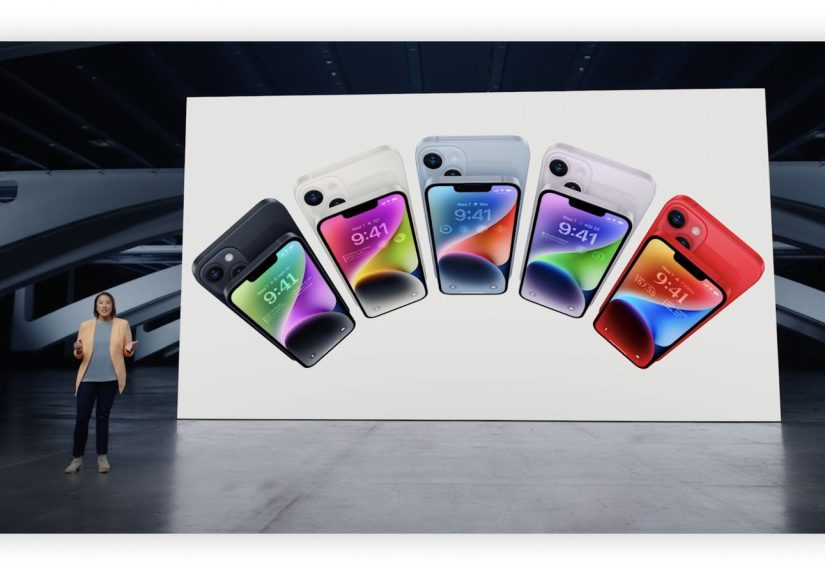
The standard iPhone 14 sits in the middle of Apple’s lineup. You get a 6.1-inch OLED display with rich colors and excellent brightness, the same A15 Bionic chip that powered last year’s iPhone 13 Pro models, 5G connectivity, and a familiar flat-sided design. The iPhone 14 Plus stretches that formula to a 6.7-inch display if you prefer more screen and battery life.
Instead of chasing wild new shapes or experimental features, Apple kept the fundamentals steady and poured its energy into a few key areas: improved durability, battery life that easily lasts a full day for most people, and the standout safety and camera upgrades that define this generation. That makes the iPhone 14 less of a tech toy and more of a reliable daily tool.
Safety First: How the iPhone 14 Tries to Watch Your Back
When Apple unveiled the iPhone 14, it talked about safety in a way that felt closer to a car company than a phone maker. The message was clear: in a serious situation, your phone should do more than sit silently in your pocket. It should help.
Crash Detection: A Phone That Knows When You’ve Been Hit
Crash Detection is one of the iPhone 14’s signature safety features. Inside the phone are new high-g accelerometers and improved gyroscopes that can detect rapid changes in speed and direction, along with microphones that listen for the specific sound profile of a severe car crash. Apple trained machine-learning models on real-world crash data so the phone can tell the difference between, say, a serious collision and you dropping your phone on the couch.
If the iPhone 14 thinks you’ve been in a severe car crash, it displays an alert and sounds an alarm. If you don’t respond within a short time, it automatically calls emergency services and shares your location. It can also notify your emergency contacts so your family gets a heads-up even if you’re unable to reach them yourself. If you wear an Apple Watch, the two devices work togetherwhichever has the best connection can place the call.
Will Crash Detection trigger every time you hit a pothole? In real-world tests, reviewers have found it generally conservative, though not perfectthere have been a few funny reports of it triggering on roller coasters. Still, in situations where seconds matter, having a phone that can call for help when you can’t is a big deal.
Emergency SOS via Satellite: Off-the-Grid Lifeline
Emergency SOS via satellite is the other star of the iPhone 14 safety show. Normally, if you’re out of cellular and Wi-Fi range, your phone is basically a camera and an offline map. With the iPhone 14, you can still reach emergency services by connecting directly to satellites orbiting the Earth.
Here’s how it works in practice. If you try to call or text emergency services and there’s no cell coverage, your iPhone 14 offers an option to use Emergency SOS via satellite. The phone then guides you to point it in the right direction to lock onto a satellitealmost like a slow-motion version of aiming a flashlight. You answer a short set of questions about your situation (injury, being lost, car trouble), and the phone compresses your answers and your location into a tiny, efficient message that can be beamed up and relayed to local emergency services or an Apple-run relay center.
It’s not instant, and it’s not meant for casual chatting. Messages can take tens of seconds or even a minute or two to send, and you need a clear view of the sky. But if you’ve broken an ankle miles from the trailhead or your car has died in the middle of nowhere, that slower-than-normal text could make the difference between being stranded and being rescued.
Originally, Apple offered satellite SOS free for the first two years on iPhone 14. The program has been extended several times, with Apple continuing to cover the cost for existing userssignaling that the company sees these safety features as part of the core iPhone experience rather than an optional add-on.
Real-World Stories: When SOS Actually Matters
These features aren’t just marketing slides. There have already been several documented rescues where iPhone 14’s satellite SOS played a starring role. One widely reported case involved a climber in Colorado who injured himself at high altitude with no cell service. Using Emergency SOS via satellite, he was able to send a distress message, and rescuers located and evacuated him safely.
These real-world stories highlight what Apple is aiming for with the iPhone 14: a phone that still does all the TikTok, messaging, and email stuff you expect, but quietly carries serious safety tech in its back pocket.
Privacy and Everyday Safety Touches
Apple also built privacy protections into these new safety tools. Messages sent via satellite are encrypted and then decrypted only so they can be passed along to emergency dispatchers. Location data is used to coordinate help, not to build an advertising profile.
The iPhone 14 also ties into existing features like Medical ID and emergency contacts. If you set them up in the Health app, responders can see critical information such as allergies or conditions from the lock screen in an emergency. Between Crash Detection, satellite SOS, Medical ID, Find My location sharing, and Apple’s long-standing focus on on-device processing, the iPhone 14 doubles as a kind of digital safety kit.
Camera Upgrades: Subtle Specs, Big Everyday Gains
Of course, safety alone won’t sell millions of phones. That’s where the cameras come in. The iPhone 14 doesn’t have the 48-megapixel sensor or the triple-lens setup of the Pro models, but it quietly borrows a lot of their best ideas and rolls them into a simpler two-camera package.
Main Camera: Bigger Sensor, Faster Lens
On paper, the iPhone 14’s main rear camera is still 12 megapixels. The difference comes from a larger sensor and a wider f/1.5 aperture, which allow more light to hit the sensor in low-light conditions. The result is less noise, better detail, and improved color, especially in dusk and nighttime shots compared to the iPhone 13.
You won’t need to think about any of this while you’re shooting. You’ll just notice that your photos from a birthday dinner or a dim concert look cleaner and less muddy, with more accurate skin tones and crisper edges.
Front Camera Glow-Up: Autofocus for Selfies and Video Calls
The front-facing camera gets a more obvious upgrade. For the first time on a standard iPhone, the selfie camera has autofocus and improved low-light performance. That means sharper front-facing photos whether you’re holding the phone at arm’s length or squeezing friends into a group selfie.
Autofocus is also a win for FaceTime, Zoom, and social video. Instead of slightly soft, fixed-focus shots, you get clearer video, especially when you’re not sitting perfectly still at the ideal distance from the phone.
Photonic Engine: Apple’s Secret Camera Sauce
The biggest camera story on the iPhone 14 isn’t a lens you can see; it’s the processing pipeline Apple calls the Photonic Engine. In simple terms, Apple moved more of its image processing earlier in the capture process, working with full-resolution image data before it gets heavily compressed.
This shift lets the phone preserve more detail and color, especially in difficult lighting. Independent reviewers and photographers have noticed a step up in low-light and mid-light shots: faces are better exposed, highlights are less likely to blow out, and night photos are less mushy. Colors also skew more natural, avoiding the overly saturated look some competing phones lean into.
For everyday users, Photonic Engine means fewer “meh” photos you want to delete. Whether it’s kids running across a dim living room or city lights reflecting on wet streets, you get more keepers with less effort.
Video, Action Mode, and Cinematic Flair
The iPhone has long been a leader in smartphone video, and the iPhone 14 keeps that streak going. You can shoot up to 4K video with excellent dynamic range, consistent focusing, and reliable stabilization.
The new Action mode is particularly handy if you’re filming while moving. Flip it on, and the phone aggressively stabilizes your footage so it looks closer to something shot with a gimbal. It’s not magicthere’s some cropping and it works best in bright lightbut for filming kids’ soccer games or a quick trail run, it’s surprisingly effective.
Cinematic mode, introduced previously, also gets an update, now supporting 4K at 30 fps. It simulates shallow depth of field, letting you shift focus between subjects for a more cinematic look. Is it Hollywood-ready? No. Is it fun and usable for casual social content, travel vlogs, and even basic YouTube videos? Absolutely.
Is the iPhone 14 Enough of an Upgrade?
Whether the iPhone 14 is “worth it” depends heavily on what you’re upgrading from and what you care about. If you’re using an iPhone 11 or older, the iPhone 14 is a huge leap in camera quality, battery life, 5G connectivity, and safety features. The phone feels faster, lasts longer, and takes dramatically better photos and videos.
If you’re coming from an iPhone 13, the story is more nuanced. The overall performance and general look are very similar. The biggest reasons to switch are the safety featuresCrash Detection and satellite SOSand the refinements in camera processing and the selfie camera. If those speak directly to your daily life (for instance, you drive a lot on rural roads or spend time hiking off-grid), the iPhone 14’s focus on safety might justify the upgrade.
The 14 Pro and 14 Pro Max go further with a 48-megapixel main camera, a telephoto lens, an always-on display, and Apple’s Dynamic Island interface. Those models are aimed at enthusiasts and power users. By contrast, the standard iPhone 14 is the “just works” optionsimpler, more approachable, and centered on practical improvements.
Who the iPhone 14 Is Really For
The iPhone 14 is ideal for people who want a reliable, modern iPhone that quietly handles the important stuff. It’s a strong fit if:
- You care more about dependable safety features than flashy design changes.
- You take a lot of photos and videos in everyday conditionskids, pets, vacations, concertsbut don’t need Pro-level camera controls.
- You’re upgrading from an older iPhone and want something that feels fast and future-proof without jumping to the highest price tier.
- You spend time outdoors or in remote areas where satellite SOS might actually matter one day.
In short, the iPhone 14 is tailored for people who want their phone to be a trustworthy companion as much as a fun gadget.
Real-World Experiences with iPhone 14 Safety and Cameras
It’s one thing to read a spec sheet. It’s another to imagine how those features play out in real life. Picture this: you’re driving home late at night on a two-lane road. It’s raining, visibility isn’t great, and a deer darts out in front of your car. You swerve, hit the brakes, and end up in a ditch. The airbags deploy, you’re dazed, and the phone flew out of your hand. In that moment, Crash Detection quietly kicks in, senses the abrupt deceleration, the sound of the impact, and the change in cabin pressure. When you don’t respond to the on-screen prompt, it automatically calls emergency services and shares your location. While you’re trying to catch your breath, help is already on the way.
Or imagine you’re on a weekend hike with friends in a national park. You’ve checked the trail map, brought snacks, and promised to be back before dark. A few hours in, you take a wrong turn that seems minor at firstbut then the trail disappears, your signal drops to zero bars, and a simple hike turns into a stressful scramble. When one of your group twists an ankle and can’t keep walking, the mood shifts from “we’re lost” to “this could be dangerous.” With the iPhone 14, you can pull out your phone, start Emergency SOS via satellite, and follow the on-screen instructions to point toward the nearest satellite. You answer a quick set of questions about your situation and send them off. The messages bounce through space and land with responders, who now know who you are, what happened, and roughly where to find you.
Not every story is dramatic. Sometimes the iPhone 14’s safety and camera features show their value in quieter ways. A parent might appreciate having Crash Detection on their teen’s phone, especially when that new driver starts taking solo trips. Knowing that the phone can automatically call for help if something goes wrong can make handing over the car keys slightly less nerve-wracking.
The camera upgrades come to life in everyday moments, too. Think about trying to get a decent photo at your kid’s school play, where the lighting seems purposefully designed to defeat phone cameras. On an older device, faces might blur into the background or look overly yellow and grainy. With the iPhone 14’s larger sensor and Photonic Engine, you’re more likely to capture clear expressions, richer colors, and a photo you’re proud to share with grandparents.
Travel is another scenario where the iPhone 14 shines. You might use Action mode while walking across a busy city bridge, filming smooth, stable video without carrying extra gear. At night, you can grab quick handheld shots of neon signs and street food without lugging around a dedicated camera. Even small improvementslike faster autofocus on the front camerashow up when you’re snapping a last-minute group selfie in front of a landmark and don’t have time to take ten versions.
Over time, these experiences stack up. You start to trust that the iPhone 14 will quietly handle emergencies better than your older phone, and that its cameras will give you more “wow, that turned out great” moments and fewer “ugh, that’s too blurry to post” disappointments. That’s really the heart of this device: less about flashy one-off tricks and more about making the things you already dostay safe, stay connected, and capture your lifework a little better every day.
Conclusion: A Practical Upgrade with Real-Life Benefits
The iPhone 14 isn’t the kind of phone that shouts for attention with wild new design experiments. Instead, it doubles down on the things that matter when you’re not thinking about your phone at all: safety and cameras. Crash Detection and Emergency SOS via satellite are the kinds of features you hope you never need, but you’ll be very glad to have if you do. The camera improvements, powered by a bigger sensor, better lenses, and the Photonic Engine, turn more of your quick snaps into photos you’ll actually want to keep.
If you’re looking for the flashiest specs, the Pro models are still there. But if you want a phone that quietly keeps you safer and captures your world more reliably, the iPhone 14 really does focus in on the right things.