Table of Contents >> Show >> Hide
If your kid has ever asked, “Can I make my own video game?” congratulations: you’ve been handed the perfect opening to teach them how to code. Programming is no longer a niche hobby reserved for hoodie-wearing adults in dark rooms. It’s a creative, hands-on way for kids to tell stories, build robots, and boss computers around (politely).
From unplugged games on the living room floor to high-tech robot kits that zoom around your kitchen, there are more ways than ever to introduce kids to coding. This guide walks you through why coding matters, the different ways to teach it, and the best coding kits for kids of all agesso you can choose tools that won’t just gather dust on a shelf.
Why Bother Teaching Kids to Code?
Learning to code is about way more than getting a future job at a tech company. Research and educational organizations note that coding boosts problem-solving, logical thinking, creativity, and even skills in math, writing, and art. When kids write simple programs, they’re practicing how to break big problems into small steps, test ideas, and fix mistakes without melting down when something goes wrong (unlike many adults staring at their printer).
Several studies and classroom case reports also show that early coding experiencesespecially hands-on “unplugged” activitiesimprove kids’ problem-solving and collaboration skills. In other words, learning to code doesn’t just create little programmers; it helps create flexible thinkers who can tackle all kinds of challenges.
Ways to Teach Kids Code (With and Without Screens)
Before you add three robot kits to your cart, it helps to understand the main approaches to teaching kids to code. Most families end up mixing a few of these methods over time.
1. Unplugged Coding Activities
Unplugged coding uses games, puzzles, and stories to teach coding ideas without any devices. Think of it as “pre-coding” where kids learn concepts like sequencing, loops, and conditionals through play.
- Sequencing games: Have kids “program” a parent across the room using step-by-step directions (forward, turn, jump). If the parent crashes into a wall, they debug the “code.”
- Paper mazes: Kids write arrow instructions to get a character from start to finish, then trade with a sibling and see if their algorithm works.
- Card-based commands: Use arrows, symbols, or colors on index cards to represent instructions, then arrange them to create a “program.”
Teachers and curriculum providers love unplugged activities because they require almost no tech, fit easily into regular lessons, and help younger kids grasp abstract concepts with physical movement and play. They’re also perfect for families who want to limit screen time but still build coding foundations.
2. Block-Based Coding Apps and Games
Once kids understand basic ideas, it’s time to let them control characters on a screen. Many early tools use block-based codingdrag-and-drop “blocks” that snap together like digital LEGO bricks. This avoids typing errors and lets kids focus on logic.
ScratchJr is a classic starting point for ages 5–7. Kids snap together blocks to make characters move, jump, dance, and talk in their own interactive stories and games, while quietly learning sequencing, events, and problem solving. Older kids can graduate to Scratch, where they design more advanced games and animations.
Other platforms blend coding with familiar games and worlds. Many kids’ coding websites offer guided lessons, mini-challenges, and shareable projects. These tools are great when you want structured learning without needing to plan every activity yourself.
3. Project-Based Learning at Home
One of the most motivating ways to teach kids how to code is to pick a project they genuinely care about:
- A simple platformer starring their favorite pet
- An interactive birthday card for Grandma
- A quiz game about dinosaurs, planets, or whatever they’re currently obsessed with
Project-based learning helps kids see coding as a creative tool, not just a list of exercises. They naturally pick up new skills as they try to make their ideas work: adding sound, tracking scores, or responding to keyboard input. Parents don’t need to be expertsjust a supportive project manager who says, “Let’s Google that together.”
4. Coding Clubs, Camps, and Online Classes
If your child thrives with peers or you’d rather not be their full-time tech support, coding clubs and online classes can be a lifesaver. Many programs use the same tools and kits covered below but add live instruction, peer interaction, and structured pathways from basics to more advanced topics like game design, robotics, or web development.
For many families, the sweet spot is a mix: some independent play with apps and kits at home, plus a class or camp to give kids extra structure and inspiration.
How to Choose a Coding Kit for Your Child
The phrase “coding kit for kids” covers everything from simple board games to complex robot-building sets. To avoid buyer’s remorse (and a neglected robot under the bed), keep these factors in mind:
- Age and reading level: Check the recommended age range and consider how much reading or text-based coding is involved.
- Learning style: Does your child love building and tinkering, or are they more into stories, art, and games?
- Screen vs. screen-free: Unplugged kits are great for younger kids and screen-conscious families, while older kids may be ready for full programming environments.
- Device requirements: Some kits require a tablet, specific operating system, or Bluetooth connectivity.
- Progression: Look for kits that grow with your childextra levels, add-on projects, or more advanced modes.
- Support and community: Tutorials, lesson plans, and online communities can make a kit far easier to use at home.
- Budget and durability: STEM toys can be an investment, so consider how often your child will realistically use the kit and how sturdy the parts are.
The Best Kits for Teaching Kids How to Code
Below are some of the most useful and widely recommended coding kits and tools, based on recent reviews from education and tech sites, plus what they’re actually like for kids to use.
1. Osmo Coding Starter or Genius Kits (Ages 5–10)
Best for: Younger kids who learn best with hands-on pieces and guided challenges.
Osmo kits combine physical coding blocks that kids place in front of an iPad or Fire tablet with interactive on-screen games. Recent guides to coding toys highlight Osmo for teaching computational thinking and visual sequencing through playful, story-driven challenges. Kids drag and drop real pieces to control characters, making it ideal for tactile learners or kids not ready to type on a keyboard.
Why it works: The screen is used intentionally, not as mindless entertainment. Challenges ramp up in difficulty, and parents can easily see what their child is working on without needing to read code.
2. ScratchJr and Scratch Projects (Ages 5–12)
Best for: Kids who love stories, art, and animation.
While not a physical kit, ScratchJr (for ages 5–7) and Scratch (for 8+) are must-have tools in your coding toolbox. Children snap together visual blocks to create stories, animations, and games, building key concepts like loops, events, and variables along the way.
Why it works: Scratch’s huge online community offers endless inspiration. Kids can remix others’ projects, share their own, and learn by exploring real code made by other children around the world.
3. LEGO Education SPIKE Prime (Upper Elementary to Middle School)
Best for: Builders who want to mix LEGO with serious robotics.
LEGO Education’s SPIKE Prime combines colorful LEGO elements with motors, sensors, and a programmable hub. Reviews from robotics education specialists and homeschoolers often call it one of LEGO’s strongest learning kits, especially for middle school students exploring engineering and coding. Programming is done through a Scratch-style interface, with options to move toward text-based languages as kids advance.
Why it works: Kids who already love LEGO get an easy on-ramp to robotics. The kit encourages experimentation and iteration as students build, test, and refine their designsexactly what good coding practice looks like.
4. Makeblock mBot and mBot Neo (Ages 8–12)
Best for: Kids who want a friendly, rolling robot they can customize.
Recent reviews of kids’ robot kits consistently highlight Makeblock’s mBot line as a solid choice for beginner coders. Kids assemble a small wheeled robot, then use block-based coding (and later Python or Arduino-style coding) to control movement, lights, sounds, and sensor-based behaviors.
Why it works: mBot kits strike a good balance between guided lessons and open-ended projects. Once kids complete the starter challenges, they can move on to maze competitions, line-following robots, or even musical light shows.
5. Sphero Robots (Various Ages)
Best for: Active kids who like to mix coding with movement.
Sphero robots look like rolling balls (or small droids) but hide full robotics platforms inside. Many educational tech reviews point out that Sphero’s block-based apps and open-ended challenges make it a hit in classrooms and at home for teaching logic, geometry, and problem-solving.
Why it works: Kids can literally see the results of their code zooming across the room. Activities can be as simple as drawing shapes on the floor or as advanced as programming obstacle-course runs or interactive games.
6. Kano Computer Kits (Ages 8+)
Best for: Curious kids who want to know how computers actually work.
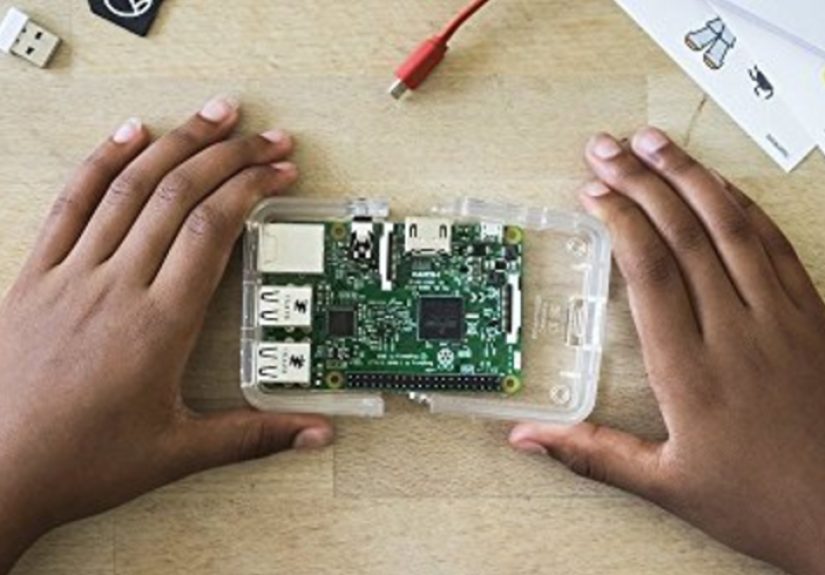
Kano kits let kids build a real microcomputer, usually powered by a Raspberry Pi, then explore coding challenges, creative apps, and lessons about hardware. Tech reviewers praise Kano for making the process of assembling a PC feel like a game, complete with colorful guides and interactive software that teaches both coding and computer literacy.
Why it works: Some kids are more fascinated by what’s inside the machine than by animated characters on the screen. For them, building a PC and learning to code on it is pure magicand a fantastic foundation for future STEM learning.
7. Unplugged Coding Game Sets
Best for: Young kids and families who need screen-free options.
In addition to DIY unplugged games, several companies now offer boxed sets with cards, tiles, or board games that teach algorithmic thinking, loops, and debugging. Many early-childhood education resources emphasize that unplugged activities are often the best way to introduce coding to kids who aren’t quite ready for screens.
Why it works: These sets are easy to pull out for family game night and don’t require device setup, app updates, or remembering passwords. They’re also a gentle way to show skeptical adults that “coding” can look like playing with cards on the carpet.
Practical Tips for Parents Teaching Kids to Code
Owning a kit is one thing; actually using it with your child is another. These strategies can help keep learning fun and consistent:
- Start small: Aim for short 15–20 minute sessions a few times a week instead of marathon sessions that leave everyone frustrated.
- Let kids drive: Ask what they want to makegame, story, robot trickand use that as the anchor project for learning.
- Celebrate “bugs” as learning moments: When something doesn’t work, treat it like a puzzle instead of a failure. Debugging is where the real learning happens.
- Show off their work: Let kids present their project to family, record a short video demo, or share safely with classmates. Audience = motivation.
- Don’t panic if you don’t know the answer: Model curiosity. Say, “I’m not surelet’s figure it out together.” That attitude is a core coding skill.
Real-World Experiences: What Teaching Kids to Code Really Looks Like
So what does all of this actually look like in a real home, with real kids, real schedules, and real crumbs in the keyboard? Here’s a snapshot of how teaching kids to code often plays outand how families make it work.
In one household, a seven-year-old starts with unplugged games after dinner. They “program” a parent to walk from the couch to the kitchen by giving step-by-step commands like “forward,” “turn left,” and “pick up the snack.” The first attempt sends the parent into a wall. Everyone laughs, the child adjusts the instructions, and suddenly they’ve learned what debugging feels likeno computer required.
A few weeks later, that same child is using ScratchJr to make a digital version of the game. Now the character (a cat wearing sunglasses, obviously) must navigate a maze using similar step-by-step commands. When the cat walks straight through a wall, the child recognizes the mistake instantly. The unplugged play and the on-screen coding reinforce each other.
In another family, an 11-year-old who loves building with LEGO receives a SPIKE Prime kit. At first, they just follow the guided buildsassembling a simple robot that rolls forward and back. Before long, they’re changing parameters, making the robot dance, and attaching homemade cardboard accessories. A small sibling is yelling, “Make it spin faster!” and suddenly you have an impromptu engineering meeting at the dining table.
Parents in these scenarios often admit they weren’t “tech people” to begin with. They simply agreed to be comfortable not knowing everything. They read a few pages ahead in the instructions, watch a quick tutorial video, and let their kids experiment. The goal isn’t for the adult to lecture; it’s for the family to explore together. Coding becomes a shared puzzle, not another homework task.
Many families also discover that kids progress in bursts. There might be a weekend when your child spends hours perfecting a game level, followed by a quiet month where the robot gathers dust. That’s normal. Interests ebb and flow. Keeping kits accessible and celebrating small winslike finishing a single challenge or adding one new featurehelps kids come back when they’re ready.
Some parents notice unexpected side benefits. A child who struggled with perseverance suddenly sticks with a tricky project because they really want their character to jump at the right time. A kid who dislikes math starts caring about angles and coordinates because their robot needs to turn exactly 90 degrees. Another child gains confidence by teaching younger siblings how to use the coding blocks, turning into the family’s resident “robot expert.”
Most importantly, teaching kids to code doesn’t have to look like a perfectly organized STEM lab. It might be a tablet propped up on the couch, a robot dodging chair legs in the kitchen, or a stack of coding cards on the living room floor. What matters is that kids get regular chances to experiment, ask “What if…?”, and see their ideas come to lifeone block, one command, one tiny bug fix at a time.
If you can create that kind of environmentcurious, playful, and forgivingyou’re already doing the most important part of teaching kids how to code. The kits, apps, and robots are just the tools. The real magic is the confidence kids build when they realize, “I can tell a computer what to do… and it listens.”