Table of Contents >> Show >> Hide
- The quick answer: blocking cuts off contact and hides your private world
- What changes the moment you block someone
- 1) They can’t send you Snaps or Chats anymore
- 2) They can’t view your private Stories (and your Charms) anymore
- 3) Your Snap Map location becomes hidden from them
- 4) You and the blocked person are removed from each other’s friend connection
- 5) They won’t show up in your search, Best Friends, or Quick Add (and you won’t show up in theirs)
- What the blocked person sees (and how they might figure it out)
- Does blocking delete messages? Here’s what happens to chats, saved messages, and media
- Group chats: blocking doesn’t automatically remove you from the group
- Blocking vs. removing vs. muting: which one should you use?
- How to block someone on Snapchat (and how to undo it)
- One sneaky privacy detail: blocked users may still see your public content
- Safety tips: when to block, when to report, and what to do about harassment
- Frequently asked questions
- Conclusion: block with confidence (and with the right expectations)
- Real-world experiences: what blocking on Snapchat feels like (and what people learn)
- 1) The ex who keeps “accidentally” sliding into your Chat
- 2) The “friend” who treats Snapchat like a customer support line
- 3) The random account that feels like a scam (because it is)
- 4) The group chat awkwardness nobody warns you about
- 5) The “I blocked them, but they still saw my public post” moment
Blocking someone on Snapchat is the digital equivalent of closing the blinds, locking the door, and pretending you’re “not home” while your phone quietly thanks you for the peace and quiet. But what actually happens when you hit Block? Does the chat vanish? Do they get a dramatic notification? Can they still see your Stories? And what about group chats, Snap Map, and all those saved messages you’re hoping don’t haunt you later?
Let’s break down what Snapchat’s blocking feature really doeswithout the panic, the myths, or the “I heard from my cousin’s roommate” nonsense. You’ll learn what changes for you, what the other person sees (spoiler: not a “You’ve been blocked!” banner), and the privacy gotchas most people don’t think about until after they’ve pressed the button.
The quick answer: blocking cuts off contact and hides your private world
When you block someone on Snapchat, Snapchat stops that account from interacting with you directly. That means no Snaps, no Chats, no private Story views, and no peeking at your profile like it’s a museum exhibit. In most cases, your account becomes effectively “unfindable” to them inside Snapchat search, and you both drop off each other’s friends lists.
Howeverand this is the part that surprises peopleblocking doesn’t automatically erase the past from the universe. Blocking is mainly about future access and visibility. Some content may still exist (especially if it was saved, screenshotted, exported, or posted publicly). If you’re blocking to protect your privacy, it’s smart to understand exactly which doors lockand which ones are more like those fancy “push” doors that everyone still pulls on anyway.
What changes the moment you block someone
1) They can’t send you Snaps or Chats anymore
Once blocked, that person can’t deliver new Snaps or Chats to you. Their messages won’t reach your inbox, and you won’t get notifications from them. From your side, their name disappears from places you’d normally see them (like Chat, friends lists, and suggestions).
Important nuance: blocking doesn’t time-travel. If you sent them something before blocking, and they already received it, blocking won’t magically “unsend” a photo/video Snap that already landed in their app. Snaps follow Snapchat’s timing rulesonce they expire, they expire, but blocking isn’t a recall button.
2) They can’t view your private Stories (and your Charms) anymore
Blocking stops them from seeing your private Stories and other friend-based features. In plain English: your “friends-only” content becomes invisible to them. If you’re thinking, “Great, now they can’t lurk,” yesblocking is designed for exactly that.
3) Your Snap Map location becomes hidden from them
If you were sharing location with that person (directly or via broader settings), blocking removes their ability to see you on Snap Map. If location privacy is the reason you’re blocking, that’s a big win.
Still, consider your overall location settings too. If you share your location with “friends” broadly, your comfort level might improve by using Ghost Mode or limiting sharing to “Only These Friends”especially if you’re doing a wider privacy cleanup.
4) You and the blocked person are removed from each other’s friend connection
Blocking is more than “mute with attitude.” It typically removes the friend relationship. That’s why blocking often makes the other person “disappear” from your Snapchat world, not just go quiet.
5) They won’t show up in your search, Best Friends, or Quick Add (and you won’t show up in theirs)
Blocking also affects discovery and suggestion systems. The blocked account won’t appear in places like Search, Best Friends, or Quick Add on your end, which helps reduce accidental run-ins. The whole point is fewer awkward “Wait… why are they here?” moments.
What the blocked person sees (and how they might figure it out)
Snapchat doesn’t send the other person a push notification that says, “Congratulations! You’ve been blocked.” There’s no confetti. No sad trombone sound. Just… silence.
That said, many people can infer they’ve been blocked because:
- Your username/profile no longer appears in search results for them.
- Your chat thread may disappear or become inaccessible depending on their view and the conversation state.
- They stop seeing your private Stories and friend-based content.
- They can’t send you Snaps/Chats that actually reach you.
In other words, Snapchat won’t announce it, but the app will start acting like you’ve stepped through a hidden doorway they can’t follow. If they try hard enough, they might confirm it by checking from another account that isn’t blockedbut that’s outside your control and true for basically any social platform.
Does blocking delete messages? Here’s what happens to chats, saved messages, and media
Snapchat chat behavior has a lot of settings, which is why people argue about this like it’s sports. The cleanest way to think about it: blocking stops access and future delivery, but deletion depends on chat settings and what was saved.
Default deletion rules still apply
By default, many chats are set to delete after they’re viewed (often 24 hours after everyone has viewed them, depending on chat type and settings). You can also set chats to delete immediately after viewing, after 7 days, or neverso two people can have totally different expectations based on settings.
Saved messages and saved media are a separate issue
If a message was saved in chat, it’s designed to “stick around” until it’s unsaved or deleted. Blocking doesn’t guarantee those saved items are wiped from the other person’s device. And if someone screenshotted something (or saved it outside Snapchat), blocking can’t pull it back from their camera roll. Blocking protects you going forwardit doesn’t vacuum the internet.
What about the chat thread on your screen?
On your end, blocking typically removes the active one-on-one conversation from view and makes the person hard to find through normal browsing. Snapchat also indicates that if you later unblock, your old chat history can still be availablebecause blocking is not the same thing as manually deleting every message.
If you need something gone, use delete (and know what it does)
If your goal is to remove a specific message you sent, Snapchat’s delete function is a more direct tool. But it comes with a tradeoff: the other person can usually see that a message was deleted (so it’s not exactly stealth mode). And it’s not a guarantee if the recipient has already saved/exported the content or is using an older app version.
Group chats: blocking doesn’t automatically remove you from the group
This one catches people off guard. If you and the blocked person share a Group Chat, blocking them doesn’t automatically eject either of you from that group. You may still see their messages in the group context, but they won’t be able to message you privately. Snapchat also notes that blocked users can’t add you to new groups.
Translation: if your goal is “I never want to see a single pixel from this person,” blocking might not be enough if you share groups. In that case, consider leaving the group, asking an admin to remove someone, or creating a new group without them.
Blocking vs. removing vs. muting: which one should you use?
Block
Use blocking when you want a hard stop: no direct contact, no private content visibility, and fewer chances of accidental discovery. This is the strongest boundary tool Snapchat offers inside the app.
Remove friend
Removing someone is a softer disconnect. You’re no longer friends, but depending on your privacy settings and what you post publicly, they may still be able to find you or see public-facing content. Removing can be ideal for “we’re not close anymore” situations where you don’t want the drama of a hard block.
Mute (or “Do Not Disturb” energy)
Muting is for when you don’t want notifications or you want someone’s Story to stop dominating your feed, but you don’t necessarily want to cut them off. It’s a quality-of-life tool, not a boundary wall.
Custom Story and privacy settings
If your main concern is “I don’t want this person to see this content,” consider using Story privacy controls (like Custom) and tightening “Who can contact me” settings. This approach can be less explosive than blocking, especially for coworkers, classmates, or extended social circles.
How to block someone on Snapchat (and how to undo it)
To block
- Go to Chat (or find them in your Friends list).
- Press and hold their name (or open their Profile).
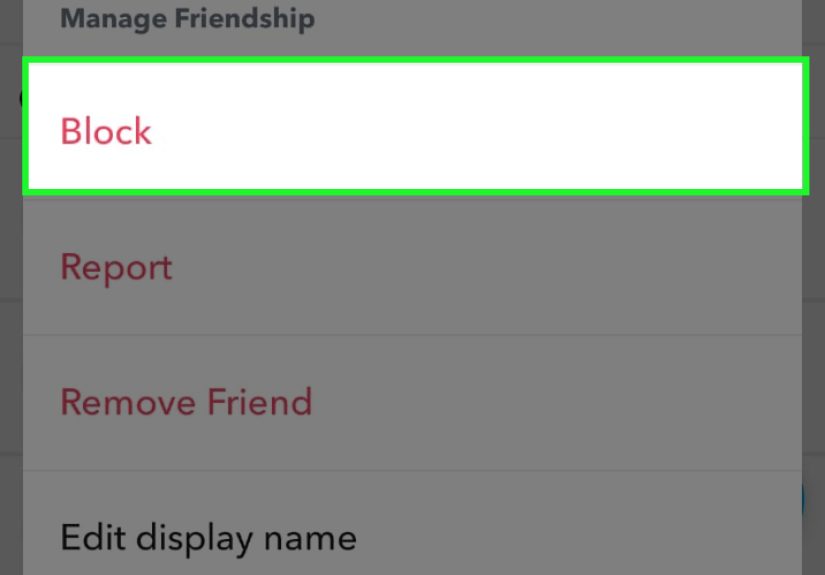
- Tap Manage Friendship.
- Tap Block, then confirm.
To unblock
- Tap your Profile icon.
- Tap Settings (the gear).
- Scroll to Blocked.
- Tap the X next to the name to unblock.
Note: unblocking lifts the restriction, but it doesn’t necessarily restore the friendship automatically. Depending on how things were set up, you may need to add each other again for full friend-based features (like private Stories) to work normally.
One sneaky privacy detail: blocked users may still see your public content
Here’s the “wait, seriously?” moment: if you post content publiclylike certain Public Stories or SpotlightSnapchat notes that users you’ve blocked can still be able to view content you post publicly.
So if you’re blocking someone because you want to disappear from their universe, consider whether you’re posting anything public. If you are, blocking helps with private interactions, but it may not fully prevent them from seeing public-facing posts.
If that matters to you, the fix isn’t more blockingit’s adjusting what you post publicly (or changing public profile/story settings).
Safety tips: when to block, when to report, and what to do about harassment
Blocking is great for boundaries. Reporting is for behavior that violates rulesharassment, threats, scams, impersonation, bullying, or anything unsafe. If someone is crossing a line, consider reporting in-app where possible.
Also important: Snapchat notes that if another user has blocked you, you might not be able to report them in the appbut you can still report through Snapchat’s support site if something harmful is going on. And if the situation is cyberbullying (especially involving minors), general safety guidance from trusted organizations recommends saving evidence (screenshots, dates, usernames) and reporting through the right channels (platform, school, or appropriate authorities depending on severity).
Frequently asked questions
Will they know I blocked them?
Snapchat won’t notify them directly. But they may figure it out if they can’t find you, can’t view your private content, or can’t contact you.
Can they still see my Story?
They shouldn’t be able to see your private “My Story (Friends)” content after being blocked. But if you post publicly, blocked users may still be able to view public-facing content (like certain Public Stories or Spotlight).
Does blocking delete our entire chat history?
Blocking usually hides the conversation from view and stops future messages. Whether old messages remain accessible depends on how chats were set to delete and whether anything was saved. Snapchat also indicates that if you unblock someone later, old chat history can still be available.
If I delete a message, does the other person know?
In many cases, yesSnapchat warns that friends can see that a message was deleted in chat. Deleting is not the same as quietly making something never happen.
What if we’re in the same group chat?
Blocking doesn’t automatically remove either of you from a shared group. You may still see group messages from them, but private messaging is cut off and they can’t add you to new groups. If you want total separation, leave the group or manage group membership.
Can I block someone who isn’t my friend?
Yes. If a non-friend messages you, Snapchat commonly gives you options like “Report or Block,” which can clear the conversation and stop contact.
Conclusion: block with confidence (and with the right expectations)
Blocking someone on Snapchat is a strong, clear boundary: it stops direct contact, hides your private Stories and friend-based features, and removes location visibility like Snap Map sharing. It also reduces the chance they’ll pop up in search or suggestions, which is exactly what you want when you’re trying to get space.
The main thing to remember is this: blocking is a forward-looking privacy tool, not a time machine. If something was already seen, saved, screenshotted, or posted publicly, blocking won’t rewind it. If you need stronger privacy, pair blocking with smarter Story settings, tighter “Who can contact me” controls, and a quick scan of what you’re posting publicly.
And if you’re blocking because someone’s behavior is unsafe or harassing, blocking is step onenot the finish line. Reporting and documenting can matter, too.
Real-world experiences: what blocking on Snapchat feels like (and what people learn)
Most people don’t block someone because they’re bored on a Tuesday and feeling whimsical. It’s usually emotional, practical, or both. Here are common “lived” scenarios people describeand the lessons that come with them.
1) The ex who keeps “accidentally” sliding into your Chat
A classic: you break up, things are “fine,” and then the midnight “u up?” messages start showing up like a bad sequel nobody asked for. Blocking often brings instant reliefno more surprise notifications, no more checking the app with a pit in your stomach. But people also learn quickly that blocking is not a memory eraser. If the ex already saved messages, screenshotted photos, or kept receipts elsewhere, blocking doesn’t reclaim those. The takeaway? Block for peace going forward, and assume anything sent in the past could still exist somewhere.
2) The “friend” who treats Snapchat like a customer support line
Some users describe a friend who spams: constant streak pressure, rapid-fire Snaps, guilt trips when you don’t respond, and a suspicious ability to message at the exact moment you finally sit down to eat. Many try muting first. When that doesn’t work, blocking becomes the boundary that actually holds. The surprise lesson here is that blocking can reduce stress immediatelybut it can also trigger offline drama if the person notices. That’s why people often pair blocking with a quick privacy check: Story settings, contact settings, and location sharing, so they’re not leaving “side doors” open.
3) The random account that feels like a scam (because it is)
A lot of blocking happens when a suspicious account appears: weird compliments, sketchy links, “investment tips,” or someone claiming they know you but refusing to say how. Blocking is the fast move, especially if the account isn’t a friend. People who’ve been through this often say the best feeling is how quickly Snapchat gets quiet afterward. But they also learn a second lesson: if the message included a link or request for personal info, blocking alone isn’t enough. Reporting (and being careful about what you click) matters, because scams are rarely a one-and-done attempt.
4) The group chat awkwardness nobody warns you about
One of the most relatable experiences is blocking someone and then realizing you’re still both in the same group chatschool club, friend group, family chaos channel, you name it. People expect blocking to create a hard wall everywhere, then feel frustrated when group messages still exist in the shared space. The common solution is surprisingly simple: leave the group, ask for the group to be re-made, or remove the person (if you have the ability). The lesson is that blocking is strongest in one-on-one interactions; groups are their own social ecosystem, and sometimes you have to change the environmentnot just the settings.
5) The “I blocked them, but they still saw my public post” moment
This one is a genuine shock for some users: they block someone, feel protected, then hear through the grapevine that the blocked person reacted to something public. That’s when people discover the difference between private friend content and public-facing content. The experience typically triggers a broader resetswitching Stories to friends-only, disabling public visibility where it’s not needed, and tightening location sharing. The takeaway: blocking is powerful, but the strongest privacy setup is layeredblocking plus smart sharing choices.
If blocking feels like a big step, that’s normal. But most people who use it intentionally describe the same end result: fewer interruptions, less anxiety, and more control. Used thoughtfully, it’s not “dramatic”it’s just boundaries with a button.