Table of Contents >> Show >> Hide
- What a Visa Gift Card Actually Is
- Why Visa Gift Cards Sometimes Fail Online
- Before You Shop: Do These 4 Things First
- How to Use a Visa Gift Card Online, Step by Step
- How to Handle a Visa Gift Card with a Small Remaining Balance
- Common Problems and How to Fix Them
- Best Uses for a Visa Gift Card Online
- Safety Tips So Your “Gift” Does Not Become a Problem
- Do Visa Gift Cards Expire?
- Final Thoughts
- Real-World Experiences Using a Visa Gift Card Online
- SEO Tags
If you have ever stared at a Visa gift card and thought, “Cool, free money,” then immediately got rejected at checkout by a pair of socks and a tube of toothpaste, welcome. You are not alone, and you are definitely not cursed. Using a Visa gift card online is usually simple, but it comes with a few tiny rules that love to hide in the fine print like they are auditioning for a spy movie.
This guide breaks down how to use a Visa gift card online without drama, panic, or the classic “Why is this card being declined when I still have money on it?” moment. We will cover activation, billing address setup, balance checks, partial payments, common errors, security tips, and a few real-world experiences that make the whole thing easier to understand.
What a Visa Gift Card Actually Is
A Visa gift card is a prepaid card loaded with a fixed amount of money. It is not a credit card, and it is usually not reloadable. Think of it as a spending container with a firm ceiling: once the money is gone, the party is over. No overdraft magic. No secret backup fund. No fairy godmother in the payment processor.
The reason people love these cards is obvious. They are flexible, easy to gift, and accepted at many merchants that take Visa. The reason people sometimes hate them is also obvious: online checkout systems expect exact billing details, full payment availability, and clean authorization. Gift cards can stumble when any one of those pieces is missing.
So yes, a Visa gift card can work online. But it works best when you treat it less like a mystery coupon and more like a proper payment method that needs setup.
Why Visa Gift Cards Sometimes Fail Online
Most online declines happen for boring reasons, not dramatic ones. The card may not be activated yet. The billing ZIP code may not match. The total may be slightly higher than the available balance once taxes or shipping are added. The merchant may place a temporary authorization hold. Or the site may not allow prepaid cards for that type of transaction.
That is why a $50 card can fail on a $49.99 purchase. Add tax, shipping, or a temporary hold, and suddenly your “perfectly planned” purchase is not so perfect anymore. Online payment systems are not being rude. They are just extremely literal.
The good news is that once you understand the rules, using a Visa gift card online becomes far less mysterious.
Before You Shop: Do These 4 Things First
1. Activate the Card
Some Visa gift cards are ready to go when you receive them, while others need activation first. Check the sticker, packaging, email, or back of the card for activation instructions. Follow the issuer’s official directions exactly. Do not guess, and do not activate through random search results that look “close enough.”
If you have a physical card, you will usually need the card number, expiration date, and CVV. If it is a digital card, the email should tell you how to claim and activate it.
2. Register the Billing Address or ZIP Code
This is the step people skip, then blame the internet. Many Visa gift cards work online only after the issuer has a billing ZIP code or billing address attached to the card. When the merchant runs an address verification check, the details you enter at checkout need to match what the card issuer has on file.
In plain English: if the billing ZIP is missing or wrong, your card can get declined even when the balance is fine.
If your issuer allows only a ZIP code, enter the correct one and use it consistently. If your issuer allows a full billing address, save the address you plan to use online and enter that exact information during checkout. Tiny mismatches can cause big annoyance.
3. Check the Balance
Always check the available balance before shopping. Not the “I think there is about twenty bucks left” balance. The actual balance. Online orders often include taxes, shipping, service fees, or temporary holds. If your item costs $24.99 and your card has $25.00 left, that is not a victory lap yet.
Use the phone number or website on the back of the card or in the eGift email. This takes about one minute and can save you ten minutes of aggressively refreshing your shopping cart.
4. Read the Restrictions
Some merchants accept prepaid Visa cards happily. Some accept them for one-time purchases but not subscriptions. Some allow only one payment method online. Some place authorization holds that eat into your balance temporarily. And many U.S.-issued Visa gift cards are intended for U.S. merchants only.
Translation: before you try to use the card for streaming services, hotel bookings, recurring bills, or international purchases, check the issuer terms and the merchant’s payment policy.
How to Use a Visa Gift Card Online, Step by Step
Step 1: Shop Like Normal
Add your items to the cart. Nothing fancy here. The drama begins later.
Step 2: Go to Checkout and Choose Card Payment
Select credit or debit card payment if the site does not list “gift card” specifically. A Visa gift card usually runs through checkout like a regular Visa card, not like a store gift card.
Step 3: Enter the Card Information Carefully
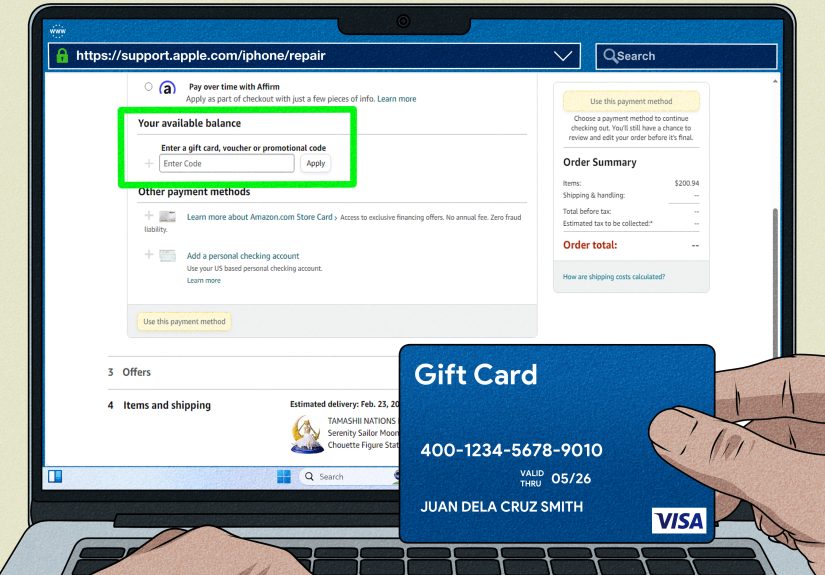
Type in the card number, expiration date, CVV, and cardholder name if requested. For the billing address, use the details registered with the card issuer. If the issuer only asked for a ZIP code, make sure you enter that same ZIP code on the order.
This is not the time for freestyle data entry. “Close enough” is how payment errors are born.
Step 4: Make Sure the Balance Covers the Full Total
Your Visa gift card usually needs enough money to cover the entire amount being charged. That means item price, tax, shipping, and anything else the merchant adds before the order is finalized.
If your balance does not cover the full amount, some merchants let you split the payment. Others do not. This is one of the biggest reasons online purchases fail. A site may not know what to do with your half-funded optimism.
Step 5: Submit the Order and Watch for Holds
Some transactions trigger a temporary authorization hold. This happens more often with hotels, restaurants, rentals, and certain services, but the general lesson still matters online: the amount temporarily reserved can be higher than the final total. If your balance is tight, a hold can block the purchase even when the final price looks affordable.
How to Handle a Visa Gift Card with a Small Remaining Balance
Let us say you have $13.42 left on your card. Not enough for sneakers, but enough for digital nonsense, small accessories, or one dangerously overpriced smoothie. You still have options.
Option 1: Use It on a Small Purchase
The easiest move is to buy something clearly under the remaining balance. Think app credits, inexpensive accessories, ebooks, low-cost beauty items, or a discounted digital rental.
Option 2: Ask Whether Split Payment Is Allowed
Some merchants allow you to pay part of the total with the Visa gift card and the rest with another payment method. If that feature exists, great. If not, do not try to force it. Online checkout systems are not known for their patience.
Option 3: Add the Card to a Wallet Service When Allowed
Some shoppers use a prepaid Visa through PayPal when the merchant accepts PayPal and the card is supported there. That can simplify checkout. But even then, the card generally needs enough balance for the full payment, and recurring payments may still be blocked.
Option 4: Use It In Store or for a Different Merchant
If one website refuses to cooperate, another might be easier. Some digital Visa gift cards can also be added to supported mobile wallets for in-store use, depending on the issuer and the merchant ecosystem.
Common Problems and How to Fix Them
The Card Is Declined
First, check whether the card is activated. Second, verify the balance. Third, confirm the billing ZIP or billing address. Fourth, make sure the merchant accepts prepaid Visa cards for that purchase type. Fifth, check whether the merchant is based outside the United States.
In many cases, one of those five steps solves the problem.
The Site Says the Billing Address Is Invalid
This usually means the card issuer does not recognize the address details you entered. Log in to the issuer’s site, update the billing information if possible, and then enter the exact same information at checkout. Be consistent with abbreviations, apartment numbers, and ZIP codes.
The Balance Looks High Enough, but the Purchase Still Fails
Look for taxes, shipping, handling fees, service fees, or temporary holds. Also consider whether the merchant only allows one payment method online. A card that works perfectly for a $20 order may fail on a $20 subscription free trial that quietly tries to create a recurring billing setup.
The Merchant Wants a Refund
If you return an item purchased with a Visa gift card, refunds usually go back to the original card. That means you should keep the card until you are sure you will not return anything. Tossing it too early is a classic mistake. It is the payment version of throwing away the charger and then discovering the battery is at 2%.
Best Uses for a Visa Gift Card Online
Visa gift cards tend to work best for straightforward, one-time purchases. Good examples include clothing, books, beauty products, electronics accessories, software, and many standard retail items. They can also be handy for setting a spending limit. If you want to shop without accidentally turning one cart into a budget crime scene, a fixed-value gift card can keep you honest.
They are less ideal for subscriptions, recurring bills, travel bookings, and merchants known for heavy authorization holds. In those cases, even a valid card can create unnecessary friction.
Safety Tips So Your “Gift” Does Not Become a Problem
Use only the activation website or phone number provided by the issuer. Do not trust random pages that pop up in search results. Keep the card number, receipt, and packaging until the balance is fully spent. If the card is lost or stolen, contact the issuer quickly. Some issuers can replace the remaining balance if you have enough information.
Also, never use a gift card to pay a stranger, settle a “government fee,” rescue a fake relative in trouble, or unlock a mystery prize. If someone tells you to buy gift cards and send the numbers, you are not entering a secret VIP opportunity. You are entering a scam.
Do Visa Gift Cards Expire?
The plastic card itself may show a “valid thru” date, but that does not always mean the money disappears on that date. Federal gift card rules provide important protections, and many issuers let you request a replacement card if funds remain after the printed date. Even so, terms vary, and some cards may charge inactivity-related fees only after long periods of no use when permitted by law.
The smart move is simple: use the card sooner rather than later, and read the issuer’s terms if you plan to hang onto it.
Final Thoughts
Using a Visa gift card online is easy once you know the routine: activate the card, register the billing ZIP or address, check the balance, enter the details carefully, and make sure the card can cover the full transaction. Most problems happen because one of those steps gets skipped.
If you remember only one thing, remember this: a Visa gift card is not hard to use, but it is unforgiving about details. Treat it like a real payment method, not a lucky token, and it will usually do exactly what you want. Ignore the setup, and it may humble you in front of your own shopping cart.
And honestly, no one deserves to be rejected by a pair of socks.
Real-World Experiences Using a Visa Gift Card Online
One of the most common experiences people report is the “I have enough money, so why did it fail?” situation. A shopper gets a $50 Visa gift card, fills an online cart with items totaling $47 or $48, and assumes everything is perfect. Then checkout adds tax and shipping, or the merchant runs a temporary authorization, and the card declines. It feels unfair in the moment, but it is usually just math doing what math does best: ruining confidence with decimals.
Another very typical experience happens with billing details. Someone gets a gift card as a present, heads straight to a favorite retailer, types in the card number, and hits an error message saying the billing address is invalid. After ten irritated minutes, they discover the card never had a ZIP code registered. Once they add the correct billing ZIP through the issuer, the same purchase goes through with zero drama. It is one of those problems that feels huge until you know the fix, and then it feels almost embarrassing.
There are also shoppers who use Visa gift cards strategically. For example, some people like using them for holiday shopping because the fixed balance creates an automatic spending limit. If the card has $100 on it, then the budget is $100. No accidental overspending, no end-of-month regret, and no emotional support needed after the checkout confirmation email arrives. In that sense, a Visa gift card can be a surprisingly useful budgeting tool, not just a gift.
Some experiences are less smooth. A person might try using a gift card for a subscription service or an account that renews automatically each month. The first payment may appear to work, but later the card can cause problems if the merchant expects recurring charges or if the balance drops below the next billing amount. This is why many experienced users avoid using Visa gift cards for memberships, streaming renewals, trial conversions, or anything that keeps charging after the first click.
Refunds are another area where experience teaches people fast. A shopper may return an item and assume the money will come back instantly, only to learn that refunds often go back to the original card and can take several days to show up. If that person already threw away the card, suddenly the situation becomes a scavenger hunt with customer service involved. Veteran gift card users tend to keep the card until every possible return window is closed.
Overall, the real-life pattern is pretty clear. People who treat a Visa gift card like a normal payment method with setup steps usually have a good experience. People who treat it like magic free money often hit preventable problems. The card is useful, flexible, and convenient, but it rewards careful users. In other words, it is less “wild adventure” and more “follow the instructions and everybody stays calm.”