Table of Contents >> Show >> Hide
- Why Snapchat Best Friends Can Feel Awkward
- What Are Best Friends on Snapchat?
- Can You Directly Remove Someone from Best Friends on Snapchat?
- Method 1: Reduce Snaps and Chats with That Person
- Method 2: Remove or Block the Friend
- Method 3: Hide or Change Best Friend Emojis
- Bonus Tip: Clear the Conversation from Your Chat Feed
- What Not to Do When Trying to Remove Best Friends
- Why Your Best Friends List Keeps Changing
- Best Method for Each Situation
- Experiences and Real-Life Scenarios: What Removing Best Friends on Snapchat Actually Feels Like
- Conclusion
- SEO Tags
Editorial note: Snapchat does not offer a magic “remove from Best Friends” button. The methods below explain what actually works: changing your interaction pattern, removing or blocking a friend when needed, and hiding or managing the Best Friend indicators so your Chat screen stops looking like a tiny social drama dashboard.
Why Snapchat Best Friends Can Feel Awkward
Snapchat Best Friends can be cute, funny, confusing, and occasionally more dramatic than a season finale. One day someone is just a person you send dog-filter selfies to. The next day, a smiling emoji appears next to their name, and suddenly your Chat screen looks like it is making friendship announcements without asking for permission.
If you are searching for how to remove Best Friends on Snapchat, you probably want one of three things: you want a person off your Best Friends list, you want to stop seeing the emoji, or you want to clean up the social signals Snapchat shows beside someone’s name. The important thing to know is that Snapchat’s Best Friends list is not a list you manually edit. It is created automatically based on who you Snap and Chat with the most, especially in one-on-one interactions.
That means you cannot open Snapchat, tap a person, and choose “remove from Best Friends” the way you might delete a playlist song. Snapchat is not giving you that much control, because apparently the app enjoys keeping a little mystery in the friendship soup. However, you still have several practical options. You can reduce interaction with that person, remove or block them, or change the way Best Friend emojis appear on your screen.
This guide breaks everything down into three simple methods, with clear steps, realistic expectations, and a few “please don’t panic” notes for anyone who just noticed a yellow heart and immediately started overthinking life.
What Are Best Friends on Snapchat?
On Snapchat, Best Friends are the people you interact with most through Snaps and Chats. They often appear higher in your Send To screen and may show special Friend Emojis beside their names. These emojis can include the smiley face, yellow heart, red heart, pink hearts, sunglasses, grimacing face, fire, and hourglass icons.
Snapchat may show up to eight Best Friends, and the list changes regularly. It is based on your recent activity, not your official real-life friendship ranking. In other words, your Snapchat Best Friend might simply be the person who keeps sending you pictures of their lunch, their cat, or the ceiling because they accidentally opened the camera again.
Can Other People See Your Best Friends List?
Your full Best Friends list is private to you. Other users cannot open your profile and view a neat little ranking of your closest Snapchat contacts. However, certain Friend Emojis may reveal something about the relationship between you and another user. For example, a yellow heart means you are each other’s number one Best Friend. A smiley face means someone is one of your Best Friends, but not necessarily your number one.
That is why people care about removing or hiding Best Friends. Sometimes the issue is not the list itself; it is the symbol next to a name that makes things feel more public than expected.
Can You Directly Remove Someone from Best Friends on Snapchat?
No, not directly. Snapchat does not provide a manual “remove this person from Best Friends” option. Best Friends are calculated by Snapchat based on your activity. If you keep sending Snaps and Chats to the same person more than others, Snapchat is likely to keep them in your Best Friends area or keep showing a Friend Emoji beside their name.
The good news is that the list is not permanent. It updates as your behavior changes. So if you want someone to disappear from your Best Friends, you need to reduce your interaction with them and increase your interaction with others. Think of it like training the algorithm, except instead of teaching a robot to recommend better movies, you are teaching Snapchat that maybe this one person does not need VIP seating on your Chat screen anymore.
Method 1: Reduce Snaps and Chats with That Person
The most natural way to remove someone from your Snapchat Best Friends list is to stop interacting with them as often. Since Snapchat calculates Best Friends based on frequent and recent one-on-one activity, your list will eventually shift if you change who you communicate with most.
How to Do It
- Stop sending one-on-one Snaps to that person as often.
- Reply less frequently to their Chats if you do not need to respond immediately.
- Send Snaps and Chats to other friends more often.
- Avoid keeping long back-and-forth conversations with the person you want removed from Best Friends.
- Give Snapchat time to update your Best Friends list.
This method is best if you do not want to remove the person as a friend. Maybe you still like them. Maybe they are a classmate, coworker, cousin, teammate, or someone you chat with because your group project refuses to organize itself. You are not trying to cause a scene; you just want Snapchat to stop acting like you two are running a 24/7 friendship hotline.
How Long Does It Take?
There is no exact timer. Snapchat does not publish a fixed schedule like “wait 48 hours and stir clockwise.” In many cases, Best Friend status can shift after a few days of changed activity, but it may take longer if you and that person have had a strong pattern of frequent Snaps or Chats. If they have been your number one Best Friend for weeks, the algorithm may need more time to notice the new pattern.
For faster results, do not simply stop messaging one person. Message other friends more. Snapchat compares activity, so replacing the old pattern with a new one is usually more effective than going completely silent.
Example
Suppose Alex is one of your Snapchat Best Friends because you send them ten Snaps a day. If you suddenly send Alex one Snap every few days while sending more Snaps to Jordan, Mia, and Chris, Snapchat may gradually move Alex down or remove them from your Best Friends. The key is consistency. One quiet afternoon will not always change the list, but a new pattern can.
Method 2: Remove or Block the Friend
If you want a stronger option, you can remove the person from your friends list or block them. This is more direct than waiting for the algorithm to adjust, but it also has bigger social consequences. Use this method when you truly want less contact, not just a cleaner emoji situation.
How to Remove a Friend on Snapchat
- Open Snapchat and swipe right to go to the Chat screen.
- Press and hold the friend’s name.
- Tap Manage Friendship.
- Tap Remove Friend.
You can also open the person’s profile, tap the three-dot menu or friendship options, choose Manage Friendship, and then select Remove Friend. Once removed, they should no longer appear in your friends list. Depending on your privacy settings, they may still be able to send you messages or view public content, so it is worth checking your settings afterward.
When Should You Block Instead?
Blocking is stronger than removing. Use it if the person is bothering you, repeatedly contacting you when you do not want them to, making you uncomfortable, or ignoring boundaries. Blocking prevents them from contacting you through Snapchat and is usually the best option when the issue is safety, harassment, or unwanted attention.
For a simple Best Friends cleanup, removing may be enough. For a person you genuinely do not want contacting you, blocking is the cleaner digital door slam. Polite? Maybe not. Effective? Absolutely.
Will They Know You Removed Them?
Snapchat usually does not send a dramatic notification saying, “You have been removed, please enjoy this awkward moment.” However, the person may figure it out if they can no longer see certain private Stories, if your friendship status changes, or if they search your profile. So while removing someone is not loudly announced, it is not completely invisible either.
Before removing a close friend, consider whether you simply want them off the Best Friends list or whether you want less contact overall. If it is only about the emoji, Method 1 or Method 3 may be less dramatic.
Method 3: Hide or Change Best Friend Emojis
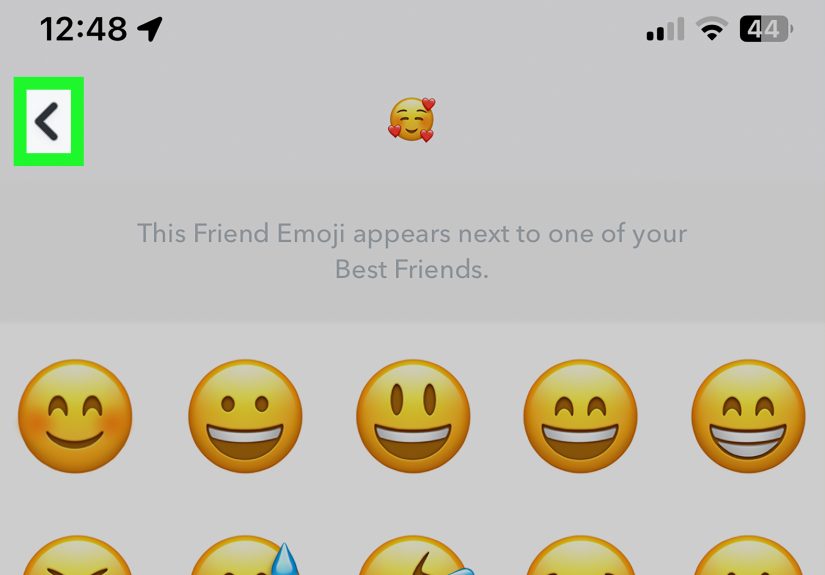
Sometimes the problem is not the actual Best Friends list. The problem is the emoji sitting beside someone’s name like a tiny gossip reporter. If the symbol bothers you, you can customize Friend Emojis so the meaning is less obvious to you.
This does not remove someone from your Best Friends list. Instead, it changes how Snapchat displays the Friend Emoji on your device. It is a visual workaround, not an algorithm reset. Still, for many users, it is enough. If seeing a heart makes you uncomfortable, changing that heart into something random can make the whole thing feel less intense.
How to Customize Friend Emojis on iPhone
- Open Snapchat.
- Tap your profile icon or Bitmoji.
- Tap the gear icon to open Settings.
- Scroll to App & Privacy.
- Tap My App.
- Tap Friend Emojis.
- Choose the emoji category you want to change.
- Select a different emoji.
How to Customize Friend Emojis on Android
- Open Snapchat.
- Tap your profile icon or Bitmoji.
- Tap the gear icon for Settings.
- Scroll to App & Privacy.
- Tap My App.
- Tap Customize Emojis.
- Change the Friend Emoji you no longer want to see.
For example, you can replace a heart with a pizza, star, plant, alien, or another emoji that feels less emotionally loaded. A yellow heart can feel like an announcement. A slice of pizza feels like dinner. Much easier to emotionally process.
What About Snapchat+ #1 BFF?
If you are a Snapchat+ subscriber, you may be able to privately pin one person as your #1 Best Friend. This is separate from the normal Best Friends algorithm. If you pinned someone and no longer want them pinned, press and hold their name from Chat or the Send To screen and look for the option to unpin or change your #1 Best Friend. Since Snapchat+ features can vary by device and app version, update Snapchat if the option is not appearing where you expect.
Bonus Tip: Clear the Conversation from Your Chat Feed
Clearing a conversation is not the same as removing a Best Friend. It does not delete saved or sent content, and it does not erase the friendship. But it can make your Chat screen look cleaner and reduce the constant visual reminder of that person.
How to Clear a Conversation on Snapchat
- Open Snapchat and tap your profile icon.
- Tap the gear icon to open Settings.
- Go to App & Privacy.
- Tap My Privacy & Data.
- Find Clear Data or Clear Conversations, depending on your device.
- Tap the X next to the person’s name to clear the conversation from your feed.
This is useful if your real goal is a tidier Chat screen rather than a changed Best Friends ranking. Just remember that clearing a conversation does not delete saved messages, sent Snaps, or content saved by either person. It is more like hiding clutter from your desk, not throwing away the desk.
What Not to Do When Trying to Remove Best Friends
Do Not Delete and Reinstall Snapchat Expecting a Reset
Deleting the app from your phone usually does not reset your Best Friends list. Your account data is tied to Snapchat’s system, not just the app sitting on your home screen. Reinstalling may help with glitches, but it should not be treated as a Best Friends removal method.
Do Not Spam Other Friends Randomly
Yes, interacting with other friends can change your Best Friends list. No, this does not mean you should send thirty blank ceiling Snaps to everyone in your contacts. That is how you become someone else’s “why is this person like this?” notification. Be normal. Send real Snaps. Have real conversations.
Do Not Trust Third-Party Apps
Avoid apps, websites, or tools that claim they can edit your Snapchat Best Friends list. Snapchat does not provide public manual control for this feature, and third-party tools may put your account or privacy at risk. If a website promises secret access to your Snapchat ranking, treat it like a raccoon offering financial advice: interesting, but absolutely not safe.
Why Your Best Friends List Keeps Changing
Your Snapchat Best Friends list changes because Snapchat tracks patterns. Who do you Snap? Who do you Chat with? Who do you message recently? Who keeps the conversation going? The answer to those questions affects the list.
That is why a person can appear, disappear, and reappear. It does not always mean anything deep. It may simply mean your activity shifted. Maybe you talked to one friend a lot during finals week, planned a birthday party with another, or sent vacation Snaps to your cousin every day for a week. Snapchat sees the behavior, not the emotional context.
Friend Emojis can also change. A smiley face may appear when someone becomes one of your Best Friends. A yellow heart appears when you are each other’s number one Best Friend. A red heart can appear after staying each other’s number one Best Friend for two weeks. Pink hearts can appear after two months. These symbols are fun, but they can also lead to overthinking. Remember: Snapchat is measuring app activity, not your soul.
Best Method for Each Situation
If you are not sure which method to use, match the method to your actual goal.
If You Still Want to Be Friends
Use Method 1. Reduce Snaps and Chats with that person and interact with others more. This is the least dramatic option and works with Snapchat’s algorithm instead of against it.
If You Want Less Contact
Use Method 2. Remove or block the person if you do not want them in your Snapchat space anymore. This is best for uncomfortable, unwanted, or boundary-crossing situations.
If You Only Hate the Emoji
Use Method 3. Customize your Friend Emojis so the symbol is less obvious or less emotionally loaded. This is ideal when the friendship is fine, but the little heart is doing too much.
Experiences and Real-Life Scenarios: What Removing Best Friends on Snapchat Actually Feels Like
In real life, removing or changing Best Friends on Snapchat is rarely just a technical task. It often comes with a tiny emotional plot twist. Maybe you are trying to stop an ex from appearing at the top of your Chat screen. Maybe a friend keeps asking why someone else has a heart emoji. Maybe you simply do not want Snapchat turning your normal conversations into a public-looking ranking system. Whatever the reason, the experience is usually part privacy, part comfort, and part “why is an app making me think this hard?”
One common experience is the “accidental Best Friend” situation. You start messaging someone because of school, work, gaming, a group plan, or a shared joke. For a few days, you talk constantly. Then Snapchat decides this person deserves Best Friend status. You may not feel close to them in real life, but the app sees frequent activity and rewards it with an emoji. The fix here is simple: slow down the direct interaction and spread your normal Snaps across other friends. After some time, the list usually adjusts.
Another situation is the “awkward heart” problem. A yellow heart, red heart, or pink hearts emoji can feel more intense than intended. You might be totally fine with the person, but the emoji makes the connection look deeper than it feels. In that case, customizing Friend Emojis can be surprisingly helpful. Changing a heart into a neutral emoji can remove the emotional weight. Nobody needs a tiny symbol making the Chat screen feel like a relationship press conference.
Some users also feel pressure from friends who check emojis too seriously. A person may ask, “Why are they your Best Friend?” or “Why did our emoji change?” The truth is that Snapchat reflects interaction habits, not loyalty, honesty, or real-world importance. If someone becomes upset over a Best Friend emoji, it may help to explain that the list changes automatically. You can also adjust your Snapchat habits if you want, but you should not feel trapped by an algorithm’s social scoreboard.
There is also the “clean break” experience. If someone makes you uncomfortable or you no longer want them contacting you, waiting for the Best Friends list to change may feel too slow. Removing or blocking the person can give immediate relief. This is not about being rude; it is about controlling your own digital space. Social apps work best when you feel comfortable using them. If someone is making Snapchat stressful, you are allowed to take stronger action.
A practical lesson from all of this is that Snapchat Best Friends should not be treated like a final friendship report card. The list can be useful, funny, and sometimes sweet, but it is also limited. It cannot understand context. It cannot tell the difference between meaningful late-night conversations and a week of sending homework reminders. It does not know whether someone is your closest friend, your lab partner, your cousin, or the person who keeps sending blurry pictures of their shoes.
The healthiest approach is to use Snapchat intentionally. Send Snaps to people you actually want to talk to. Change emojis if they bother you. Remove or block people when needed. And if the Best Friends list looks weird for a while, breathe. The app updates over time, and your real friendships are bigger than a smiley face beside a username.
Conclusion
Learning how to remove Best Friends on Snapchat starts with understanding one important fact: you cannot manually delete someone from the Best Friends list with a single button. Snapchat creates the list automatically based on who you Snap and Chat with most. That may be annoying, but it also means the list can change when your habits change.
For the simplest fix, reduce your interaction with that person and communicate more with others. For a stronger boundary, remove or block the friend. For a softer visual fix, customize your Friend Emojis or clear the conversation from your Chat feed. Each method solves a slightly different problem, so choose the one that matches what you actually want.
Best Friends on Snapchat can feel personal, but they are mostly a reflection of recent app activity. Do not let a tiny emoji run your mood, your friendships, or your entire afternoon. Snapchat may rank conversations, but you still decide who gets your attention.