Table of Contents >> Show >> Hide
There is a special kind of optimism involved in buying a toy printer. You see a tiny machine, a tiny price tag, and a giant promise: instant creativity without the usual technical drama. In your mind, it will turn out dragons, desk gadgets, birthday favors, and maybe one suspiciously ambitious phone stand before dinner. In reality, many toy-grade 3D printers arrive with the same energy as a shopping cart with one bad wheel. They move. They make noise. They are technically functional. But graceful? Not exactly.
Still, here is the surprising truth: a toy printer can absolutely be made great. Not “great” in the sense that it suddenly transforms into a professional workhorse capable of knocking out engineering prototypes all weekend long without complaint. That is fantasy, and not even the fun kind. But great for a specific user, a specific purpose, and a specific budget? Yes. Very much yes.
The real question is not whether a toy printer can compete with serious machines. It cannot, at least not on raw speed, precision, material flexibility, or reliability. The smarter question is whether a toy printer can be tuned, upgraded, and used so well that it becomes genuinely satisfying. And once you frame it that way, the answer gets a lot more interesting.
What Counts as a “Toy Printer” Anyway?
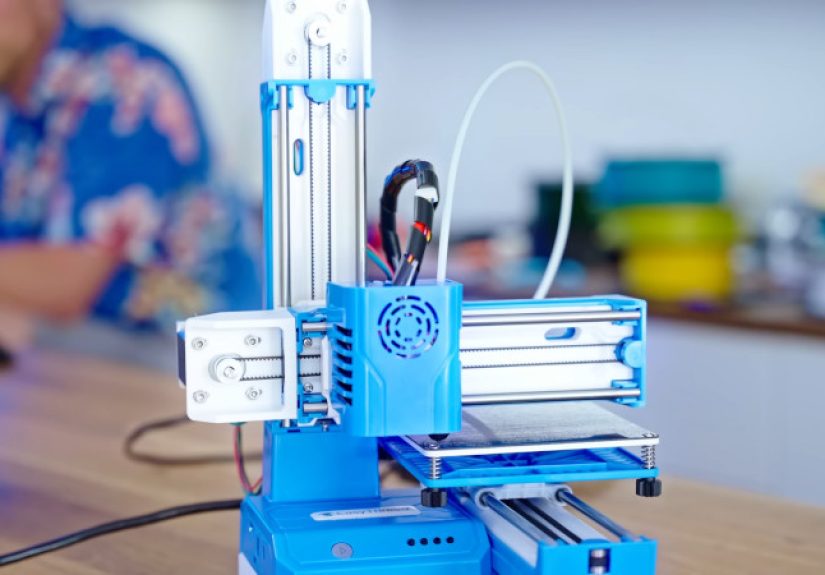
For this article, a toy printer means the ultra-cheap, ultra-small, beginner-friendly end of the 3D printer market. These are the machines marketed toward kids, curious first-timers, gift buyers, and anyone whose budget says, “Let us start with something adorable and questionable.” They usually have tiny build volumes, simplified controls, lightweight frames, limited material support, and a very strong “don’t ask too many questions” vibe.
Some are built specifically for children, with safer enclosures, rounded edges, tablet-friendly apps, and a more guided experience. Others are technically adult products, but they are priced and designed so aggressively that they might as well come with a wink and a challenge. The common thread is compromise. Lots of it.
That does not automatically make them bad. It just means the manufacturer has chosen convenience, cost, and simplicity over performance. If a premium 3D printer is a capable hatchback with parking sensors and a clean interior, a toy printer is a go-kart with a cup holder and great intentions.
Why Toy Printers Usually Disappoint
1. The Mechanics Are Built on a Budget
The biggest problem with toy printers is not that they are small. Small can be charming. Small can be efficient. Small can even be excellent. The problem is that the low-end machines often achieve their price by using lighter structures, cheaper motors, simpler motion systems, and fewer quality-control safeguards. That combination can show up in prints as wobble, backlash, uneven layers, soft corners, or surfaces that look like they were printed during a minor earthquake.
When people complain that a toy printer feels “flimsy,” they are not just being dramatic. Stiffness matters. A rigid frame helps the nozzle move where it is supposed to move. A better motion system reduces vibration and keeps detail sharper. If the machine flexes, rattles, or struggles to hold alignment, print quality suffers fast.
2. The Software Is Usually Trying to Protect You From Yourself
Beginner printers often come with heavily simplified software. On the bright side, this keeps new users from accidentally selecting a nozzle temperature that turns a cheerful print session into a modern art smoke event. On the darker side, it also means you may lose access to the settings that actually improve print quality. Retraction, acceleration, line width, wall order, seam placement, first-layer tuning, and cooling behavior are not just nerd candy. They are how good prints happen.
When the software hides those controls, the printer becomes easy to start but hard to improve. That is why many toy printers feel fun for a week and frustrating by week two. You stop asking, “How do I print?” and start asking, “How do I print well?” The second question requires more than a giant green button.
3. Material Limits Shrink Your Ambition
Most toy-grade printers live happiest with PLA, and there is nothing wrong with PLA. It is beginner-friendly, widely available, and usually the least dramatic filament in the room. But once a machine has a tiny frame, a limited hot end, little thermal control, and maybe no heated bed worth bragging about, your range of materials and model types narrows quickly. Suddenly your printer is not a creative freedom machine. It is a very specific plastic noodle artist.
Again, that does not make it useless. It just means your expectations need a map, not a motivational poster.
How a Toy Printer Becomes Great
1. Redefine “Great” Before You Spend a Dime
A toy printer becomes great the moment you stop judging it by the standards of a machine that costs five times more. Great does not mean flawless cosplay helmets, engineering-grade threaded parts, or all-day batch production. Great might mean reliable keychains, clean name tags, mini desk toys, cable labels, classroom demos, replacement knobs, tiny brackets, cookie-cutter prototypes, and one very proud child holding a freshly printed rocket.
That shift matters. A cheap printer that reliably makes small, simple objects is not a failure. It is a specialist. The trouble starts when users expect a scooter to perform like a pickup truck.
2. Tune the Basics Like a Serious Person
The fastest route to better prints is almost never a dramatic hardware mod. It is boring, repeatable tuning. Bed leveling matters. First-layer height matters. Print speed matters. Retraction matters. Cooling matters. And with PLA in particular, strong cooling can be a lifesaver for details, bridges, and small features.
If your toy printer is laying down blobs, strings, elephant’s foot, sagging overhangs, or corners that curl like a potato chip, do not immediately declare the machine cursed. Slow it down. Lower the layer height for detail when appropriate. Tune retraction. Make sure the filament path is smooth. Check for airflow hitting the part consistently. Keep the printer away from wild drafts. Many “bad printers” are really just badly matched profiles wearing a disguise.
There is also a lesson here that seasoned makers know well: calibration cubes are not the whole story. Chasing one perfect little test print can fool you into believing the machine is fully dialed in when real models still fail. The better approach is to test with the kinds of parts you actually want to print. A toy printer becomes useful when it performs well on your workload, not when it wins a cube beauty pageant.
3. Upgrade What Changes Results, Not What Looks Cool on Social Media
If the machine is worth improving, focus on upgrades that solve actual weaknesses. A sturdier bracket can help more than a flashy cosmetic shell. Better motor mounting can reduce slop. A smarter spool holder can improve filament feeding. Cleaner part cooling can sharpen details. A better slicer profile can outperform a pile of unnecessary printed accessories. Sometimes the best “upgrade” is simply using software with deeper control and learning what the settings do.
Some modders push tiny printers impressively far by stiffening the frame, replacing motors, and tweaking electronics. That can work. But it can also become a comedy sketch in which you buy a $75 printer and then lovingly install another $140 worth of parts to avoid buying a better printer in the first place. There is a fine line between clever optimization and emotionally attached penny arithmetic.
4. Design for the Machine You Have
This is the secret sauce. Toy printers look much smarter when the user does too. If your build volume is small, design in pieces. If bridging is weak, avoid unsupported spans. If tall, skinny models wobble, shorten them or add a wider base. If your printer loves simple PLA geometry, give it simple PLA geometry and let it win. Smart model selection can make a humble machine feel way more capable than its spec sheet suggests.
When a Toy Printer Is Actually the Right Choice
A toy printer makes sense for beginners who want to learn the rhythm of 3D printing without spending serious money. It also makes sense for parents who want a guided introduction for kids, teachers who need a compact demo machine, and hobbyists who enjoy tinkering with hardware almost as much as printing itself. If your joy comes from experimentation, a tiny printer can be part machine, part classroom, part comedy partner.
It can also be perfect as a second printer. That sounds backwards, but it is true. Experienced users often appreciate a small, dedicated machine for quick PLA parts, labels, tiny fixtures, or low-risk test runs. In that role, the printer is no longer being asked to prove itself as an all-purpose hero. It just has one job, and that is where many little printers suddenly look competent.
When You Should Walk Away Politely
If you already know you want stronger materials, large parts, reliable dimensional accuracy, less manual tuning, or room to grow, skip the toy printer. Also skip it if the idea of troubleshooting makes you feel personally betrayed. A cheap printer can teach you a lot, but only if you are willing to learn. If what you really want is convenience, a more mature beginner machine with better automation is often the cheaper choice in the long run, even if the sticker price is higher.
That is the cruel little economics lesson of low-end hardware: the cheapest machine is not always the least expensive experience.
Hands-On Experiences: What Living With a Toy Printer Actually Feels Like
Using a toy printer over time is a very specific emotional journey. The first day feels magical. You open the box, admire how tiny it is, and think, “This thing is cute enough to leave on my desk forever.” The setup is usually simple, sometimes surprisingly so. You load filament, tap through a friendly interface, and watch the nozzle begin its little dance. Even the sound is exciting at first. It has the hopeful buzz of a machine trying very hard to impress you.
The second phase is humbling. Your first print might work, but it probably will not be perfect. The corners may look soft. The surface may show little scars. You may discover stringing, which is the printer’s way of decorating your object with accidental spiderwebs. You will probably stare at a small plastic boat, cube, or mascot and say something very technical like, “Huh.” That moment matters more than people think. It is when the relationship becomes real.
After that, the experience starts to split depending on the kind of user you are. If you enjoy tinkering, the toy printer becomes weirdly lovable. Every improvement feels earned. Tighten one screw, lower one speed, change one cooling setting, and suddenly the printer behaves like it got a good night’s sleep. Small wins become addictive. A cleaner first layer can make you feel like an industrial wizard. A sharper corner can improve your entire mood. This is the part of the hobby where adults become emotionally attached to tiny plastic dragons for reasons no one should examine too closely.
If you do not enjoy tinkering, toy printers can become exhausting. The same simplicity that looked friendly at first starts feeling restrictive. You want cleaner prints, but the bundled app only gives you cheerful, vague options. You want to print a slightly larger object, but the build area laughs softly and says no. You want to experiment with a new material, but the machine clearly prefers the one safe plastic it already knows. The printer is still functional, but you can feel the ceiling getting lower every week.
One of the most memorable things about toy printers is how strongly they reward realistic projects. Print a tiny badge, a cable clip, a nameplate, or a miniature stand, and they can feel surprisingly competent. Try to print a giant articulated masterpiece with fine tolerances and dramatic overhangs, and they turn into stressed little goblins. The gap between success and failure is often not talent. It is project selection.
There is also a social side to the experience. Kids love seeing a printer make something from “nothing,” even if the object is simple. Guests are fascinated. Friends who have never touched 3D printing suddenly want custom initials, desk toys, and oddly specific hooks. A toy printer may not impress experts, but it absolutely creates moments. It starts conversations. It invites curiosity. That counts for a lot.
In the end, living with a toy printer feels less like owning a polished appliance and more like raising a clever, slightly chaotic pet. It needs attention. It rewards patience. It occasionally embarrasses you in front of company. But if you understand its personality, respect its limits, and give it the right jobs, it can become one of the most charming tools on your desk.
Final Verdict
So, can a toy printer be made great? Yes, but greatness is contextual. A toy printer becomes great when it is safe enough, tuned enough, and honestly matched to the work it is asked to do. It becomes great when the user understands that low cost does not remove the laws of mechanics. It becomes great when the machine is treated as a focused tool instead of a miracle box.
The best toy printers are not secret replacements for premium models. They are entry points, teaching tools, tiny specialists, and sometimes surprisingly joyful companions. With the right expectations, a bit of patience, and a few smart adjustments, a toy printer can absolutely graduate from novelty to usefulness. And honestly, that is a pretty great trick for a machine that looks like it was designed by a committee of optimistic lunchboxes.