Table of Contents >> Show >> Hide
- Why Facebook Is Still Useful for Making New Friends
- Start With the Easiest Method: Facebook Search
- Use “People You May Know” the Smart Way
- Upload Contacts to Find People You Already Know
- Join Facebook Groups to Meet New People Naturally
- Use Events, Pages, and Shared Interests
- How to Send a Friend Request Without Seeming Weird
- Fix Your Profile Before You Try to Make Friends
- Review Privacy Settings Before You Add People
- Why Facebook May Not Let You Send a Friend Request
- How to Review or Cancel Sent Friend Requests
- How to Find Better Friends on Facebook, Not Just More Friends
- Frequently Asked Questions
- Can I find someone on Facebook by phone number or email?
- Why do I keep seeing strangers in People You May Know?
- Can I hide People You May Know?
- How do I make my profile easier for real people to trust?
- What should I do before accepting a friend request?
- Can I make friends on Facebook without adding strangers?
- How many friends can you have on Facebook?
- Final Thoughts
- Real-World Experiences: What Actually Happens When You Try to Make Friends on Facebook
Making new friends on Facebook can feel surprisingly easy… right up until it feels weird. One minute, you are joining a local cooking group and chatting about sourdough starters. The next, Facebook is suggesting your dentist, your cousin’s ex, and a guy you met once at a conference in 2017. Social networking is magical like that.
The good news is that finding new friends on Facebook is still very possible when you do it with a little strategy, a little common sense, and only a tiny amount of social bravery. Whether you want to reconnect with old classmates, meet people through shared interests, grow a local circle, or simply make your feed feel less like a random flea market of content, this guide walks you through exactly how to find new friends on Facebook.
Below, you’ll learn how Facebook friend suggestions work, how to search for people properly, how to use groups and communities to meet like-minded people, how to manage privacy while doing all this, and what to do when Facebook basically responds with a digital shrug and won’t let you send a friend request.
Why Facebook Is Still Useful for Making New Friends
Facebook may not always feel like the newest party on the internet, but it still has one big advantage: scale. People use it for neighborhood groups, hobbies, school networks, local events, parenting communities, buy/sell groups, alumni circles, gaming communities, and professional networking. In other words, it is still one of the easiest places to discover people you have something in common with.
If you approach it thoughtfully, Facebook can help you find:
- Old friends you lost touch with
- New local friends in your city or neighborhood
- People who share your hobbies and interests
- Friends of friends you already have some connection to
- Community members from groups, clubs, classes, and events
The trick is not to treat Facebook like a giant vending machine that spits out friendships when you press a button. It works better when you combine Facebook’s built-in tools with actual human behavior: commenting, participating, messaging politely, and not acting like a suspicious robot with too much free time.
Start With the Easiest Method: Facebook Search
If you know the person’s name, Facebook search is still the most direct option. Use the search bar at the top of Facebook, type the person’s name, and then narrow results by selecting the People filter when available. This is especially useful if the name is common and you need to separate your former coworker from the six hundred other people named Chris Johnson.
Tips for Better Facebook Search Results
- Add a city, school, workplace, or mutual interest to the search
- Look for mutual friends, profile photos, and current city details
- Check whether the profile seems active and authentic
- Use the person’s full name instead of a nickname whenever possible
Sometimes, Facebook can also help people find one another through email addresses or phone numbers, but that usually depends on the person’s privacy settings and whether that information is visible or searchable. So yes, it can work, but no, it is not a magic detective trick.
Use “People You May Know” the Smart Way
The People You May Know feature is one of the fastest ways to find potential friends on Facebook. These suggestions are typically influenced by signals such as mutual friends, shared groups, networks, contacts, or other social connections. That means the list is not random, even when it looks hilariously random.
This feature is most useful when you:
- Recently joined new groups
- Added classmates or coworkers
- Moved to a new place and started engaging with local pages
- Uploaded contacts from your phone
Do not blindly add every person Facebook serves up like appetizers at a wedding. Instead, look for real signs of overlap. Do you have mutual friends? Are you in the same hiking group? Did you both comment on the same local event page? Those details make a friend request feel far less awkward and much more genuine.
What If the Suggestions Are Terrible?
Sometimes Facebook suggests people you do not know, do not recognize, and frankly do not want to know. In that case, hide or remove those suggestions and keep engaging with the types of groups and pages that better reflect your interests. You may be able to temporarily hide People You May Know from your feed, though the feature can still appear elsewhere on Facebook.
Upload Contacts to Find People You Already Know
Another built-in option is contact uploading. If you allow Facebook to access contacts from your phone or another account, the platform can use that information to help you find people you already know. This is handy if your goal is reconnecting with former classmates, family members, coworkers, or old friends whose names you forgot how to spell correctly. No judgment. It happens.
Before turning contact syncing on, think about privacy. Some users like the convenience. Others hear the words “upload contacts” and immediately want to wrap their phone in aluminum foil. Both reactions are understandable.
When Contact Syncing Makes Sense
- You recently switched phones and lost numbers
- You want to reconnect with people already in your address book
- You are moving and want to rebuild social connections
- You prefer real-world contacts over random suggestions
If you use this feature, it is worth reviewing your settings later and turning it off if you no longer need it.
Join Facebook Groups to Meet New People Naturally
If you want to make actual new friends, not just rediscover people from the past, Facebook Groups are where things get interesting. Groups are often the best place to meet people because you already share a context. Instead of starting with, “Hi, stranger,” you start with, “Hey, I also love container gardening, trail running, watercolor painting, vintage cameras, or neighborhood taco recommendations.” Much better.
Best Types of Groups for Making New Friends
- Local neighborhood or city groups
- Hobby groups such as books, fitness, crafts, photography, or cooking
- Parenting and family groups
- Alumni or school-related groups
- Professional interest groups
- Volunteer, faith, or community service groups
The key is to participate before you connect. Comment on posts. Answer questions. React to discussions. Share useful advice. When someone becomes familiar through repeated, positive interactions, sending a friend request feels much more normal.
In fact, the strongest Facebook friendships often begin indirectly. You chat in comments for a while, realize you have similar interests, then connect as friends later. That is the digital version of bumping into the same person at the same coffee shop enough times that eventually one of you says hello.
Use Events, Pages, and Shared Interests
Facebook is not only about profiles and groups. Local events, public pages, and interest communities can also help you discover people. If you join a local event, attend a workshop, or interact with a community page regularly, you may notice familiar names appearing in comments or related groups.
This works especially well for:
- Local classes and workshops
- Fitness clubs and running events
- Book clubs and reading events
- Volunteer opportunities
- Neighborhood festivals and meetups
Just remember: liking the same pizza page does not automatically mean you are destined for lifelong friendship. It is a conversation starter, not a legally binding social contract.
How to Send a Friend Request Without Seeming Weird
Let’s talk etiquette, because technology is only half the battle. The other half is not creeping people out.
Do This
- Send requests to people you have actually interacted with
- Prioritize mutual friends or shared communities
- Message first when appropriate, especially if the connection is not obvious
- Keep your profile complete and genuine so you do not look fake
Do Not Do This
- Send dozens of requests in a short time
- Add strangers with no context at all
- Use a blank profile with no photo or bio
- Message people with copy-paste intros that sound like scam bait
If you are reaching out to someone from a group or event, a short message can help. Something like, “Hey, we’re both in the local hiking group and I’ve enjoyed your posts about weekend trails,” feels normal. Something like, “Hello dear, destiny has connected us,” absolutely does not.
Fix Your Profile Before You Try to Make Friends
If you want people to accept your request, your profile should look like it belongs to a real human. That means a clear profile photo, a few normal posts, basic information, and enough activity to show that you are not a spam account or a mysteriously abandoned profile from 2014.
Profile Tweaks That Help
- Use a recognizable profile picture
- Add a short bio or intro
- List your city, school, or workplace if you are comfortable
- Make a few public-facing posts that reflect your interests
- Review your privacy settings so your profile is visible enough to look real, but not overexposed
A trustworthy-looking profile improves your odds of accepted requests and better friend suggestions.
Review Privacy Settings Before You Add People
Facebook gives you some control over how people find and contact you. That matters a lot when you are trying to build a social circle without opening the floodgates to every random account on the internet.
Important Settings to Check
- Who can send you friend requests: usually options like Everyone or Friends of friends
- Who can look you up using your email or phone number
- Who can see your friends list
- Who can see your posts
- Whether your contact details are visible on your profile
If you want new connections but not complete chaos, a balanced setup works best. Keep your profile approachable, but limit overly personal details. Think “friendly front porch,” not “all my private records taped to the mailbox.”
Why Facebook May Not Let You Send a Friend Request
Sometimes the problem is not you. Sometimes it is Facebook being Facebook.
You may be unable to send a friend request because:
- The person only accepts requests from friends of friends
- They already denied your request
- You have too many pending friend requests
- You or the other person reached the friend limit
- Your account has been temporarily restricted for request activity
- The person blocked you
If this happens, slow down. Review your sent requests, cancel old ones if needed, and focus on genuine connections instead of volume. Facebook tends to be suspicious of behavior that looks spammy, and frankly, so do humans.
How to Review or Cancel Sent Friend Requests
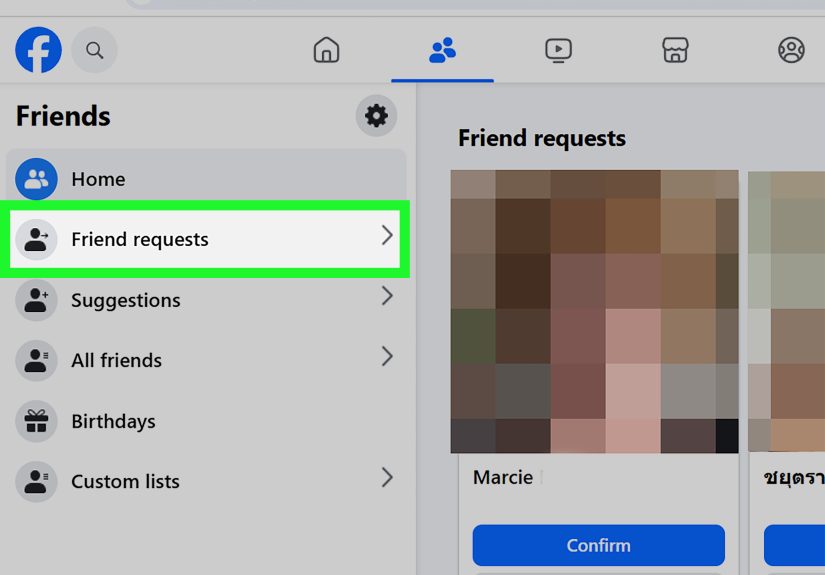
If you have ever sent a request and then immediately thought, “Actually, no, let’s not,” Facebook usually lets you review sent requests and cancel them if they are still pending. This is useful if you accidentally added the wrong person, changed your mind, or realized the profile looked like it was created in a basement five minutes ago.
Checking sent requests is also a smart cleanup habit. Too many unanswered requests can make your account activity look less natural, and it clutters your connection history.
How to Find Better Friends on Facebook, Not Just More Friends
The real goal is not a huge friend count. It is building a better network. A smaller, more relevant Facebook circle often leads to a better feed, better conversations, and fewer posts from people trying to sell “entrepreneurial opportunities” with eleven rocket emojis.
To find better-quality Facebook friends:
- Connect through shared hobbies
- Look for repeated interaction before sending requests
- Favor local and community-based groups
- Keep your own posts thoughtful and authentic
- Use friend lists or close-friend features to organize meaningful connections
Facebook works best as a layered social tool. Some people stay in your broader network. Some become close friends. Some are great for sharing tips in a gardening group and never need to know your birthday. That is normal.
Frequently Asked Questions
Can I find someone on Facebook by phone number or email?
Sometimes, yes. It depends on whether that person allows themselves to be found that way and whether the information is searchable or visible in their settings.
Why do I keep seeing strangers in People You May Know?
Facebook suggestions may be influenced by shared contacts, mutual friends, groups, networks, and other signals. So even if someone feels random to you, Facebook may see a connection somewhere in the background.
Can I hide People You May Know?
You can usually hide it from your feed temporarily, but you may still see friend suggestions in other areas of Facebook.
How do I make my profile easier for real people to trust?
Use a clear profile photo, add basic personal details, post like a normal human, and avoid an empty or suspicious-looking profile.
What should I do before accepting a friend request?
Check mutual friends, recent posts, profile authenticity, and whether the connection makes sense. If it feels off, trust your instincts.
Can I make friends on Facebook without adding strangers?
Absolutely. The safest route is connecting through mutual friends, groups, events, hobbies, and real conversations before sending a request.
How many friends can you have on Facebook?
Facebook personal profiles have a friend limit, so if you are using Facebook to reach a broader audience, follow features or professional/public-facing options may make more sense than collecting random friend requests.
Final Thoughts
If you want to find new friends on Facebook, the best approach is equal parts technology and tact. Use search, People You May Know, contact syncing, groups, and events to discover people. Then do the human part well: be relevant, be respectful, and be real.
Friendship on Facebook is rarely about clicking Add Friend on a total stranger and hoping for the best. It is usually built through context, familiarity, and repeated positive interaction. So start with shared interests, clean up your profile, adjust your privacy settings, and connect with people in a way that feels natural. That is how you turn Facebook from a noisy platform into an actually useful social tool.
And if Facebook suggests your high school lab partner, your former landlord, and a man whose profile picture is a motorcycle with no face in sight, remember this timeless truth: not every suggestion is destiny.
Real-World Experiences: What Actually Happens When You Try to Make Friends on Facebook
In real life, finding new friends on Facebook is usually less dramatic than people imagine. It is not some movie montage where you send three friend requests and suddenly have a thriving social circle, a brunch group, and matching holiday sweaters. It is usually slower, more ordinary, and honestly more effective because of that.
For a lot of people, the first good experience happens by accident. They join a local group for a practical reason, maybe to ask about dog parks, beginner pickleball, farmers markets, or apartment recommendations. Then they notice the same names popping up again and again. One person gives helpful comments. Another posts funny, relatable updates. Eventually, someone reacts to someone else’s post enough times that sending a friend request no longer feels random. It feels earned.
That is one of the biggest patterns people experience on Facebook: warm connections work better than cold ones. A request from a total stranger often gets ignored. A request from “the person who always shares good book recommendations in the neighborhood group” has a much better chance.
Another common experience is reconnecting with old friends through mutual friends. You add one former classmate, and suddenly Facebook begins suggesting a whole cast of familiar names from school, old jobs, clubs, or previous cities. That can be genuinely useful. One person leads to another, and before long you are catching up with people you had not thought about in years. Sometimes that turns into active friendship again. Sometimes it turns into one nice conversation and a few birthday likes every year. Both outcomes are perfectly normal.
There is also a privacy learning curve. Many users start out either too open or too closed off. If your profile is completely locked down, real people may hesitate to accept your request because they cannot tell who you are. If your profile is too public, you may attract random requests that feel intrusive or suspicious. Most people eventually land in the middle: enough visibility to seem real, enough privacy to feel comfortable.
Then there is the awkward side. Nearly everyone who uses Facebook long enough has had one of these moments: sending a request and never hearing back, realizing they added the wrong person with the same name, or discovering that someone they thought looked familiar was actually not familiar at all. It is mildly embarrassing, but also very normal. Facebook friendships are part social skill, part search engine, and part accidental chaos.
The people who tend to have the best results are usually the ones who treat Facebook as a community tool, not a numbers game. They comment thoughtfully, join groups that match their real interests, avoid spamming requests, and build familiarity first. Over time, their network becomes more useful and more personal. Their feed improves. Conversations feel more natural. And instead of collecting random names, they end up with a circle that actually reflects who they are and what they care about.
So yes, people really do make new friends on Facebook. Usually not instantly, not magically, and definitely not by acting like a chatbot with Wi-Fi. But with patience, context, and a little online manners, it can absolutely happen.